StubledUpon this one, a guide to EQing, how it can be used.
http://www.recordingwebsite.com/articles/eqfreq.php
50Hz
1. Increase to add more fullness to lowest frequency instruments like foot, toms, and the bass.
2. Reduce to decrease the "boom" of the bass and will increase overtones and the recognition of bass line in the mix. This is most often used on loud bass lines like rock.
100Hz
1. Increase to add a harder bass sound to lowest frequency instruments.
2. Increase to add fullness to guitars, snare.
3. Increase to add warmth to piano and horns.
4. Reduce to remove boom on guitars & increase clarity.
200Hz
1. Increase to add fullness to vocals.
2. Increase to add fullness to snare and guitar ( harder sound ).
3. Reduce to decrease muddiness of vocals or mid-range instruments.
4. Reduce to decrease gong sound of cymbals.
400Hz
1. Increase to add clarity to bass lines especially when speakers are at low volume.
2. Reduce to decrease "cardboard" sound of lower drums (foot and toms).
3. Reduce to decrease ambiance on cymbals.
800Hz
1. Increase for clarity and "punch" of bass.
2. Reduce to remove "cheap" sound of guitars.
1.5KHz
1. Increase for "clarity" and "pluck" of bass.
2. Reduce to remove dullness of guitars.
3KHz
1. Increase for more "pluck" of bass.
2. Increase for more attack of electric / acoustic guitar.
3. Increase for more attack on low piano parts.
4. Increase for more clarity / hardness on voice.
5. Reduce to increase breathy, soft sound on background vocals.
6. Reduce to disguise out-of-tune vocals / guitars.
5KHz
1. Increase for vocal presence.
2. Increase low frequency drum attack ( foot / toms).
3. Increase for more "finger sound" on bass.
4. Increase attack of piano, acoustic guitar and brightness on guitars (especially rock guitars).
5. Reduce to make background parts more distant.
6. Reduce to soften "thin" guitar.
7KHz
1. Increase to add attack on low frequency drums ( more metallic sound ).
2. Increase to add attack to percussion instruments.
3. Increase on dull singer.
4. Increase for more "finger sound" on acoustic bass.
5. Reduce to decrease "s" sound on singers.
6. Increase to add sharpness to synthesizers, rock guitars, acoustic guitar and piano.
10KHz
1. Increase to brighten vocals.
2. Increase for "light brightness" in acoustic guitar and piano.
3. Increase for hardness on cymbals.
4. Reduce to decrease "s" sound on singers.
15KHz
1. Increase to brighten vocals (breath sound).
2. Increase to brighten cymbals, string instruments and flutes.
3. Increase to make sampled synthesizer sound more real.
EQ chart
There used to be a very cool colored one of these around the webernet some place, i think it might even have been a down load from one of the interface vendors, m-audio or pre-sonus maybe.
Any hoo. I had it printed up in color and kept it on the wall next to my little studio in the corner of the room. It was great till i moved and it got trashed.
Cool find dudles.
Any hoo. I had it printed up in color and kept it on the wall next to my little studio in the corner of the room. It was great till i moved and it got trashed.
Cool find dudles.
15" 2.4 MBP/Live/Sampler/Operator/ Home made Dumble clone/Two Strats/One Jazz Bass.
Come and visit any time= Soundcloud
Come and visit any time= Soundcloud
oh yeah - that's that recording institute of Detroit guy
also look out for Bob Katz's EQ yin and yang as a way to create some of those effects by cutting corresponding frequencies
At the moment I'm all about this guy: http://www.mixingwithyourmind.com
in particular, one tip that stuck out to me was his anti-sweeping method of EQing - he reckons that it works much better with your ears and helps you train yourself much better in frequencies by just turning off the filter, finding the frequency then turning it on again - that way you get much more accurate and get to know the frequencies a lot better
also look out for Bob Katz's EQ yin and yang as a way to create some of those effects by cutting corresponding frequencies
At the moment I'm all about this guy: http://www.mixingwithyourmind.com
in particular, one tip that stuck out to me was his anti-sweeping method of EQing - he reckons that it works much better with your ears and helps you train yourself much better in frequencies by just turning off the filter, finding the frequency then turning it on again - that way you get much more accurate and get to know the frequencies a lot better
is it this oneHomebelly wrote:There used to be a very cool colored one of these around the webernet some place, i think it might even have been a down load from one of the interface vendors, m-audio or pre-sonus maybe.
http://www.har-bal.com/index.php?/frequency-chart.php
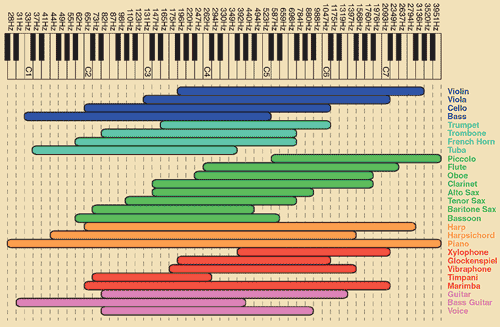
Nah..
Thats a nice simple one though..
The one i'm thinking of was loud and purple.
I'll be turning my almost redundant G5 on later, i'll see if i can find it in there some dark and scary place..
Thats a nice simple one though..
The one i'm thinking of was loud and purple.
I'll be turning my almost redundant G5 on later, i'll see if i can find it in there some dark and scary place..
15" 2.4 MBP/Live/Sampler/Operator/ Home made Dumble clone/Two Strats/One Jazz Bass.
Come and visit any time= Soundcloud
Come and visit any time= Soundcloud


Nice overviews. I got hand on an DIN A1+ printer, maybe I should print a large format version for my new studio room. Thanks ladies! 
HAL: I know I've made some very poor decisions recently, but I can give you my complete assurance that my work will be back to normal. I've still got the greatest enthusiasm and confidence in the mission. And I want to help you.
-
leisuremuffin
- Posts: 4721
- Joined: Tue Apr 06, 2004 12:45 am
- Location: New Jersey
these charts always make my badger foam at the mouth.
eq'ing by numbers is the suck.
Forge mentions an "anti-sweeping" method. I'm not sure what that is, but i'll share how i handle EQing (i think it's the same method):
First of all, i never EQ any one track on it's own. Everything in the mix should be playing when you EQ. The point is to get the mix working correctly, not one element.
I start by finding the trouble freqs by sweeping. I take a parametric eq, use a fairly narrow width, boost it, and then sweep the freq until i find an area that sounds ugly and muddies up the mix. Then i cut at that freq and repeat as needed.
I'm pretty sure that most people know that method, so it's nothing mind blowing, but it is the best way of doing it that i've found.
.lm.
eq'ing by numbers is the suck.
Forge mentions an "anti-sweeping" method. I'm not sure what that is, but i'll share how i handle EQing (i think it's the same method):
First of all, i never EQ any one track on it's own. Everything in the mix should be playing when you EQ. The point is to get the mix working correctly, not one element.
I start by finding the trouble freqs by sweeping. I take a parametric eq, use a fairly narrow width, boost it, and then sweep the freq until i find an area that sounds ugly and muddies up the mix. Then i cut at that freq and repeat as needed.
I'm pretty sure that most people know that method, so it's nothing mind blowing, but it is the best way of doing it that i've found.
.lm.
TimeableFloat ???S?e?n?d?I?n?f?o
No one's asking you to EQ by numbers. Like most charts it's just something to begin with and share the knowledge/understanding of other people before you. Use your ears, yes, but also trust some other people's ears who've done the thing for years and know what the audience expects.
HAL: I know I've made some very poor decisions recently, but I can give you my complete assurance that my work will be back to normal. I've still got the greatest enthusiasm and confidence in the mission. And I want to help you.
-
leisuremuffin
- Posts: 4721
- Joined: Tue Apr 06, 2004 12:45 am
- Location: New Jersey
In my opinion it reinforces a misguided way of thinking about EQ.
first, that you would EQ one track on it's own to change the character of the sound, and second that there are magic numbers that you use to do it.
you can think whatever you want, but i would NEVER teach a fledgling engineer with this method. That's my opinion of course...
I think it's valuable to teach someone to be able to hear what frequencies are what by ear, but making a proclimation like "increase 5k to get more finger sound on bass guitar" is counter productive to the learning process.
.lm.
first, that you would EQ one track on it's own to change the character of the sound, and second that there are magic numbers that you use to do it.
you can think whatever you want, but i would NEVER teach a fledgling engineer with this method. That's my opinion of course...
I think it's valuable to teach someone to be able to hear what frequencies are what by ear, but making a proclimation like "increase 5k to get more finger sound on bass guitar" is counter productive to the learning process.
.lm.
TimeableFloat ???S?e?n?d?I?n?f?o
Thanks. A lot of things to read when I'll be back home!
- Best
- Pasha
- Best
- Pasha
Mac Studio M1
Live 12 Suite,Zebra ,Valhalla Plugins, MIDI Guitar (2+3),Guitar, Bass, VG99, GP10, JV1010 and some controllers
______________________________________
Music : http://alonetone.com/pasha
Live 12 Suite,Zebra ,Valhalla Plugins, MIDI Guitar (2+3),Guitar, Bass, VG99, GP10, JV1010 and some controllers
______________________________________
Music : http://alonetone.com/pasha
+1leisuremuffin wrote:In my opinion it reinforces a misguided way of thinking about EQ.
first, that you would EQ one track on it's own to change the character of the sound, and second that there are magic numbers that you use to do it.
you can think whatever you want, but i would NEVER teach a fledgling engineer with this method. That's my opinion of course...
I think it's valuable to teach someone to be able to hear what frequencies are what by ear, but making a proclimation like "increase 5k to get more finger sound on bass guitar" is counter productive to the learning process.
.lm.
a better learning method is to challenge the student to get rid of a certain element in the sound...

.leisuremuffin wrote:these charts always make my badger foam at the mouth.
eq'ing by numbers is the suck.
Forge mentions an "anti-sweeping" method. I'm not sure what that is....... and then sweep the freq until i find an area that sounds ugly and muddies up the mix. Then i cut at that freq and repeat as needed.
I'm pretty sure that most people know that method, so it's nothing mind blowing, but it is the best way of doing it that i've found.....
no that's the point
I have always done it that way, but in that book he suggests you switch the EQ off while you change frequencies and just pick one then switch it on, then if it's wrong switch it off again and find the next one then switch it on again - targeting specific frequencies
he lists a number of reasons why it's better to do it that way, for one that it helps train your ear more accurately and sweeping can actually wear your ears out
I highly recommend checking it out
http://www.mixingwithyourmind.com