Out of the blue, I've been having this issue with my Push 2 where just touching the encoders results in a low 'grumbling' hum sound — almost like a cat purring lowly.
This happens irrespective of whether Ableton is running, and ONLY when the USB cable is connected to the computer.
I've gone to the trouble of adding some tags for the 'Creator' category for some Drum Kits in my library, and these tags are not visible when I go to filter Browser searches via Push 2.
Is there something I am doing wrong, or is this feature not supported?
So does that mean that I should probably crop and consolidate and do a 'Collect and Save' and then manually go through the 'Recorded' folder in my Finder to manually remove bits I don't need.
Not optimal, but neither is a hard drive full of unused audio.
I'll sometimes work on projects where I recording in a long piece of audio (5-7 mins etc) and later trim and only use a few bars of that section, which I cut and Consolidate a small section.
As I repeatedly do this over the course of the project, what is the correct ('Safe') way to delete any ...
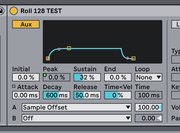
I was able to work something out by Mapping the 'PEAK' parameter in the AUX envelope to Sample Offset. I then Mapped 'Peak' to a Macro at the top level of my Rack called 'Start.
Is there any reason to choose one version of a plug in over another when you have multiple options in your folder? (I'm on Mac, Live 12 it it makes any difference)
I've never been able to find a definitive answer on this. (and kinda get sick of seeing all the duplicates in my Library, and when ...