I have a set of old analog multitrack recordings (done on my Tascam 688), which I want to get into Ableton. I have all the hardware, and I've done this a few times, before, with mixed results. In particular I'm unsure how to get the tempos to match up, so that I can work with the tracks sensibly in the arrange view.
Some of the material I have used drum machines, and is pretty consistent, but some was with a somewhat inconsistent human drummer, and some of the tracks had deliberate tempo changes, particularly between intros and the main material.
Any recommendations on the approach I should take? Or should I just figure that however I get them into Live, I should treat it from a session view perspective?
Old analog multitracks to Live
Old analog multitracks to Live
Liam Routt
Sometime musician
Now on Ableton Live 11!
Sometime musician
Now on Ableton Live 11!
-
Greenapples2019
- Posts: 283
- Joined: Wed Apr 10, 2019 6:43 pm
-
Pitch Black
- Posts: 6722
- Joined: Sat Dec 21, 2002 2:18 am
- Location: New Zealand
- Contact:
Re: Old analog multitracks to Live
For the actual recording/“printing to disk” just make sure Auto Warp Long Samples is disabled in Lives audio prefs, and Live will behave like any other multi track DAW.
How you treat locking to Lives project tempo, or not, is up to you. Do you know Live can do Multi-track warping? If all the recorded files/stems/tape tracks are exactly the same length (which they probably will be if recorded in one pass from tape) then make a group-selection of them in the Arrange View and warp them just like a single audio track/file.
Check out 9.2.1 on this page for setting one of your Arrange tracks/files to lead Live’s tempo:
https://www.ableton.com/en/manual/audio ... d-warping/
How you treat locking to Lives project tempo, or not, is up to you. Do you know Live can do Multi-track warping? If all the recorded files/stems/tape tracks are exactly the same length (which they probably will be if recorded in one pass from tape) then make a group-selection of them in the Arrange View and warp them just like a single audio track/file.
Check out 9.2.1 on this page for setting one of your Arrange tracks/files to lead Live’s tempo:
https://www.ableton.com/en/manual/audio ... d-warping/
MBP M1Max | Sonoma 14.7 | Live 12.1 | Babyface Pro FS | Push 3T | clump of controllers
Soundcloud
Ableton Certified Trainer
Soundcloud
Ableton Certified Trainer
Re: Old analog multitracks to Live
Another approach is to use Melodyne to create a MIDI tempo map which adjusts the grid to the performance.
https://youtu.be/YNFJB32Ofu4
https://youtu.be/YNFJB32Ofu4
-
Pitch Black
- Posts: 6722
- Joined: Sat Dec 21, 2002 2:18 am
- Location: New Zealand
- Contact:
Re: Old analog multitracks to Live
^^^ dsu, any particular reason why you'd use Melodyne? Asking because all you have to do is switch this button to "Lead" on any of your warped arrangement clips. This will play the clip (or multi-track clips) as if they were un-warped, and Live's project tempo/grid will follow along, including any and all natural tempo changes.
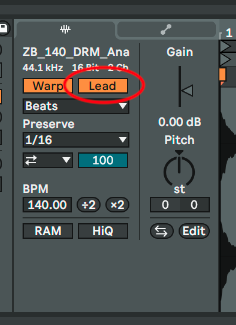
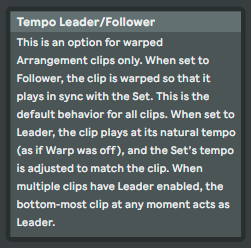
NB: This Lead/Follow switch only appears for clips that are in Arrange View, not Session.
NB: This Lead/Follow switch only appears for clips that are in Arrange View, not Session.
MBP M1Max | Sonoma 14.7 | Live 12.1 | Babyface Pro FS | Push 3T | clump of controllers
Soundcloud
Ableton Certified Trainer
Soundcloud
Ableton Certified Trainer
Re: Old analog multitracks to Live
Plenty to check out here, thanks!
I'll report back on what works best for me.
I'll report back on what works best for me.
Liam Routt
Sometime musician
Now on Ableton Live 11!
Sometime musician
Now on Ableton Live 11!
Re: Old analog multitracks to Live
No particular reason other than it is another technique that appears to help aggregate multiple tracks into a single map. How does the Live follow function work with multiple tracks. I could imagine it would be difficult to figure out which track to follow, hence the manual intervention with the Melodyne method.Pitch Black wrote: ↑Thu Dec 30, 2021 12:14 am^^^ dsu, any particular reason why you'd use Melodyne? Asking because all you have to do is switch this button to "Lead" on any of your warped arrangement clips. This will play the clip (or multi-track clips) as if they were un-warped, and Live's project tempo/grid will follow along, including any and all natural tempo changes.
When I have tried the Live following with my strange electronic drone tracks Live struggles to hear what I hear but I'm strange LOL.
ds
-
Pitch Black
- Posts: 6722
- Joined: Sat Dec 21, 2002 2:18 am
- Location: New Zealand
- Contact:
Re: Old analog multitracks to Live
It’s a if-you-warp-it-Live-will-follow-it situation. For ambient or beat-less tracks in the past I’ve sometimes recorded a simple click track by playing along with a MIDI drum instrument, render it to an audio file, and using that as the tempo leader.
Re your question about multiple tracks, you can do a multitrack warp and then use any of them as the tempo leader.
Re your question about multiple tracks, you can do a multitrack warp and then use any of them as the tempo leader.
MBP M1Max | Sonoma 14.7 | Live 12.1 | Babyface Pro FS | Push 3T | clump of controllers
Soundcloud
Ableton Certified Trainer
Soundcloud
Ableton Certified Trainer
Re: Old analog multitracks to Live
-
Last edited by pottering on Tue Jan 04, 2022 4:29 am, edited 1 time in total.
♥♥♥
Re: Old analog multitracks to Live
... and right on cue, my 688 needs to be serviced. But I think that I will be able to make this work, when I get it back!
Thanks!
Thanks!
Liam Routt
Sometime musician
Now on Ableton Live 11!
Sometime musician
Now on Ableton Live 11!
Re: Old analog multitracks to Live
I will have to try it again. I tried recording the a clock pulse driving my synth on a separate track along with the audio to make it easier for Ableton to decode but I don't remember using the Follow option. It will be a fun experiment of try this again.Pitch Black wrote: ↑Fri Dec 31, 2021 11:36 pmIt’s a if-you-warp-it-Live-will-follow-it situation. For ambient or beat-less tracks in the past I’ve sometimes recorded a simple click track by playing along with a MIDI drum instrument, render it to an audio file, and using that as the tempo leader.
Re your question about multiple tracks, you can do a multitrack warp and then use any of them as the tempo leader.