Hello Everyone,
I am Brand New to Ableton, so bare with me. I bought the Ableton 9 software and an APC20 controller. However, I want to be able to control the parameters of a particular track with a touch screen, rather than a knob or slider or mouse. So my question is... does anyone know of a touch screen that will work with 9? Considering I already have the APC, I was hoping there was something available that strictly controlled effect. And could be used in conjunction with the APC20, rather than one or the other. Maybe this is a dumb question, but I am admittedly a noob. So anything will help me out here.
Thanks
Can I get a Midi Touch Screen Controller for Live 9?
-
MidiMadMan
- Posts: 10
- Joined: Wed May 01, 2013 3:31 am
Re: Can I get a Midi Touch Screen Controller for Live 9?
I've heard people running Live on the new Windows surface tablets have issues they weren't expecting, but I think that's your best bet for Live on an actual touch screen.
That said, if you have an iPad by chance, there's a few absolutely excellent apps you can buy and create your own controllers/devices to interact with Live. My favorite is Lemur ( http://liine.net/en/products/lemur/ ), which is kind of expensive. TouchAble is excellent as well, and created specifically for Live ( http://www.touch-able.com/touchAble/touchable.html ). If you are looking for a low cost alternative to Lemur to create custom devices, Touch-Osc is good ( http://hexler.net/software/touchosc ). There's also an interesting program called Beat Surfing that has awesome demos to play with, but I haven't taken the time to learn the scripting of it -- ( http://beatsurfing.net/ )
I feel like these are probably your best bets for touch technology with Live. Good luck!
That said, if you have an iPad by chance, there's a few absolutely excellent apps you can buy and create your own controllers/devices to interact with Live. My favorite is Lemur ( http://liine.net/en/products/lemur/ ), which is kind of expensive. TouchAble is excellent as well, and created specifically for Live ( http://www.touch-able.com/touchAble/touchable.html ). If you are looking for a low cost alternative to Lemur to create custom devices, Touch-Osc is good ( http://hexler.net/software/touchosc ). There's also an interesting program called Beat Surfing that has awesome demos to play with, but I haven't taken the time to learn the scripting of it -- ( http://beatsurfing.net/ )
I feel like these are probably your best bets for touch technology with Live. Good luck!
Tim Tilberg - Duluth, MN | SoundCloud - Arsenal
2011 13" MBP w/8GB ram | Live 9 Suite, Reason 6.5, FXPansion DCAM/Etch/Maul, Izotope Ozone 5
2011 13" MBP w/8GB ram | Live 9 Suite, Reason 6.5, FXPansion DCAM/Etch/Maul, Izotope Ozone 5
Re: Can I get a Midi Touch Screen Controller for Live 9?
The original GUI of Ableton is not very touchscreen friendly, so simply running
Live on Windows with a touchscreen instead of a mouse is no option.
But there is a software called Surface Editor that mirrors the session view of
Live in a touchscreen friendly way and you can add custom knobs and faders to your setup.
http://www.surface-editor.net/
I use it on stage with a 19" touchscreen - http://www.youtube.com/watch?v=ftPoHaJI4oo
For iOS there is the already mentioned TouchOSC which works very good, but
development has stopped. I am still using it, but will abandon it and would
not go that way, because it is a dead project.
For the much cheaper Android devices (I just bought 2 10" tablets for 80 Euros each)
there is DAWOSC - http://www.dawsound.com/#!overview/c13ps
There will be a new version in a few days that is on the level of TouchOSC
in most parts, in some parts it is already better. And I am sure it will
overtake TouchOSC in the next version.
You can built your own layouts and control Live via LiveOSC.
I am pretty sure there also will be factory layouts soon to do this.
Recommended !
Live on Windows with a touchscreen instead of a mouse is no option.
But there is a software called Surface Editor that mirrors the session view of
Live in a touchscreen friendly way and you can add custom knobs and faders to your setup.
http://www.surface-editor.net/
I use it on stage with a 19" touchscreen - http://www.youtube.com/watch?v=ftPoHaJI4oo
For iOS there is the already mentioned TouchOSC which works very good, but
development has stopped. I am still using it, but will abandon it and would
not go that way, because it is a dead project.
For the much cheaper Android devices (I just bought 2 10" tablets for 80 Euros each)
there is DAWOSC - http://www.dawsound.com/#!overview/c13ps
There will be a new version in a few days that is on the level of TouchOSC
in most parts, in some parts it is already better. And I am sure it will
overtake TouchOSC in the next version.
You can built your own layouts and control Live via LiveOSC.
I am pretty sure there also will be factory layouts soon to do this.
Recommended !

-
sinosoidal
- Posts: 13
- Joined: Wed May 15, 2013 11:43 am
- Location: Braga, Portugal
- Contact:
Re: Can I get a Midi Touch Screen Controller for Live 9?
Hi,
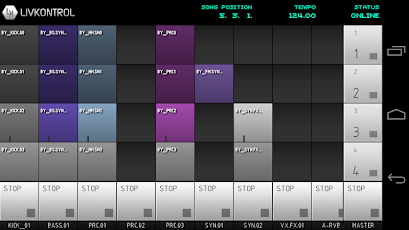
LIVKONTROL is a nice alternative to the ones already mentioned here. It works in iOS our Android devices. It's super easy to connect to it and it will map your scene onto your device.
It is really Ableton Live dedicated, so you don't have to make custom layout. You can see all your scene clips and trigger them. You will also have midi sliders for custom device parameters assignment and control. It is also very affordable.

App Store
https://itunes.apple.com/pt/app/livkont ... 81243?mt=8
Google Play
https://play.google.com/store/apps/deta ... Ryb2wiXQ..
You find more info about it at:
http://www.livkontrol.com
Regards,
Nuno Santos
LIVKONTROL is a nice alternative to the ones already mentioned here. It works in iOS our Android devices. It's super easy to connect to it and it will map your scene onto your device.
It is really Ableton Live dedicated, so you don't have to make custom layout. You can see all your scene clips and trigger them. You will also have midi sliders for custom device parameters assignment and control. It is also very affordable.
App Store
https://itunes.apple.com/pt/app/livkont ... 81243?mt=8
Google Play
https://play.google.com/store/apps/deta ... Ryb2wiXQ..
You find more info about it at:
http://www.livkontrol.com
Regards,
Nuno Santos