Julian it seems the link you provided doesn't work anymore.
The fact that Ableton forces M4L devices to use midichannel 1 has been a HUGE waste of my time as I tried to figure out what was wrong with my setup. I really appreciate your efforts to rectify this front.
-J
[HOW-TO]workaround for sending and receiving 16MIDI channels
Re: [HOW-TO]workaround for sending and receiving 16MIDI channels
igneous wrote:Julian it seems the link you provided doesn't work anymore.
The fact that Ableton forces M4L devices to use midichannel 1 has been a HUGE waste of my time as I tried to figure out what was wrong with my setup. I really appreciate your efforts to rectify this front.
-J
This is not Ableton forcing M4L, this is Live only using 1 channel per track, so M4L, as a device (which means as a device within a track) is dependant of a track.
Basically, this is quite easy to code a device sending data from a channel to another. In that case, it would require send/receive from a m4l device to another m4l device in another track. The timing is not totally guarantee as the documentation is saying:
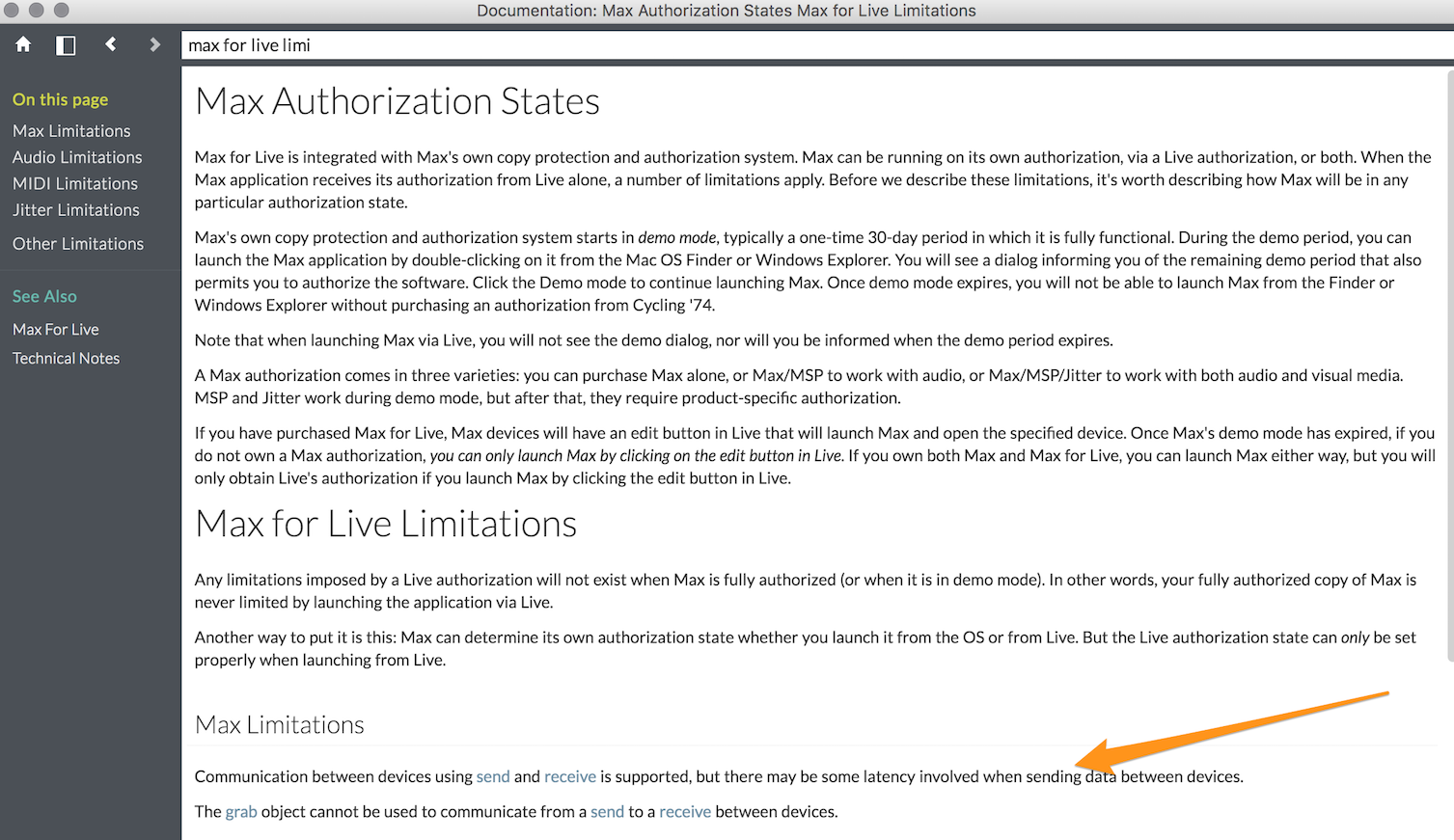
It means we can have something like send/receive busses from one device sending (let's say a m4l sequencer)
and some devices receiving each one a specific data flow from the device sending.
Each receive is its specific own track, and each one of these tracks has its [MIDI TO] set to a specific midi bus and for this bus, a midi channel.
I unfortunately don't have time to patch even a small example at the time but I guess you got the point.
Anyway,
Julien Bayle
Art + Teaching/Consulting
Ableton Certified Trainer
Max Certified Trainer
Structure Void / Ableton Certified Training Center
Art + Teaching/Consulting
Ableton Certified Trainer
Max Certified Trainer
Structure Void / Ableton Certified Training Center
-
chapelier fou
- Posts: 6359
- Joined: Mon May 15, 2006 12:15 pm
Re: [HOW-TO]workaround for sending and receiving 16MIDI channels
Wait, M4L was out in 2009 ??
Damn, i'm definitely getting old.
Damn, i'm definitely getting old.
MacBook Pro 13" Retina i7 2.8 GHz OS 10.13, L10.0.1, M4L.
MacStudio M1Max 32Go OS 12.3.1
MacStudio M1Max 32Go OS 12.3.1
Re: [HOW-TO]workaround for sending and receiving 16MIDI channels
2011.chapelier fou wrote:Wait, M4L was out in 2009 ??
Damn, i'm definitely getting old.
I don't know why some time-scale collisions are occurring here

Julien Bayle
Art + Teaching/Consulting
Ableton Certified Trainer
Max Certified Trainer
Structure Void / Ableton Certified Training Center
Art + Teaching/Consulting
Ableton Certified Trainer
Max Certified Trainer
Structure Void / Ableton Certified Training Center
-
chapelier fou
- Posts: 6359
- Joined: Mon May 15, 2006 12:15 pm
Re: [HOW-TO]workaround for sending and receiving 16MIDI channels
Ah ok, that's weird.julienb wrote:2011.chapelier fou wrote:Wait, M4L was out in 2009 ??
Damn, i'm definitely getting old.
I don't know why some time-scale collisions are occurring here
MacBook Pro 13" Retina i7 2.8 GHz OS 10.13, L10.0.1, M4L.
MacStudio M1Max 32Go OS 12.3.1
MacStudio M1Max 32Go OS 12.3.1
Re: [HOW-TO]workaround for sending and receiving 16MIDI channels
I'm struggling to create a sender device with a VST (Nora) embedded, that sends out MIDI on all 16 channels.
The corresponding receiver device(s) should receive on all activated (by filter Buttons) channels.
Live and Max are constantly crashing, so I gave up after 6h.
Any advice or hints are highly appreciated. From my understanding the structure should be far from complex, (no need for delay compensation, as featured in devices found @max4live.com)
The corresponding receiver device(s) should receive on all activated (by filter Buttons) channels.
Live and Max are constantly crashing, so I gave up after 6h.
Any advice or hints are highly appreciated. From my understanding the structure should be far from complex, (no need for delay compensation, as featured in devices found @max4live.com)
Re: [HOW-TO]workaround for sending and receiving 16MIDI channels
I've found embedded VST in M4L generally problematic and had several crashes even with simple plugins, in particular when switching the device between edit and performance mode (which seems to trigger unloading and reloading the plugin).
On the other hand, send/receive between devices always worked well for me. But notice that [vst~] outputs a stream of raw MIDI bytes and merging such streams on the receiver may lead to problems not recognising the bytes which belong together. So in this case, I would pack and send the data in list format of messages like notes, CC etc.
On the other hand, send/receive between devices always worked well for me. But notice that [vst~] outputs a stream of raw MIDI bytes and merging such streams on the receiver may lead to problems not recognising the bytes which belong together. So in this case, I would pack and send the data in list format of messages like notes, CC etc.
Re: [HOW-TO]workaround for sending and receiving 16MIDI channels
why vst?jeblo05 wrote:I'm struggling to create a sender device with a VST (Nora) embedded, that sends out MIDI on all 16 channels.
The corresponding receiver device(s) should receive on all activated (by filter Buttons) channels.
Live and Max are constantly crashing, so I gave up after 6h.
Any advice or hints are highly appreciated. From my understanding the structure should be far from complex, (no need for delay compensation, as featured in devices found @max4live.com)
Julien Bayle
Art + Teaching/Consulting
Ableton Certified Trainer
Max Certified Trainer
Structure Void / Ableton Certified Training Center
Art + Teaching/Consulting
Ableton Certified Trainer
Max Certified Trainer
Structure Void / Ableton Certified Training Center
Re: [HOW-TO]workaround for sending and receiving 16MIDI channels
Nora (https://squaredheads.com) is a creative arpeggiator that can send different patterns to different MDI channels. Unfortunately Live flattens all MIDI channels.
Instead of running multiple instances of Nora VST I want to wrap it into a Max sender device and use receiver devices.
For my use case Max is only a workaround of Live's MIDI implementation
Instead of running multiple instances of Nora VST I want to wrap it into a Max sender device and use receiver devices.
For my use case Max is only a workaround of Live's MIDI implementation