I've definitely experienced sluggishness with the Live 8 interface, but based on some very tentative exploration, it seems to be largely caused by Latin Percussion (specifically copying / moving clips in LP tracks). My theory is that, while the MIDI data associated with LP clips is fairly sparse, the number of automation lanes associated with LP kits is pretty outrageous, and I it's the computational intensity of handling all of these lanes during GUI operations that's causing the slowness.
Any other thoughts on the matter?
Oh, this is on a Macbook Pro 2.2GHz, 4GB Ram, ~70GB free on a 320GB 7200rpm HD.
suite 8 is sluggish
-
pepezabala
- Posts: 3503
- Joined: Mon Jun 07, 2004 4:29 pm
- Location: In Berlin, finally
Re: suite 8 is sluggish
Latin percussion is a pain to use. I freezed/flattened it when working on a track, but that defeats the purpose a little.
Re: suite 8 is sluggish
It's a native osx task, managing windows graphics and effects afaik.barstu wrote:I think WindowServer is a native OSX task. Whenever my Mac grinds to a halt (which is very rare) that seems to be near the top of Activity Monitor.
feug.net -:- virb.com/feug
Re: suite 8 is sluggish
Latin percussion is very heavy for me... (macbook core 2 duo)
Ableton Suite 8, Komplete 6, Macbook + IMac, Nuforce Icon HDP, Art tubefire 8, Korg MicroKontrol + wacKMK, Oxygen 8 +++
http://soundcloud.com/ashtonron
http://soundcloud.com/ashtonron
Re: suite 8 is sluggish
Yes, at the point in the session when I began exploring Latin Percussion, doing things like trying to preview different sounds and loops, that is the very time when the spinning wheel rears its head and the program bogs down.
In fact, in an empty session, all I need to do is navigate to Latin Percussion and there's the spinning wheel. Everything goes downhill from there: grinding halt, unresponsive. After this, even shutting down the program takes much longer than usual.
I should probably report this through the official tech support service, in hopes that it may help them to isolate this behavior.
In response to an earlier post- no I haven't run 7 for comparison. Although I've left 7 on the machine in case of severe problems, I plan to work through with 8 and not look back to 7. I don't use ableton for live gigging, so there's not that kind of pressure on me as a user for 8 to be rock solid.
I'm almost 100% certain it's not my machine causing any of these problems; I use it weekly for live gigging (dj software) and keep it very lean as a matter of necessity. Dashboard is pruned, startup items are minimal, plenty of free space on the drive, bluetooth disabled, time machine never used, desktop uncluttered and clean as a whistle.
It's a fact, WindowServer really spikes the Activity Monitor when I run live.
In fact, in an empty session, all I need to do is navigate to Latin Percussion and there's the spinning wheel. Everything goes downhill from there: grinding halt, unresponsive. After this, even shutting down the program takes much longer than usual.
I should probably report this through the official tech support service, in hopes that it may help them to isolate this behavior.
In response to an earlier post- no I haven't run 7 for comparison. Although I've left 7 on the machine in case of severe problems, I plan to work through with 8 and not look back to 7. I don't use ableton for live gigging, so there's not that kind of pressure on me as a user for 8 to be rock solid.
I'm almost 100% certain it's not my machine causing any of these problems; I use it weekly for live gigging (dj software) and keep it very lean as a matter of necessity. Dashboard is pruned, startup items are minimal, plenty of free space on the drive, bluetooth disabled, time machine never used, desktop uncluttered and clean as a whistle.
It's a fact, WindowServer really spikes the Activity Monitor when I run live.
Ableton Suite 8.2.2 suite; OS 10.6.7
Re: suite 8 is sluggish
Does enabling time machine on OSX have a performance overhead then?
-
sparklepuff
- Posts: 3300
- Joined: Sat Apr 22, 2006 4:54 am
- Location: Brooklyn
Re: suite 8 is sluggish
YESbarstu wrote:I think WindowServer is a native OSX task. Whenever my Mac grinds to a halt (which is very rare) that seems to be near the top of Activity Monitor.
I just noticed this. With Live 8 in focus, and looking at my activity monitor, Window Server is burning the fuck up, using a shitload of CPU.
This is only with Live 8 running.
Guitar | Synths | Samplers | Ableton @ Phantogram & Big Grams
Re: suite 8 is sluggish
8 suite crashed 2 times last night while working on a pure live 7 project! It happened first while recording midi into a loop in arrange, and after trying to move the clip while it was running. Second time it crashed when trying to move a clip in arrange while a loop was playing. (loop with loop branches in arange)
I also had crashes and slowdowns when using live 8 suite stuff exclusively. Starting with slow down of moving clips (9 seconds for each move) in arrange, the crash, and after that the project want open at all. I manage to rescue the tracks though, by dragging them from the browser into a new project. I suspect Latin percussion to be the main problem.
Other then that, I love the whole Suite 8 thing, and im shore they will fix this!
PCXP sp2, Q6600 2.4 quad, 2GRAM, lots of drive space, MOTU Onyx.
I also had crashes and slowdowns when using live 8 suite stuff exclusively. Starting with slow down of moving clips (9 seconds for each move) in arrange, the crash, and after that the project want open at all. I manage to rescue the tracks though, by dragging them from the browser into a new project. I suspect Latin percussion to be the main problem.
Other then that, I love the whole Suite 8 thing, and im shore they will fix this!
PCXP sp2, Q6600 2.4 quad, 2GRAM, lots of drive space, MOTU Onyx.
Re: suite 8 is sluggish
i did have a couple of crashes in the studio when draging parts in arrrange view this weekend..... 
but seems to be faster than live 7....and i love the Live 8 version....
but seems to be faster than live 7....and i love the Live 8 version....
Bitwig/1.0.5 - Ableton/Live 8 - Apple/MacPro-2.8Ghz-8Core-RAID - Samsung/SM-P2770H 27" - Yamaha/HS80M/HS10W - Behringer/BCR/BCF - Allen & Heath/Xone:3D - Sennheiser/HD25-13 - Native Instruments/Komplete9/Traktor Pro
Re: suite 8 is sluggish
For the time being I have no intent to upgrade. I'm going back to using live for just audio. I don't have the best machine these days and I think that Live has simply surpassed a few of us as of late.
Logic Studio, Live 7, Max 5, Monome 64, and Desktop Evolver
Re: suite 8 is sluggish
I've recapped this issue in an email to abe tech support. I've added some new pics to show the differences in RAM usage and WindowServer CPU activity throughout the stages of use of the computer and Suite 8.
I know some of this is redundant, but I am posting anyway because it's the easiest way I can get my report plus graphics to support. Hopefully this thread will be of use to others if they are experiencing similar problems.
Hello,
I've just upgraded from Live 7 to Suite 8.
I would like to report issues I come across in an effort to resolve them and to assist your developers in the fine tuning of Suite 8.
I began a related thread on your forum, and after reading responses it seems that others are experiencing a significant slowdown of Suite 8 when using the Latin Percussion. There is also a consensus that the process Windows Server is eating up an inordinate of CPU power when Suite 8 is running. These 2 issues seem to be a relatively common area of trouble.
My system specifications are as follows:
Mac OSX 10.5.5
2.2 GHz Intel Core 2 Duo
2GB 667 MHz DDR2 SDRAM
L2 Cache 4MB
Bus Speed 800 Mhz
Hard disk: 232.57 GB - 156.96 GB Available
When I use Latin Percussion, I immediately get the Mac spinning wheel. The first click in Live's browser on LP begins this behavior. Sluggishness increases as I browse the LP presets and drag related MIDI clips into the arrangement view. If I create 3 MIDI tracks using LP the program will nearly grind to a halt. At this point, any action in Live slows to a crawl- saving the file and quitting Live takes a very long time. The program has not yet crashed, but becomes painfully slow. At this time, all system operations slow down, globally.
I have noted changes in RAM usage before starting suite 8, while loading one of the tutorial demos, and while loading my problematic project with the Latin Percussion.
-----------------------------------------------------
With Safari and Mail running:
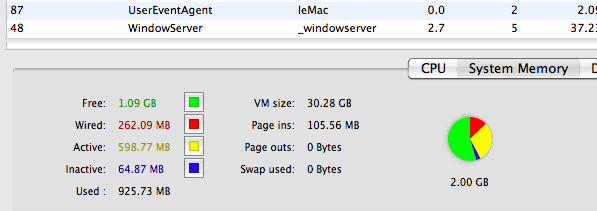
WindowServer 2.7% of CPU
Free RAM: 1.09 GB
Active RAM: 598.77 MB
-----------------------------------------------------
Safari, Mail, Suite 8 empty project:
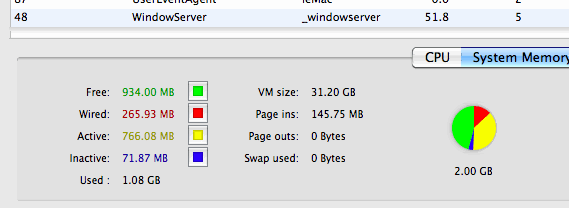
WindowServer: 51.8% CPU
Free RAM: 934.00 RAM
Active RAM: 766.08 MB
-----------------------------------------------------
Safari, Mail, Suite 8 Demo session:
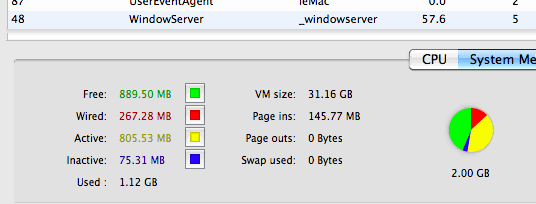
WindowServer: 57.6% CPU
Free RAM: 889.50 MB
Active RAM: 805.53 MB
-----------------------------------------------------
Safari, Mail, Suite 8 project w/ Latin Percussion (3 instances), Operator (1 instance), 2 drum machines, 2 audio tracks.
This is the session that slows everything to a crawl.
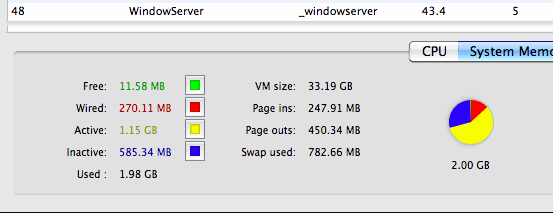
Window Server: 43.4% CPU
Free RAM: 11.58 MB
Active RAM: 1.15 GB
-----------------------------------------------------
As you can see, the RAM usage greatly increases with the last instance of Suite 8. It is normal for large projects to require a lot of RAM, but I'm not sure that my session with Latin Percussion would be considered a "large" project.
I'm unsure why the spike in WindowServer CPU usage when I start Suite 8.
I hope this a software related problem, and doesn't have to do with my computer specs. I am, after all, running the recommended specs for Suite 8 and don't believe that my problematic session is particularly "large".
I try not to be such a technical geek; I prefer music, spinning, porn, and vodka. But I really do want Suite 8 to work well for me, so I've made the best effort I can to show an accurate picture of my current woes.
I know some of this is redundant, but I am posting anyway because it's the easiest way I can get my report plus graphics to support. Hopefully this thread will be of use to others if they are experiencing similar problems.
Hello,
I've just upgraded from Live 7 to Suite 8.
I would like to report issues I come across in an effort to resolve them and to assist your developers in the fine tuning of Suite 8.
I began a related thread on your forum, and after reading responses it seems that others are experiencing a significant slowdown of Suite 8 when using the Latin Percussion. There is also a consensus that the process Windows Server is eating up an inordinate of CPU power when Suite 8 is running. These 2 issues seem to be a relatively common area of trouble.
My system specifications are as follows:
Mac OSX 10.5.5
2.2 GHz Intel Core 2 Duo
2GB 667 MHz DDR2 SDRAM
L2 Cache 4MB
Bus Speed 800 Mhz
Hard disk: 232.57 GB - 156.96 GB Available
When I use Latin Percussion, I immediately get the Mac spinning wheel. The first click in Live's browser on LP begins this behavior. Sluggishness increases as I browse the LP presets and drag related MIDI clips into the arrangement view. If I create 3 MIDI tracks using LP the program will nearly grind to a halt. At this point, any action in Live slows to a crawl- saving the file and quitting Live takes a very long time. The program has not yet crashed, but becomes painfully slow. At this time, all system operations slow down, globally.
I have noted changes in RAM usage before starting suite 8, while loading one of the tutorial demos, and while loading my problematic project with the Latin Percussion.
-----------------------------------------------------
With Safari and Mail running:
WindowServer 2.7% of CPU
Free RAM: 1.09 GB
Active RAM: 598.77 MB
-----------------------------------------------------
Safari, Mail, Suite 8 empty project:
WindowServer: 51.8% CPU
Free RAM: 934.00 RAM
Active RAM: 766.08 MB
-----------------------------------------------------
Safari, Mail, Suite 8 Demo session:
WindowServer: 57.6% CPU
Free RAM: 889.50 MB
Active RAM: 805.53 MB
-----------------------------------------------------
Safari, Mail, Suite 8 project w/ Latin Percussion (3 instances), Operator (1 instance), 2 drum machines, 2 audio tracks.
This is the session that slows everything to a crawl.
Window Server: 43.4% CPU
Free RAM: 11.58 MB
Active RAM: 1.15 GB
-----------------------------------------------------
As you can see, the RAM usage greatly increases with the last instance of Suite 8. It is normal for large projects to require a lot of RAM, but I'm not sure that my session with Latin Percussion would be considered a "large" project.
I'm unsure why the spike in WindowServer CPU usage when I start Suite 8.
I hope this a software related problem, and doesn't have to do with my computer specs. I am, after all, running the recommended specs for Suite 8 and don't believe that my problematic session is particularly "large".
I try not to be such a technical geek; I prefer music, spinning, porn, and vodka. But I really do want Suite 8 to work well for me, so I've made the best effort I can to show an accurate picture of my current woes.
Ableton Suite 8.2.2 suite; OS 10.6.7
Re: suite 8 is sluggish
Latin Percussion is an extremely heavy load due to the samples, so no one is alone on this.
I really don't think Drum Racks was the way to go for the collection, but I don't know that it would have been any easier using Sampler or Simpler.
Still... these samples were recorded with great clarity.
I really don't think Drum Racks was the way to go for the collection, but I don't know that it would have been any easier using Sampler or Simpler.
Still... these samples were recorded with great clarity.
Re: suite 8 is sluggish
yeah maybe it does all boil down to RAM (for Latin Percussion), and truckloads of it! it took me by surprise; LP was one of the first batches of sound I dug into cause I like those kind of sounds. i gotta figure a way to crack into that part of the library without killing the app.
if this is a RAM issue, I'd like to know how much of it a Suite 8 user needs? They recommend 2 Gigs on the spec sheet.... I hope it's something other than RAM, or they have some type of work around so I can play with the LP as much as I like.
if this is a RAM issue, I'd like to know how much of it a Suite 8 user needs? They recommend 2 Gigs on the spec sheet.... I hope it's something other than RAM, or they have some type of work around so I can play with the LP as much as I like.
Ableton Suite 8.2.2 suite; OS 10.6.7
Re: suite 8 is sluggish
Hi TRS,
Did your issues with sluggishness ever get resolved? I have a similar setup as you, and 8.0.3 did little to solve my hanging meters and general delays.
Did your issues with sluggishness ever get resolved? I have a similar setup as you, and 8.0.3 did little to solve my hanging meters and general delays.
Ian Gallagher
[email protected]
[email protected]
Re: suite 8 is sluggish
latin percussion is a beast, ever dived into those racks?
if you do the same in Live 7 and 8 it should behave roughly the same, everything else would be a bug.
regarding the window server (goes out to sparky, too): are you not on 10.5.7 yet?
dom
if you do the same in Live 7 and 8 it should behave roughly the same, everything else would be a bug.
regarding the window server (goes out to sparky, too): are you not on 10.5.7 yet?
dom
ableton support team
[email protected]
[email protected]