I installed Asio4All (on my HP DV9000 laptop) to improve latency with Ableton. But I can't get the sound to work. Anyone else experience the same thing? Suggestions?
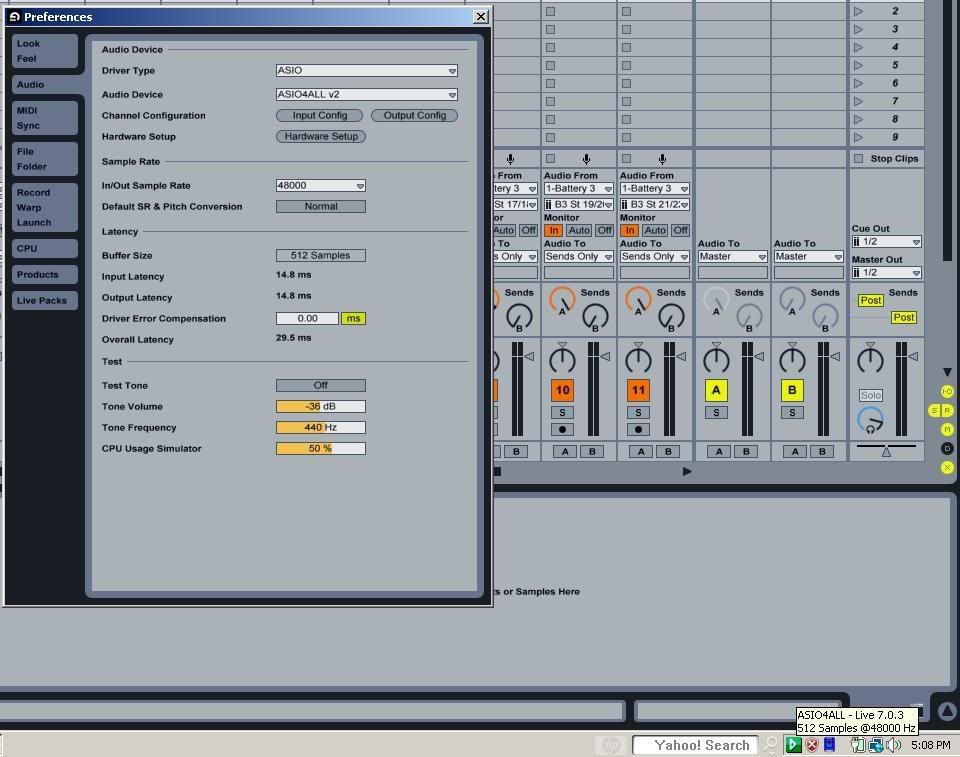
Here is a pic of how I have it set up. The green triangle shows, but still no sound : /
http://i187.photobucket.com/albums/x292 ... enshot.jpg
thanks!
* Ableton and Asio4All * How does this work ?
-
bigbonthabeat
- Posts: 73
- Joined: Tue Sep 02, 2008 11:30 pm
* Ableton and Asio4All * How does this work ?
Last edited by bigbonthabeat on Thu May 21, 2009 10:32 pm, edited 1 time in total.
Re: * Ableton and Asio4All * How does this work ?
If you're going to use asio4all, you need to tell asio4all which output device(s) to use, and you need to tell Ableton Live to use asio4all as its output device. Have you done that? If so, can you supply details?
-
greenscreens
- Posts: 172
- Joined: Fri May 11, 2007 3:23 pm
Re: * Ableton and Asio4All * How does this work ?
is there asio 4 all for mac?
-
leedsquietman
- Posts: 6659
- Joined: Sun Nov 19, 2006 1:56 am
- Location: greater toronto area
Re: * Ableton and Asio4All * How does this work ?
You need to select the ASIO4ALL driver in Live's audio preferences. Check driver type (asio) and it should only have asio4all on XP and asio4all and windows generic asio driver for vista. Select asio4all and a control panel will open, select the number of samples buffer (256 is a good place to start, increasing it if necessary).
asio4all works differently on different cards, it was lousy on my old laptop's sigmatel card, barely making any difference, but is like a magic device on the new laptops inbuilt sigmatel card, significantly improving performance to be really good.
When you have correctly set up asio4all for your onboard card, a green play like triangle icon will appear in the system tray icons (bottom right screen, near where your wifi and clock icons are located).
asio4all works differently on different cards, it was lousy on my old laptop's sigmatel card, barely making any difference, but is like a magic device on the new laptops inbuilt sigmatel card, significantly improving performance to be really good.
When you have correctly set up asio4all for your onboard card, a green play like triangle icon will appear in the system tray icons (bottom right screen, near where your wifi and clock icons are located).
http://soundcloud.com/umbriel-rising http://www.myspace.com/leedsquietmandemos Live 7.0.18 SUITE, Cubase 5.5.2], Soundforge 9, Dell XPS M1530, 2.2 Ghz C2D, 4GB, Vista Ult SP2, legit plugins a plenty, Alesis IO14.
-
bigbonthabeat
- Posts: 73
- Joined: Tue Sep 02, 2008 11:30 pm
Re: * Ableton and Asio4All * How does this work ?
Here is a pic of how I have it set up. The green triangle shows, but still no sound : /leedsquietman wrote:You need to select the ASIO4ALL driver in Live's audio preferences. Check driver type (asio) and it should only have asio4all on XP and asio4all and windows generic asio driver for vista. Select asio4all and a control panel will open, select the number of samples buffer (256 is a good place to start, increasing it if necessary).
asio4all works differently on different cards, it was lousy on my old laptop's sigmatel card, barely making any difference, but is like a magic device on the new laptops inbuilt sigmatel card, significantly improving performance to be really good.
When you have correctly set up asio4all for your onboard card, a green play like triangle icon will appear in the system tray icons (bottom right screen, near where your wifi and clock icons are located).
http://i187.photobucket.com/albums/x292 ... enshot.jpg
Re: * Ableton and Asio4All * How does this work ?
No, but with Core audio on a mac you don't need a workaround like asio4all on a PC to work with a built-in soundcard.greenscreens wrote:is there asio 4 all for mac?
'If they act too hip, you know they can’t play shit.'
-
leedsquietman
- Posts: 6659
- Joined: Sun Nov 19, 2006 1:56 am
- Location: greater toronto area
Re: * Ableton and Asio4All * How does this work ?
In Live's channel configuration did you turn on the stereo inputs and mono 1 and 2 if applicable ?
Is the sound card muted, or needs the volume raising - you need to do this with the speaker icon in the system tray or in control panel for your audio card ...
Is the sound card muted, or needs the volume raising - you need to do this with the speaker icon in the system tray or in control panel for your audio card ...
http://soundcloud.com/umbriel-rising http://www.myspace.com/leedsquietmandemos Live 7.0.18 SUITE, Cubase 5.5.2], Soundforge 9, Dell XPS M1530, 2.2 Ghz C2D, 4GB, Vista Ult SP2, legit plugins a plenty, Alesis IO14.
-
bigbonthabeat
- Posts: 73
- Joined: Tue Sep 02, 2008 11:30 pm
Re: * Ableton and Asio4All * How does this work ?
yes, I have activated inputs 1 and 2...And my volume isn't mutedleedsquietman wrote:In Live's channel configuration did you turn on the stereo inputs and mono 1 and 2 if applicable ?
Is the sound card muted, or needs the volume raising - you need to do this with the speaker icon in the system tray or in control panel for your audio card ...
-
bigbonthabeat
- Posts: 73
- Joined: Tue Sep 02, 2008 11:30 pm
Re: * Ableton and Asio4All * How does this work ?
try updating to Live 7.0.16!
http://www.ableton.com/download-live-lite?v=full
http://www.ableton.com/download-live-lite?v=full
Re: * Ableton and Asio4All * How does this work ?
ark wrote:If you're going to use asio4all, you need to tell asio4all which output device(s) to use, and you need to tell Ableton Live to use asio4all as its output device. Have you done that? If so, can you supply details?
I love you man