Page 2 of 8
Re: changed: Put all your awesome non audio os x tips here.
Posted: Sat May 30, 2009 1:17 am
by oblique strategies
porfiry wrote:I use a dark skin on Live, which is turned blinding beige by the negative effect. Agh!
Yep, you have to switch the Live skin to Frost to use either the control+option+command+8 option or Nocturne without Live getting too bright.
Re: changed: Put all your awesome non audio os x tips here.
Posted: Sat May 30, 2009 1:23 am
by stringtapper
oblique strategies wrote:stringtapper wrote:Getting eye strain during a long session?
control+option+command+8
Dig this an an alternative to the tip mentioned above:
http://www.macupdate.com/info.php/id/24898/nocturne
Nocturne:
A simple app for switching a computer to night vision mode. It does, however, add a few things:
Proper color correction in monochrome modes - you don't lose all your blues or reds when you tint the screen.
Window shadow toggling - if glowing windows aren’t your thing.
Background removal - hide the desktop picture so you don’t see a inverted version.
Thanks, that's pretty sweet.
Re: changed: Put all your awesome non audio os x tips here.
Posted: Sat May 30, 2009 1:47 am
by oblique strategies
stringtapper wrote:oblique strategies wrote:stringtapper wrote:Getting eye strain during a long session?
control+option+command+8
Dig this an an alternative to the tip mentioned above:
http://www.macupdate.com/info.php/id/24898/nocturne
Nocturne:
A simple app for switching a computer to night vision mode. It does, however, add a few things:
Proper color correction in monochrome modes - you don't lose all your blues or reds when you tint the screen.
Window shadow toggling - if glowing windows aren’t your thing.
Background removal - hide the desktop picture so you don’t see a inverted version.
Thanks, that's pretty sweet.
You're welcome. I like how you can make it any colour you like. Really fun to play with.
Re: changed: Put all your awesome non audio os x tips here.
Posted: Sat May 30, 2009 1:54 am
by fishmonkey
Re: changed: Put all your awesome non audio os x tips here.
Posted: Sat May 30, 2009 2:07 am
by john doe by choice
control browser font size/zoom: control + alt + scroll
zoom on screen overall (good for screen capture tutorial vids): control + scroll
scroll backward/forward through browser history: option + command + scroll
shut down computer (without using power button): control + command + eject
My favorite, command + tab to shift through open applications (if you have multiple applications open, hold tab and shift to the one you want to close, and without letting off of the command button, hit "Q", quits the application)
here's a pretty good list:
http://support.apple.com/kb/HT1343
Re: changed: Put all your awesome non audio os x tips here.
Posted: Sat May 30, 2009 3:33 am
by leonard
you cna press enter once to have the name show up for editing, then press enter again. use arrow keys to scroll.
Re: changed: Put all your awesome non audio os x tips here.
Posted: Sat May 30, 2009 8:31 am
by hangar17
im not sure if this one's widely used by i use command+tab alot to switch in between apps
Re: changed: Put all your awesome non audio os x tips here.
Posted: Sat May 30, 2009 1:30 pm
by oblique strategies
hangar17 wrote:im not sure if this one's widely used by i use command+tab alot to switch in between apps
Yes mon, plus you can use command+shift+tab to reverse direction!

Re: changed: Put all your awesome non audio os x tips here.
Posted: Sat May 30, 2009 1:33 pm
by SubFunk
ctrl+alt+command+8
to reverse the screen colours, very handy in heavy sunlight or glare on stages.
Re: changed: Put all your awesome non audio os x tips here.
Posted: Sat May 30, 2009 2:15 pm
by Tarekith
CMD+, (as in the comma key) always opens an apps preferences.
Click on your desktop, then CMD+N to open finder, I use this a lot.
Re: changed: Put all your awesome non audio os x tips here.
Posted: Sat May 30, 2009 2:51 pm
by Pitch Black
command + ~ (i.e. the key above the TAB key) cycles thru the currently open windows of an app.
Often I leave Live's prefs window open in the background and use this to hop back and forth.
Re: changed: Put all your awesome non audio os x tips here.
Posted: Sat May 30, 2009 3:07 pm
by Pitch Black
Sorry, gonna bend the rules of the thread title here... an awesome non osx audio tip.
SoundSource lets you switch audio hardware from your menu bar and provides quick shortcuts to Audio and MIDI prefs.
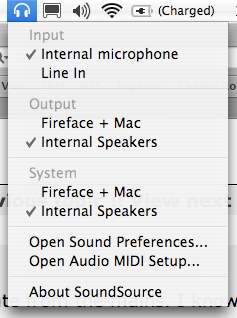 http://www.rogueamoeba.com/freebies/
Re: changed: Put all your awesome non audio os x tips here.
Posted: Sat May 30, 2009 3:26 pm
by SubFunk
Pitch Black wrote:Sorry, gonna bend the rules of the thread title here... an awesome non osx audio tip.
SoundSource lets you switch audio hardware from your menu bar and provides quick shortcuts to Audio and MIDI prefs.
http://www.rogueamoeba.com/freebies/
sweet!!! tanks for that one...
and as we bend the rules, very handy is LabTick, it let's you adjust the keylights even if the sensor 'says' no. handy on stages where the flashing lights sometimes screw the sensor and can lead to a flicker on / off keylight.
http://labtick.proculo.de/
Re: the os x tips thread
Posted: Sat May 30, 2009 4:24 pm
by Machinesworking
You can make any menu item in any application a keyboard shortcut in System Preferences.
System Preferences/keyboard and Mouse/Keyboard Shortcuts
Also, it's probably just me, but I often forget that on a macbook you can use two fingers to scroll a window
horizontally as well as vertically!

Re: the os x tips thread
Posted: Sat May 30, 2009 4:32 pm
by SubFunk
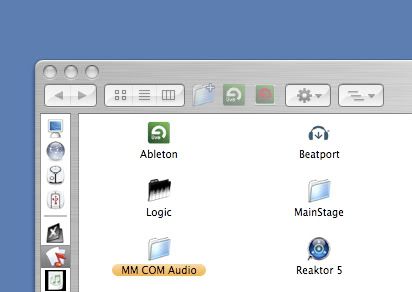
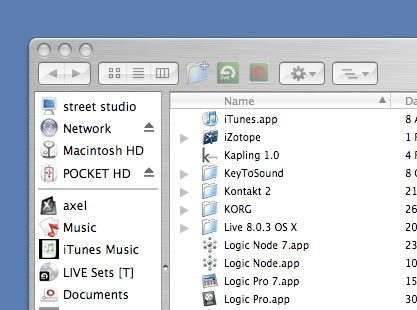
another cool feature is that you can drag any folder or apps into the top row of the finder window top bar, if you slected the 'browser view'
that way you can easy and quickly acsess those folders or apps from any window opened...
i dragged my ableton and my ableton library folder into it and have it handy / direct access, no matter which window is open.
like that:
another great trick is, if you have a lot of apps you use frequently but still not as often as others and your dock is going to be overfilled, then create a folder (anywhere you like) and drag shortcuts of all apps you need into it and drag this folder into the dock, if you now right click onto the folder in the dock... this lovely menu pops up...

oh, how much i love, i not even speak about the stability and performance, OSX... i get sick and often need to puke at work where we have windows machines, they are headache givers. i hate them. nothing is logic about the structure of windows.