Worth running Live Sets from external hard drives...

Share your favorite Ableton Live tips, tricks, and techniques.
Kristijonas
Posts: 111
Joined: Mon Sep 26, 2005 2:48 pm
Location: Planet Earth
Contact:

Re: Worth running Live Sets from external hard drives...

Post by Kristijonas » Wed Oct 21, 2009 9:15 pm

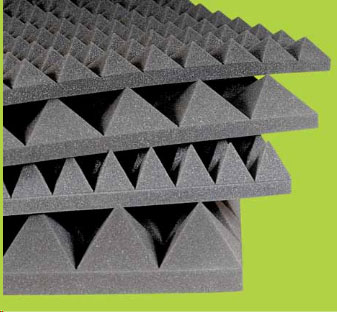
Just put your laptop on the a simple sheet of foam like this and it will solve you problem, I think:

Image

You don't need expensive acoustic foam, of course, the main point is to get soft material to absorb destructive vibrations.
You can use your soft case of laptop, sweeter, trousers or panties in extra situations :)
But don't put directly on the table! Hard drive slows down because vibration causes difficulties to read data.
And this is nothing comparing to being at a big risk to crash your HDD and loose all the data by using computer in such a conditions without any protection :!: :wink:
Last edited by Kristijonas on Wed Oct 21, 2009 10:37 pm, edited 1 time in total.
SOUNDPROVOCATION
Check out my new release: "Eccentric Grooves"

benjamingordon
Posts: 560
Joined: Tue Jan 24, 2006 11:20 pm

Re: Worth running Live Sets from external hard drives...

Post by benjamingordon » Wed Oct 21, 2009 9:26 pm

I keep it on a stand, off the table but im wondering whether external or even internal SSD drives would make a difference in performance/reading lots of audio and working with a live set and reliability.


Kristijonas
Posts: 111
Joined: Mon Sep 26, 2005 2:48 pm
Location: Planet Earth
Contact:

Re: Worth running Live Sets from external hard drives...

Post by Kristijonas » Wed Oct 21, 2009 10:18 pm

Maybe it's all right here, I'm talking just in case about harm of vibration :wink:
Stand or table, box or a chair - it doesn't mater, just keep it safe from shaking ;-) Maybe your stand absorbs vibrations, than everything is OK, it is just a suggestion according to this:
Im always scared im putting a lot of pressure on the machine and i can feel it choking sometimes
Also, Macbooks has sensors inside to lock the HDD when it falls. Hard vibrations can cause this sensor to lock the drive for a few seconds.
Firewire 800 has transfer rate of about 780 Mbps, 2.5'' 5400 RPM hard drive, according to this: tech specs, - has ~1.5 - 3 Gbps transfer rate (tech. gurus, correct me if I'm not right here).
So, even if you will connect fast external SSD, the only useful thing you'll get - resistance to vibration, but speed still will be limited by Firewire 800 permeability.
Possible solutions 1. Check if your Macbook Pro is protected from vibration. 2. Try to replace internal drive to 7200 RPM.
You know, I'm performing with Live too. And I am also doing it with Macbook Pro. One day I have found that putting soft foam under my MBP keeps it run smoother in shaky noisy places.
Also, my friend is working in computer service and he told me about hills of broken laptop HDDs in his office and that is because users are forgetting about sensitive part of computer - HDD and dropping their laptops all around :)
SOUNDPROVOCATION
Check out my new release: "Eccentric Grooves"

roadsandcars
Posts: 2
Joined: Thu Jul 23, 2009 4:29 am

Re: Worth running Live Sets from external hard drives...

Post by roadsandcars » Thu Oct 22, 2009 5:17 pm

A simple response to the original question:

-If you're worried about conserving space on your primary HD, why not store the sets on your external until you're performance, in which case you can just transfer the files to your laptop's HD temporarily. I don't think a 4G set should be choking up/slowing down your computer as much as you're saying it does.

benjamingordon
Posts: 560
Joined: Tue Jan 24, 2006 11:20 pm

Re: Worth running Live Sets from external hard drives...

Post by benjamingordon » Fri Oct 23, 2009 12:18 pm

Guys... check this out...

http://www.amazon.co.uk/exec/obidos/ASI ... oh_product

I just bought this and a PCI express card for my macbookpro so i can run my live set from this.

What dya think?

Cheers :)

Post Reply