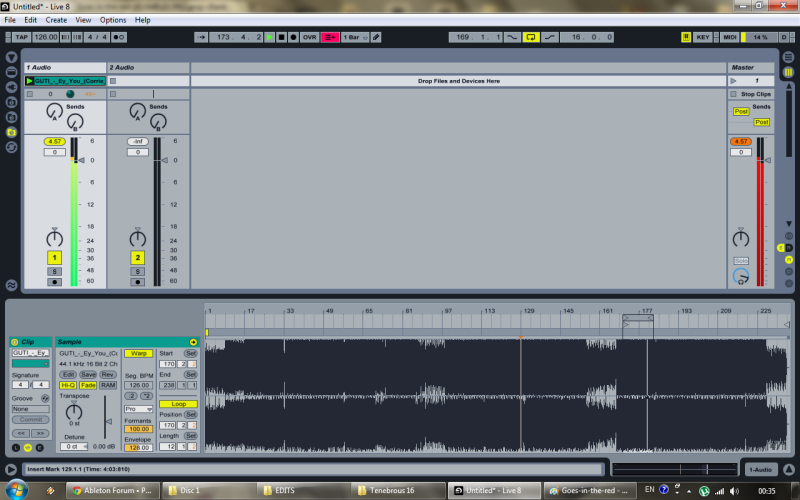
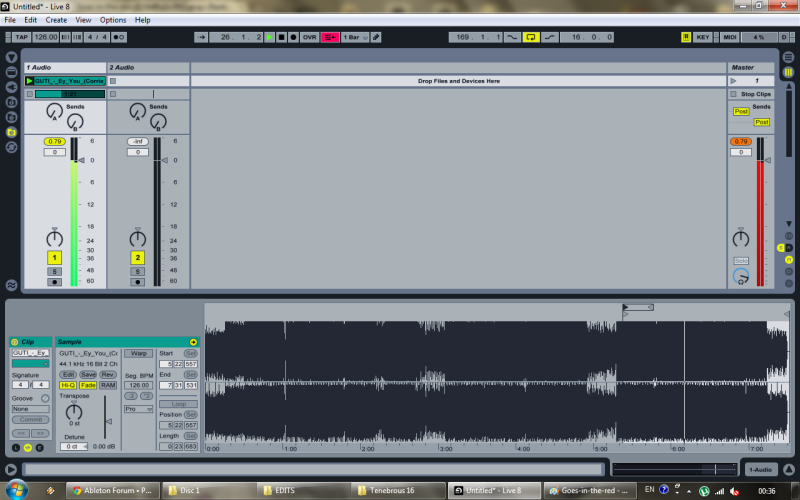
The volume level in warp mode (complex / pro) increases in a range from + 3 / + 6db, if the volume increase for example + 3db is constant, one takes note of this and lowers the track by -3db .. but the thing is somewhat variable. Think what an example for a djset you throw in the track and normally it should already be on + - 0db and instead not!
boston_bul wrote: ↑Sun Jul 24, 2011 9:49 pmI tried to look up for something about this topic in the forums but fruitlessly. Sorry if its been already discussed...
When i load a mastered audio file in Live - like a track from beatport, juno, etc.(or any file that's been recorded close to 0dBFS - like a sample from a sound bank than has been compressed) - it goes above zero.
Furthermore, changing the Warp Mode makes a difference - usually when i choose Complex or Complex Pro (that one would usually use on an whole piece of music according to Live's recommendations) it goes a bit more above zero than in other Warp Modes. Just to clarify - this happens even with Warp function off.
Even stranger is that it DOES makes a difference whether the file is being played in Session or Arrangement View (in Arrangement View the effect is around 1-2 dB more depending on the track)
My question is - has anyone experienced this? How is it possible, without any gain added to it, for a digital file to go above 0dBFS? Even if this thing could be explained with the process of warping it doesnt explain how that occurres with the Warp function off?! (i've posted screen shots with the Warp on and off).
I know about Live's 32 bit floating point and that internally routed channels goin above zero is not really an issue, but when i want to remaster an already mastered track to my liking i have to compromise with either loosing loudness or further compress an already compressed track, because even with flat EQ (or whatever i'm "remastering" with) i'm goin in the red on the master channel, unless lowering down the corresponding mixer channel or using a limiter to avoid clipping
Any thoughts about this?
Here are the direct links to the screen shots if you want to zoom in:
http://i134.photobucket.com/albums/q97/ ... RP-ing.png
http://i134.photobucket.com/albums/q97/ ... LEXPRO.png
And here're the screen shots: