I haven't tried that yet.. I'm still wondering if it's just something small like a setting.Vios wrote:Sounds like a problem with Ableton Live's export engine. Have you tried reinstalling Ableton Live?
Exported Wav file help
Re: Exported Wav file help
Re: Exported Wav file help
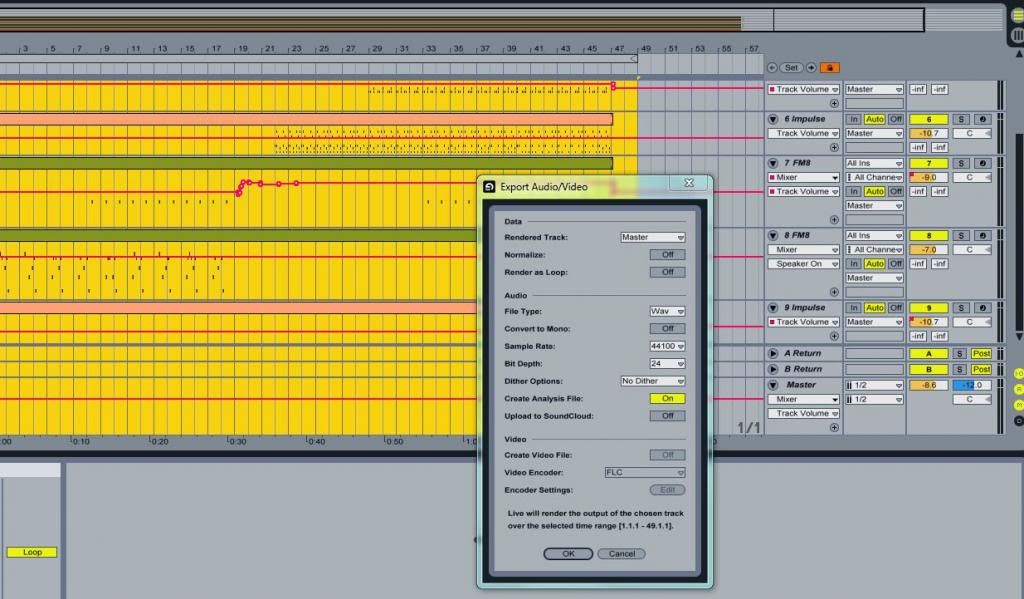
these are my settingsH20nly wrote:what about the settings in the pic that jestermgee posted?
no mention of whether those are the settings being used... is "rendered track" set to "Master" or not?

Re: Exported Wav file help
I've also rendered my file to 16bit debth and still no sound. I was told to get quicktime and that'd solve the problem but it didn't =/.. I give up
Re: Exported Wav file help
those export settings look good... except for the bit depth set to 24 that won't play if you record to CD. you need 16 bit 44.1 samples.
i'm not so sure about your Preferences. the audio output device is not giving me the same feeling of certainty that your export settings do, but i'm not in front of a computer with Live right now to compare anything or noodle around and i'm not familiar with your setup.
have you tried contacting [email protected]?
even though several of us are interested in helping... we are still just users. maybe the Abes could shed some light on this for you.
don't give up. you will learn something from this.
i'm not so sure about your Preferences. the audio output device is not giving me the same feeling of certainty that your export settings do, but i'm not in front of a computer with Live right now to compare anything or noodle around and i'm not familiar with your setup.
have you tried contacting [email protected]?
even though several of us are interested in helping... we are still just users. maybe the Abes could shed some light on this for you.
don't give up. you will learn something from this.
Re: Exported Wav file help
I don't know if you managed to fix your problem. I had the same issues and i could get around it by closing Live before playing the exported files, as you suggested. Then my exported .wav file is fine in any player, unlike yours I believe. I am using the same settings as you, master track, no dither, 44k, 16 bit, except no analysis file, as I don't know how to read those analysis files anyway 
Francis Ko
soundcloud.com/francisk0
facebook.com/franciskomusic
soundcloud.com/francisk0
facebook.com/franciskomusic
-
Bastahoobi
- Posts: 2
- Joined: Fri Aug 29, 2014 12:13 am
Re: Exported Wav file help
I also had issues with rendering into wav files. Would not play in Media player and VLC player had no actual sound when it played. I found out that the trick is to temporarily configure one of your tracks back to MME/DirectX, rather than the ASIO driver. Then render. Then switch it back to ASIO later (because who likes lag???)
Re: Exported Wav file help
Did you click the "Back to Arrangement" button and sweep out an area in your Arrangement view before exporting?danteZav wrote:this is terrible.. a brand new copy of ableton I have not messed with the setting at all. I just bought it, unpacked, made music and rendered my wav file but it's epty. it plays but it has no sound.
(If you don't know where the "Back to Arrangement" button is, look near the end of section 4.4 of the Live manual. Alternatively, you can use F10)
-
alexkywalker
- Posts: 6
- Joined: Wed Aug 15, 2018 4:44 pm
Re: Exported Wav file help
Thanks for the tips, I started using Ableton on a brand new Razer 15" laptop and was having issues with the exported WAV files not playing at all.
I changed the default Bit Depth of 16 to 24 and now the exported WAV files have audible content. Tried with Groove Music and Windows Media Player and yes.
THANK YOU @jestermgee for posting that screenshot!
I changed the default Bit Depth of 16 to 24 and now the exported WAV files have audible content. Tried with Groove Music and Windows Media Player and yes.
THANK YOU @jestermgee for posting that screenshot!