Page 2 of 3
Re: Push - Sample Recording/Chopping workflow needed.
Posted: Wed Apr 10, 2013 8:07 am
by humnumb
humnumb wrote:boderekstits wrote:This is the first time i've watched any sampling tutorials on Maschine. I'm a Live user and nothing else, but before that, I made beats on an MPC1000. This makes me want to get Push and Maschine and use them both side by side. Sampling sure looks a lot more fun on the Maschine.
No doubt. When it comes to sampling workflow, Maschine is a no-brainer. Especially if you've been on hardware like MPCs before, you know just how super fast and fun, hands-on sample chopping workflow can be:
http://www.youtube.com/watch?v=ySW7JthAt3E
https://www.youtube.com/watch?v=-ZFY5oRrY8A&t=01m08s
Those videos were shared to serve as reference material in the quest of hacking together a more hands-on sampling workflow between Push and Live. Now go patch! Max4Live that shit up. I want those slices warping in realtime and audio waveforms popping on the display in ASCII.
Re: Push - Sample Recording/Chopping workflow needed.
Posted: Tue Apr 30, 2013 3:16 pm
by djtendo
geekbeats wrote:panten wrote:It's possible to do what you want already by going to device mode then hitting a pad. At the top you'll see that next to the drum rack there is another slot for each pad. Select that device slot, then which ever encoder you change will be only for that pad.
I'm really digging on the device mode. Lovely implementation. Just wish we could dig in and out of MIDI & Audio clips in the same way.
THANK YOU SO MUCH
This is the solution and it allows me to chop audio and tweak it perfectly. I just tested it.
Are you saying that you can now control the sample start point and end point with push? And it would not change the global setting of each slice? Is there anyway to get a video of this or at least a confirmation of what it looks like in images? I am planning to get a push but the lack of maschine like control was the only thing holding me back.
Re: Push - Sample Recording/Chopping workflow needed.
Posted: Wed May 01, 2013 4:58 pm
by panten
Yes you are able to adjust the sample start/end points for each pad individually from Push. What you can't do is explained in my 1st post which in my eyes is all that's needed from the Abes to get this workflow down.
Why they left the Live API hobbled the way it is, is beyond me.
Re: Push - Sample Recording/Chopping workflow needed.
Posted: Sun Aug 11, 2013 11:59 am
by molefonken
I agree. bump bump!
Re: Push - Sample Recording/Chopping workflow needed.
Posted: Sun Aug 11, 2013 1:26 pm
by onefootskanka
+1
This would be amazing
Re: Push - Sample Recording/Chopping workflow needed.
Posted: Wed Aug 14, 2013 11:12 am
by makeem
+1
Re: Push - Sample Recording/Chopping workflow needed.
Posted: Sun Feb 16, 2014 10:11 pm
by janzak
Plus onnnnne
Re: Push - Sample Recording/Chopping workflow needed.
Posted: Thu Feb 27, 2014 1:26 pm
by makeem
+++3

and
Multiple audio events per clip: Automatically cut up samples and rearrange them on the fly in the Detail Editor,
Mixer in Arrangement View...
Re: Push - Sample Recording/Chopping workflow needed.
Posted: Fri Feb 28, 2014 1:38 pm
by molefonken
Is this possible? What about max4life? This is the only thing I'm missing on my Push.....
Re: Push - Sample Recording/Chopping workflow needed.
Posted: Tue Jan 27, 2015 6:26 pm
by alexfsu
panten wrote:It's possible to do what you want already by going to device mode then hitting a pad. At the top you'll see that next to the drum rack there is another slot for each pad. Select that device slot, then which ever encoder you change will be only for that pad.
I'm really digging on the device mode. Lovely implementation. Just wish we could dig in and out of MIDI & Audio clips in the same way.
I'm confused, when I go into Device mode and hit a pad, the pad just plays. I don't see what 'slots' at the top you mean on the Push. Could you please clarify? Thanks.
Re: Push - Sample Recording/Chopping workflow needed.
Posted: Fri Apr 03, 2015 11:43 pm
by panten
alexfsu if you take a look at this image and find the 'selection control' buttons.
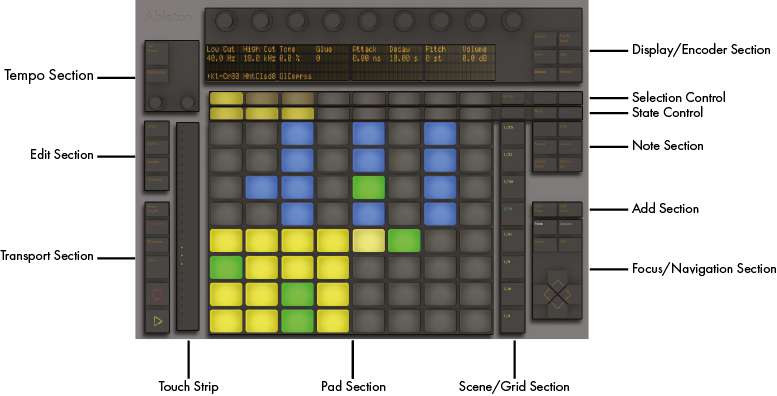
When I said 'slots' I really meant these buttons. When you're in device mode in a DrumRack, the second Selection Control button in from the left will allow you to change the parameters for each sample pad using the encoders.
Try it:
- Enter Device Mode.
- press the second 'selection control' button from the left.
- Tap a DrumRack pad on Push.
- adjust sample start/end point using encoders.
- tap another DrumRack pad.
- repeat etc...
Sorry I'm so late in replying, I don't tend to lurk these forums as much as I used to; but I hope this helps.
Re: Push - Sample Recording/Chopping workflow needed.
Posted: Thu Jun 25, 2015 8:02 am
by noark
is sample chopping in push possible now?
i will buy one if so
Re: Push - Sample Recording/Chopping workflow needed.
Posted: Thu Jun 25, 2015 9:07 am
by scheffkoch
Re: Push - Sample Recording/Chopping workflow needed.
Posted: Mon Jun 29, 2015 5:07 pm
by noark
no, not really, but thanks for the link.
Re: Push - Sample Recording/Chopping workflow needed.
Posted: Mon Jul 20, 2015 8:40 pm
by panten
Indeed. In fact it's more like.. THE LINK IN THE FIRST POST I MADE ON THIS THREAD.
