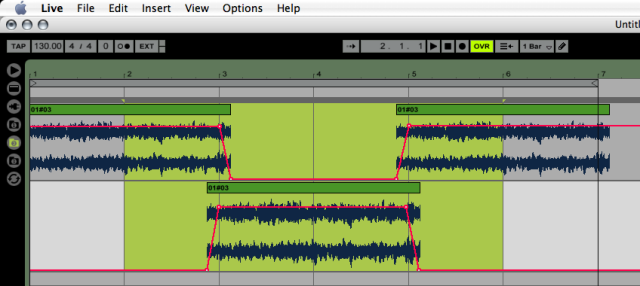
Cheers PB...pictures always help me...thanks for this!Pitch Black wrote:If it's audio, lay it up on the Arrange Page with crossfades drawn in, then render to disk. The highlighted area, Bars 2-6, will be a sample-accurate loop you can then drag back into your project.
Looping pads is a P.I.T.A.
3.2 GHz Windows XP, Live 7, Reason 4, FL Studio 7, Stylus RMX, Sytrus, Toxic III, Novation X-Station 49, Akai MPD24, EMu XK6, Roland MC-303, Gemini BPM5000 Mixer, MBox
-
cosmosuave
- Posts: 1774
- Joined: Mon Mar 15, 2004 3:36 am
- Location: Toronto
- Contact:
jb61264 wrote:I'm trying your method now...thanks! :)cosmosuave wrote:If your sequencing it then try my method it'll work...jb61264 wrote: it's an audio loop i'm recording from one of my synths

Just put the lotion in the basket..
MD SPS-1 DARKENERGY JX-3P (PG200) Mbase01
http://soundcloud.com/cosmosuave
http://www.cosmosuave.com/
http://soundcloud.com/cosmosuave
http://www.cosmosuave.com/
-
Pitch Black
- Posts: 6722
- Joined: Sat Dec 21, 2002 2:18 am
- Location: New Zealand
- Contact:

one of my favourite tricks for looping pad sounds is to
duplicate the clip reverse the audio in one of the copies and alternate between them.
If you have two chords - eg 4 bars on one chord followed by 4 bars on another - then just use the center section and alternate it with a reversed copy.
ie. "daadaadaadaadoodoodoodoo" becomes "daadaadoodoooodoodaadaad'
duplicate the clip reverse the audio in one of the copies and alternate between them.
If you have two chords - eg 4 bars on one chord followed by 4 bars on another - then just use the center section and alternate it with a reversed copy.
ie. "daadaadaadaadoodoodoodoo" becomes "daadaadoodoooodoodaadaad'
"That very perceptive of you Mr Stapleton, and rather unexpected... in a G Major"