Page 2 of 2
Posted: Thu Feb 15, 2007 1:45 am
by jb61264
Pitch Black wrote:If it's audio, lay it up on the Arrange Page with crossfades drawn in, then render to disk. The highlighted area, Bars 2-6, will be a sample-accurate loop you can then drag back into your project.
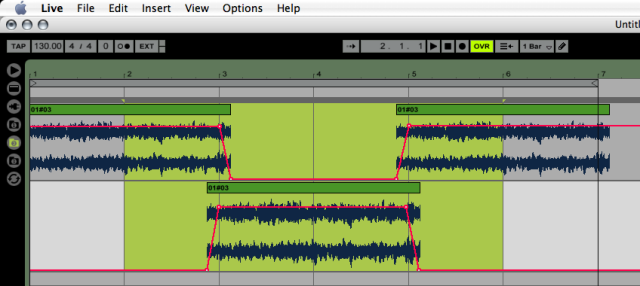
Cheers PB...pictures always help me...thanks for this!
Posted: Thu Feb 15, 2007 1:47 am
by cosmosuave
jb61264 wrote:cosmosuave wrote:jb61264 wrote:
it's an audio loop i'm recording from one of my synths
If your sequencing it then try my method it'll work...
I'm trying your method now...thanks! :)

Just put the lotion in the basket..
Posted: Thu Feb 15, 2007 2:18 am
by Pitch Black
Posted: Thu Feb 15, 2007 11:32 am
by Lux Libra
Crossfading will do the trick - like above. I use Soundforge for that.
It's a shame that Live (as DAW) lacks of features like this.
Posted: Thu Feb 15, 2007 7:07 pm
by nolus
one of my favourite tricks for looping pad sounds is to
duplicate the clip reverse the audio in one of the copies and alternate between them.
If you have two chords - eg 4 bars on one chord followed by 4 bars on another - then just use the center section and alternate it with a reversed copy.
ie. "daadaadaadaadoodoodoodoo" becomes "daadaadoodoooodoodaadaad'
