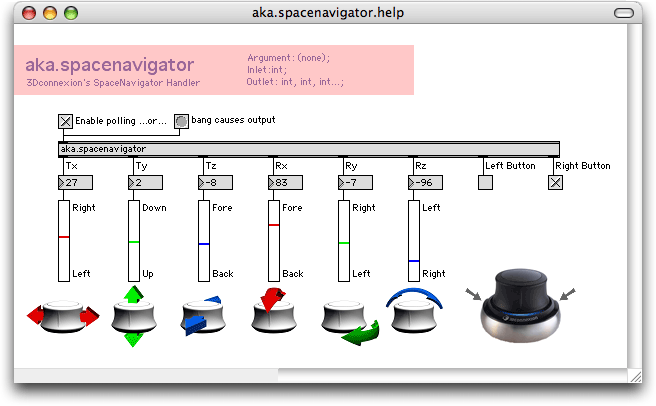
so i bought a spacenavigator, and IT'S GREAT!!!!
i can set any selected knob/slider turning the knob as i intended in my original post.
but what's more amazing, is that i've set the up and down tilt to zoom in and out (+/- of the numerical pad), and tilt right/left to arrangement horizontal scroll (ctrl-alt-left/right arrow). which means i won't ever use the mouse again to navigate inside the arrangement (it also works for session view, and i can switch from session to arrange by pulling the button up).
pushing the button down starts/stops the sequencer (space bar).
pushing it to the front is shift-tab (switching from device to clip view).
and i've got a couple of positions still free to assign.
great little device.
does such a device exist?
Nice one!
I have the powermate, I didn't know I could get it to assign any knob I click on I'll have to try that. But the space navigator looks much better. What's the difference between the standard and personal edition?
With assiging the arrow keys, does the software have fine and smooth action when you turn the knob, or does it react in course steps?
I have the powermate, I didn't know I could get it to assign any knob I click on I'll have to try that. But the space navigator looks much better. What's the difference between the standard and personal edition?
With assiging the arrow keys, does the software have fine and smooth action when you turn the knob, or does it react in course steps?
i don't know what's the diff between standard and personal editions. i got the standard.
regarding the arrow speed, it works rather smoothly (the knob is not an endless dial, it's got a center position, and you turn it right and left, but when you release it it goes back to central position). but anyways, with the (custom) driver i use, you can for instance have "slow motion" on the first part of the knob, and have it fast when you twist it more.
or you can set it for instance like this: over a range close to center position, it will be arrow keys, and if you twist it more, it will be a completely different function (zoom in/out, ctrl-C, undo... whatever you want that can be controlled with the mouse or keyboard or a combination of both, with multiple actions).
there's a guy who developped an amazing driver for it.
regarding the arrow speed, it works rather smoothly (the knob is not an endless dial, it's got a center position, and you turn it right and left, but when you release it it goes back to central position). but anyways, with the (custom) driver i use, you can for instance have "slow motion" on the first part of the knob, and have it fast when you twist it more.
or you can set it for instance like this: over a range close to center position, it will be arrow keys, and if you twist it more, it will be a completely different function (zoom in/out, ctrl-C, undo... whatever you want that can be controlled with the mouse or keyboard or a combination of both, with multiple actions).
there's a guy who developped an amazing driver for it.
Hmmm not sure about the center detent and the way it springs back. How do you adjust a knob accurately like that? It seems like you will lose you're setting when you let go of the knob.  Maybe the powermate is better for this. It's endless and wherever you move it, it stays...
Or do I just need to actually try the space navigator to understand how easy it works for this?
Maybe the powermate is better for this. It's endless and wherever you move it, it stays...Or do I just need to actually try the space navigator to understand how easy it works for this?
it's not like a midi assignation: the knob is assigned to up and down arrow keys of the computer.
so if you turn it left, the value goes down, if you release it, the value doesn't move. it works quite well.
maybe the powermate is better for that, but then, you have lots extra (amazing) features on the spacenavigator.
so if you turn it left, the value goes down, if you release it, the value doesn't move. it works quite well.
maybe the powermate is better for that, but then, you have lots extra (amazing) features on the spacenavigator.
OK, so I'm about to spring for the space navigator. I called 3Dconnexion and they said Ableton is not supported (of course). The sales guy was messing around with the Mac driver on the phone and he couldn't get the rotate left/right assigned to the up/down arrow keys (or any other keys), but he wasn't a mac guy.
peeddrroo -
I see that you're on XP and got it to work but I'm concerned about the mac driver being able to assign these commands properly.
The powermate works right out of the box with the stock driver. I don't want to have to download and futz with some 3rd party workaround scripts, computer geek programmers code, max stuff etc, to get it to work.
mike@trackteam -
Does it work right out of the box for key commands on the Mac or were the Max scripts a prerequisite just to get the basic functions working?
peeddrroo -
I see that you're on XP and got it to work but I'm concerned about the mac driver being able to assign these commands properly.
The powermate works right out of the box with the stock driver. I don't want to have to download and futz with some 3rd party workaround scripts, computer geek programmers code, max stuff etc, to get it to work.
mike@trackteam -
Does it work right out of the box for key commands on the Mac or were the Max scripts a prerequisite just to get the basic functions working?
sparklepuff just contacted me cause he bought one and is on mac.
get in touch with him he might have found a solution
http://www.ableton.com/forum/profile.ph ... le&u=12842
machinate uses one (or two) also i believe
otherwise on PC you need a special driver developped by some (smart) guy.
with the original driver it is useless.
get in touch with him he might have found a solution
http://www.ableton.com/forum/profile.ph ... le&u=12842
machinate uses one (or two) also i believe
otherwise on PC you need a special driver developped by some (smart) guy.
with the original driver it is useless.
-
chrysalis33rpm
- Posts: 1020
- Joined: Wed Aug 11, 2004 9:56 pm
- Location: San Francisco
I have the shuttle pro - I use the knobs for jog wheel and zooming, works great EXCEPT that you have to click in the audio waveform once for it to come into focus so the shuttlepro takes effect on it. Not a big deal when not playing live. But I'd prefer to have it permanantly mapped to something.peeddrroo wrote:i've searched the forum and apparently there's a few users having troubles getting their powermate to work with live.
there's been a few ppl mentionning Shuttle Xpress, that looks also interesting.
any feedback?
-
sparklepuff
- Posts: 3300
- Joined: Sat Apr 22, 2006 4:54 am
- Location: Brooklyn
Yo cold raw fish, I downloaded ControllerMate.
ControllerMate
Took just a few minutes of reading the manual to figure it out. Works like a charm. It reminds me of using Max, you create little modules that correspond to the buttons and movements of the SpaceNavigator. It's pretty deep, because you don't just assign say the up/down arrows to the tilt forward/backward motion. You can do that, but also restrict the sensitivity, so that there are 256 points of resolution to tilting forward, but it won't pick up until a point you've defined, like 120, so you don't have to worry about accidentally moving something you didn't want to.
I'm really happy with it, it's only $15, and I haven't even mapped out all of the axes yet. It is so great for zooming, I use it in both Live and Logic.
You can even make pages in ControllerMate that you can recall. So say I made a whole Logic layout, I can make different mappings for Live, save both pages, and just recall them whenever I switch programs.
Let me know if you have other questions, it's such a sweet little piece of gear. And it's got blue LED's! Who doesn't like pointless LED's on their gear!?
ControllerMate
Took just a few minutes of reading the manual to figure it out. Works like a charm. It reminds me of using Max, you create little modules that correspond to the buttons and movements of the SpaceNavigator. It's pretty deep, because you don't just assign say the up/down arrows to the tilt forward/backward motion. You can do that, but also restrict the sensitivity, so that there are 256 points of resolution to tilting forward, but it won't pick up until a point you've defined, like 120, so you don't have to worry about accidentally moving something you didn't want to.
I'm really happy with it, it's only $15, and I haven't even mapped out all of the axes yet. It is so great for zooming, I use it in both Live and Logic.
You can even make pages in ControllerMate that you can recall. So say I made a whole Logic layout, I can make different mappings for Live, save both pages, and just recall them whenever I switch programs.
Let me know if you have other questions, it's such a sweet little piece of gear. And it's got blue LED's! Who doesn't like pointless LED's on their gear!?
Guitar | Synths | Samplers | Ableton @ Phantogram & Big Grams
Thanks sparky. Hmm the controllermate thing doesn't sound toooo bad but honestly your reference to Max scares me a bit. I don't want to spend all day programming the darn controller like a little hobbit geek when I could just grab something with the mouse and get on with it.  Am I gonna pull my hair out and slap myself silly with my space knob?
I have the powermate but the rotation speed seems too slow so I think I'm going to hock in on ebay and get this thing. (I hate the word hock because it sounds like "a lugee" should go after it.)
Plus space knob has glowing LED for my supriror tarnce mooding! How can I go wrong. Do you? The powermate LED color is not enough neon for full tarnce mood lighting for mega dance hit. Pleease advice!
Am I gonna pull my hair out and slap myself silly with my space knob?I have the powermate but the rotation speed seems too slow so I think I'm going to hock in on ebay and get this thing. (I hate the word hock because it sounds like "a lugee" should go after it.)
Plus space knob has glowing LED for my supriror tarnce mooding! How can I go wrong. Do you? The powermate LED color is not enough neon for full tarnce mood lighting for mega dance hit. Pleease advice!
-
sparklepuff
- Posts: 3300
- Joined: Sat Apr 22, 2006 4:54 am
- Location: Brooklyn
No no no, it's not scary like Max, it's cool llke Max.
Here's what it looks like to make twisting the knob translate into Control + Arrow keystrokes:

You grab the module corresponding to a motion on the SpaceNavigator.
Then you grab a module that calibrates the axis so you choose what comes out of it, like just -1 and 0, instead of the whole spectrum of resolution points.
Then you throw on a value selector module, that takes in the values that comes out of the axis calibrator and translates that -1 into an ON position, while 0 sends an OFF message.
Then you choose your keystroke. The On and Off messages from the previous module act as fingers pressing the keys.
It really is intuitive, I'm certainly no programmer, and I had this thing fucking rockin it in about half and hour. Now it's a piece of cake.
Here's what it looks like to make twisting the knob translate into Control + Arrow keystrokes:
You grab the module corresponding to a motion on the SpaceNavigator.
Then you grab a module that calibrates the axis so you choose what comes out of it, like just -1 and 0, instead of the whole spectrum of resolution points.
Then you throw on a value selector module, that takes in the values that comes out of the axis calibrator and translates that -1 into an ON position, while 0 sends an OFF message.
Then you choose your keystroke. The On and Off messages from the previous module act as fingers pressing the keys.
It really is intuitive, I'm certainly no programmer, and I had this thing fucking rockin it in about half and hour. Now it's a piece of cake.
Guitar | Synths | Samplers | Ableton @ Phantogram & Big Grams
-
sparklepuff
- Posts: 3300
- Joined: Sat Apr 22, 2006 4:54 am
- Location: Brooklyn
Yes, because you can't assign the knob to any keystrokes with the driver that comes with the controller. It's more like Automap, where I think it works with like Illsutrator or something out of the box. If you want to assign any of your own controls, get controllermate.
LED's are teh bommmm tarnce axessoreezz!!!11!!
LED's are teh bommmm tarnce axessoreezz!!!11!!
Guitar | Synths | Samplers | Ableton @ Phantogram & Big Grams