Page 2 of 2
Posted: Sat Oct 11, 2008 4:00 pm
by Fidel
I do want a card with external MIDI I/0 but I don't need my sound card to have MIDI, I do on the other hand need my MIDI controller to have USB so it's good to know that while very stable the Foxes aren't for me.
Posted: Sun Oct 12, 2008 8:26 pm
by mike_o
I own a remote sl 25 & 37 and I love them to death, the thing is this, the automap for live SUCKS, flat out garbage, the HUI template for DP and the automap for plugins and softsynth controls are amazing, and I have been doing this almost 10 years, I am not easily won over.
if you use multiple daw systems then the remote sl is the way to go hands down, if your a live only guy then consider this before deciding.
I erased my remote sl automap template for live and created my own template using standard midi controls, I have about 90 different things I can control live through all the buttons knobs and assigning keyboard keys,7 channels, 7 launches and 7 mutes, about 8 FX in my master chain with about 24 customized controls to drop my fx in different settings and patterns and more little cut and edit tricks to perform.
then I can just turn one knob and activate my automap for instruments only to control vi's while I am producing, then just click back to my live template for mixing and performing.
under midi template control the remote has worked perfectly, the native sequencer automap for live is garbage, the instrument and plugin automap is great, you CAN overwrite the live automap and make your own setup for mixing and performing, while keeping the plugin/vi automap for sound design/synth control and original production.
It all really depends on your needs
DJ only, faderfox looks good.
Producer, DJ, live performer and sound designer making all your own beats riffs and loops from vi's and a hardware rack, the the remote sl can't be beat.
Posted: Mon Oct 13, 2008 10:11 am
by oblique strategies
I've used them both. I own 2 Faderfox units: LD2 encoders & LX1 buttons. They are extremely well thought out & implemented controllers. Very powerful (especially for their size). Plus they have native support in Live 7. You can also write your own user scripts, though I am finding this to be like shooting in the dark... kinda random so far. But I'm a MIDI novice. I need help!
The Remote Zero struck me as having a lesser build quality -the Faderfox units are like little bricks!

Naturally, it all depends on what you want to do & how you like to work. Both are cool.
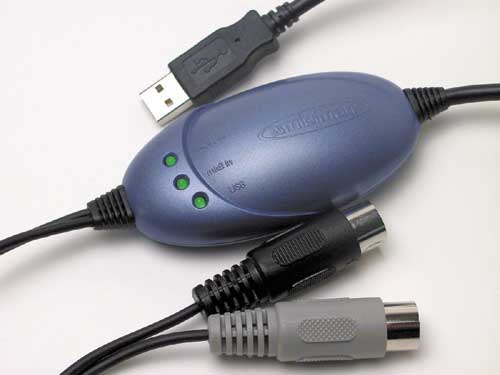
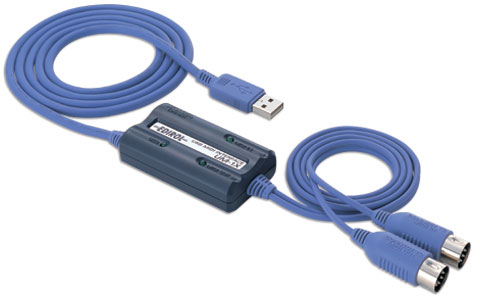
As for USB issue: what's wrong with one of these?
Posted: Thu Oct 16, 2008 12:16 pm
by Gianluca
Hi
just a quick question..Suppose I buy a faderfox, would it be possible to connect it to my Korg Zero 8 by MIDI and the Korg would sent both the signal of the Korg itself and of the Faderfox to Ableton with the Firewire cable that is plugged in my Korg to my Mac?
Is this possible or am I just guessing?

Thanks for any help!
Posted: Thu Oct 16, 2008 1:52 pm
by supamonsta
Yes I guess...
I'm able to do it with a faderfox LV2 midi plugged to my padkontrol, pK that sends all infos via usn to live, and live receives BOTH infos from the pK AND the faderfox.
so that should be the same for your system...
but I don't know the korg zero, so may I be wrong

cheers
edit : I guess it is ok for you IF the korg zero acts as a firewire midi interface
Posted: Thu Oct 16, 2008 7:38 pm
by Fidel
oblique strategies wrote:
As for USB issue: what's wrong with one of these?
One more piece of hardware to carry along and have something go wrong with, Plus with all the trouble I've had keeping my Triggerfinger seen in Live I'd like to keep m-Audio out of the picture. Ideally one audio interface, and one midi controller with usb and midi in and out.
Posted: Thu Oct 16, 2008 11:58 pm
by oblique strategies
Fidel wrote:oblique strategies wrote:
As for USB issue: what's wrong with one of these?
One more piece of hardware to carry along and have something go wrong with, Plus with all the trouble I've had keeping my Triggerfinger seen in Live I'd like to keep m-Audio out of the picture. Ideally one audio interface, and one midi controller with usb and midi in and out.
Understandable. However, the one thing that M-Audio seems to have universally got right has been their simple MIDI interfaces! They are a pretty safe bet.
Posted: Fri Oct 17, 2008 7:58 am
by 966sf
Actually, all my old midiman stuff doesn't work anymore. There's a Midisport at my school that goes crazy when more than three channels are played at the same time. Even my bro's FW410's Midi I/O only works half the time.
Yeah, for a company that used to have MIDI in their name, M-Audio sure makes some crappy MIDI interfaces.