Clip Mapper 1.0
Re: Clip Mapper 1.0
what about pattrstorage and interpolati between several presets? there are several interpolating modes and one could just get inspired by some "old" (pardon the quotes, but...) Pluggo features...
sound spatialization content & technologies @ audit-orium.com
Re: Clip Mapper 1.0
Yeah. That was what I may use. Haven't looked into it deeper, but I know it does simple interpolation between 2 presets. Anything beyond that requires some more reading and thinking. All in due timeJabbon wrote:what about pattrstorage and interpolati between several presets? there are several interpolating modes and one could just get inspired by some "old" (pardon the quotes, but...) Pluggo features...

-
glitchrock-buddha
- Posts: 4357
- Joined: Fri Oct 14, 2005 1:29 am
- Location: The Ableton Live Forum
Re: Clip Mapper 1.0
Nice man, thanks for this, very useful.
Yeah it sounds like the preset morphing might take a little thought, especially if there were 4 presets.
I think even having a dual A/B preset selector with a little slider underneath that morphed between them would be amazing... quite simply would be the most useful device ever made in Live.
Yeah it sounds like the preset morphing might take a little thought, especially if there were 4 presets.
I think even having a dual A/B preset selector with a little slider underneath that morphed between them would be amazing... quite simply would be the most useful device ever made in Live.
Professional Shark Jumper.
Re: Clip Mapper 1.0
I guess that the real work goes into patterizing the 16 ccs, and to decide which startegy to use.
What should a preset store? One could even decide to store various CCs assignements.
Check the interp message to send to a pattrstorage message...
What should a preset store? One could even decide to store various CCs assignements.
Check the interp message to send to a pattrstorage message...
sound spatialization content & technologies @ audit-orium.com
Re: Clip Mapper 1.0
I've been messing about with a few ideas. But I'm wondering if it'll be useful enough with the 16 Dials or if such a device would morph entire presets. That line of thinking may lead into an area of creating your own preset files which I'm not keen in getting into.
And there's also the fact that you can have multiple of these devices.
Max for Live is diabolic. Must.... Keep... things.... simple... must... resist... urge... to.. over... complicate... Arrgh....
Sorry about that
This pattr stuff isn't voodoo, but it sure ain't easy reading either. Getting there though.
And there's also the fact that you can have multiple of these devices.
Max for Live is diabolic. Must.... Keep... things.... simple... must... resist... urge... to.. over... complicate... Arrgh....
Sorry about that
This pattr stuff isn't voodoo, but it sure ain't easy reading either. Getting there though.
Re: Clip Mapper 1.0
Hehe yeah. I noticed you went way deeper into the rabbit hole. I didn't say anything before because you're my baseline test of how much a man can squeeze into a single deviceS4racen wrote:Stop..... Hammertime!
Cheers
D
-
glitchrock-buddha
- Posts: 4357
- Joined: Fri Oct 14, 2005 1:29 am
- Location: The Ableton Live Forum
Re: Clip Mapper 1.0
I thought about the same thing. I think it makes more sense that the presets to be morphed should include just the macros, so a preset or snapshot should be just to do with the macro device. This is a good simple way to control and see what is being morphed.hoffman2k wrote:I've been messing about with a few ideas. But I'm wondering if it'll be useful enough with the 16 Dials or if such a device would morph entire presets.
Professional Shark Jumper.
Re: Clip Mapper 1.0
And you could've saved me.....!!hoffman2k wrote:Hehe yeah. I noticed you went way deeper into the rabbit hole. I didn't say anything before because you're my baseline test of how much a man can squeeze into a single deviceS4racen wrote:Stop..... Hammertime!
Cheers
D
Oh well it was fun whilst it lasted, gonna make things for me now rather than thinking of all the configurabilty someone else might want....
It's all good and the clip mapper is such an integral part of what i use regularily now....
Cheers
D
Re: Clip Mapper 1.0
Nobody stopped me when I built a step sequencer running up to 6000 devices (before the pitch plugin could transpose full range.. Had to make one..)
I'm honestly the last person to comment on others patching methods. Been at this for years and I still make very silly mistakes. All I know is that I'll try to keep things simple. Though I'm not above adding complexity with more devices. As long as they are manageable.
It is indeed lots of fun. I can't wait till they start adding the bells and whistles
I'm honestly the last person to comment on others patching methods. Been at this for years and I still make very silly mistakes. All I know is that I'll try to keep things simple. Though I'm not above adding complexity with more devices. As long as they are manageable.
It is indeed lots of fun. I can't wait till they start adding the bells and whistles
Re: Clip Mapper 1.0
Yeah, i think i'm going to put it on the back burner for a bit until the next release maybe and concentrate on putting some mixes together, i don't even make my own music but it's been fun anyway...
Cheers
D
Cheers
D
Re: Clip Mapper 1.0
glitchrock-buddha wrote:I thought about the same thing. I think it makes more sense that the presets to be morphed should include just the macros, so a preset or snapshot should be just to do with the macro device. This is a good simple way to control and see what is being morphed.hoffman2k wrote:I've been messing about with a few ideas. But I'm wondering if it'll be useful enough with the 16 Dials or if such a device would morph entire presets.
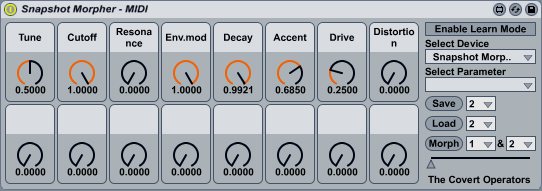
http://covops.dreamhosters.com/uploads/ ... 9.amxd.zip
Any brave souls wonna have a go on the Snapshot Morpher?

-
glitchrock-buddha
- Posts: 4357
- Joined: Fri Oct 14, 2005 1:29 am
- Location: The Ableton Live Forum
Re: Clip Mapper 1.0
Oh no you didn't! Nice... Will try later tonight... you know what I'll say though..... (audio effect version?hoffman2k wrote:glitchrock-buddha wrote:I thought about the same thing. I think it makes more sense that the presets to be morphed should include just the macros, so a preset or snapshot should be just to do with the macro device. This is a good simple way to control and see what is being morphed.hoffman2k wrote:I've been messing about with a few ideas. But I'm wondering if it'll be useful enough with the 16 Dials or if such a device would morph entire presets.
http://covops.dreamhosters.com/uploads/ ... 9.amxd.zip
Any brave souls wonna have a go on the Snapshot Morpher?
 )
)Is that load button midi mappable by the way? I'll find out soon enough anyways!
Professional Shark Jumper.
Re: Clip Mapper 1.0
Audio Effect version coming if there aren't bugs in this one. Plus the MIDI version could respond to program changes.glitchrock-buddha wrote:
Oh no you didn't! Nice... Will try later tonight... you know what I'll say though..... (audio effect version?
Is that load button midi mappable by the way? I'll find out soon enough anyways!
Its all MIDI Mapable. Haven't set up automap though.
-
glitchrock-buddha
- Posts: 4357
- Joined: Fri Oct 14, 2005 1:29 am
- Location: The Ableton Live Forum
Re: Clip Mapper 1.0
Well that's a thing of beauty!
At first I didn't think it was working and then realized you had to hit the morph button to enable the new selection when you change the morpj preset assignment. It might be even better if it automatically did that when you change one of the two morph presets.
But this is extremely cool man, great work! Beautifully simple and infinitely useful.
And that's actually really well implemented. Since you can change the presets assigned to the morph slider via a midi controller, that gives you a lot of possible combinations to play with. Although if they were to take affect immediately rather than by hitting the morph button, that would be even better for hardware control.
At first I didn't think it was working and then realized you had to hit the morph button to enable the new selection when you change the morpj preset assignment. It might be even better if it automatically did that when you change one of the two morph presets.
But this is extremely cool man, great work! Beautifully simple and infinitely useful.
And that's actually really well implemented. Since you can change the presets assigned to the morph slider via a midi controller, that gives you a lot of possible combinations to play with. Although if they were to take affect immediately rather than by hitting the morph button, that would be even better for hardware control.
Professional Shark Jumper.