Not really new, but altered in build from the defaults:
The Classic Drum Machines that behave properly:
http://www.ableton.com/forum/viewtopic.php?t=82050
THE Rack List. (What can you do with Racks?)
-
michaellpenman
- Posts: 396
- Joined: Wed Dec 12, 2007 1:12 pm
- Location: edinburgh
- Contact:
Minimal Techno Glitch
/Volumes/NEW VOLUME/Ableton/Live Pack/Drums/Minimal/glitchgo!!!!!.alp
My Minimal Tech Techiquies. Explore[/img]
My Minimal Tech Techiquies. Explore[/img]
-
Idonotlikebroccoli
- Posts: 1205
- Joined: Thu Aug 11, 2005 12:29 pm
- Location: Norway

-
michaellpenman
- Posts: 396
- Joined: Wed Dec 12, 2007 1:12 pm
- Location: edinburgh
- Contact:
FunkyBreaks:
http://www.zshare.net/download/69560873845393/
http://www.zshare.net/download/69560873845393/
-
logic_user99
- Posts: 1965
- Joined: Fri Oct 26, 2007 3:58 pm
- Location: Nottingham, UK

-
michaellpenman
- Posts: 396
- Joined: Wed Dec 12, 2007 1:12 pm
- Location: edinburgh
- Contact:
Vocal Mangeling trick just drop your vocal in the vox track and play:
http://www.zshare.net/download/6991779c0c8901/
http://www.zshare.net/download/6991779c0c8901/
-
mickey disco
Re: Filter Shape.
Hi,friend_kami wrote:Filter Shape
::Features::
* Dual LFO (Autofilter).
Two separate Autofilters on two separate device chains with the features the native Ableton Live autofilter provides, no fuzz or mapping required.
* One Knob Filter.
The incredible and infamous one-knob filter, as seen here
* Adjustable EQ position.
Decide whether to eq before beeing sent to the lfo/filter, after or some % in between them both!
* Low, Mid, Hi cut/boost EQ. (frequencies easily adjusted through the macro map mode)
* Easy to understand interface and grouping.
Separate Outputs for all chains/racks (for easy manipulation, effect grouping and modifications).
::Controls::
* Filter.
Filter frequency.
* LFO.
Dry <--> Wet.
* Spread (aka Width).
LFO phase mono<-->stereo.
*Dry/Wet.
Filter Shape (master rack) dry<-->wet.
* Low, Mid, Hi.
Cut<-->Boost.
* Before or After FX
EQ position.
Not really useable on the filter, but for the LFO´s
http://nwrecords.com/Ableton_Live/filtershape_block.txt
Rack: http://nwrecords.com/Ableton_Live/Filter_Shape.adg
i could stop, but i dont feel like it.
:p
Is it possible for you to upload this and your step sequencer rack again please? I can't find them on your site.
Thanks!

ROFLMAOIdonotlikebroccoli wrote:You do realize that you must upload it TO THE WEB first? I can't download directly from your machine now can I?
tarekith
https://tarekith.com
https://tarekith.com
-
friend_kami
- Posts: 2255
- Joined: Mon May 29, 2006 10:10 pm
Re: Filter Shape.
umm.. ill see if i can find them again. just did some harddrive cleaning, might have gone then :pmickey disco wrote:Hi,friend_kami wrote:Filter Shape
::Features::
* Dual LFO (Autofilter).
Two separate Autofilters on two separate device chains with the features the native Ableton Live autofilter provides, no fuzz or mapping required.
* One Knob Filter.
The incredible and infamous one-knob filter, as seen here
* Adjustable EQ position.
Decide whether to eq before beeing sent to the lfo/filter, after or some % in between them both!
* Low, Mid, Hi cut/boost EQ. (frequencies easily adjusted through the macro map mode)
* Easy to understand interface and grouping.
Separate Outputs for all chains/racks (for easy manipulation, effect grouping and modifications).
::Controls::
* Filter.
Filter frequency.
* LFO.
Dry <--> Wet.
* Spread (aka Width).
LFO phase mono<-->stereo.
*Dry/Wet.
Filter Shape (master rack) dry<-->wet.
* Low, Mid, Hi.
Cut<-->Boost.
* Before or After FX
EQ position.
Not really useable on the filter, but for the LFO´s
http://nwrecords.com/Ableton_Live/filtershape_block.txt
Rack: http://nwrecords.com/Ableton_Live/Filter_Shape.adg
i could stop, but i dont feel like it.
:p
Is it possible for you to upload this and your step sequencer rack again please? I can't find them on your site.
Thanks!
ill take a looksie.
-
friend_kami
- Posts: 2255
- Joined: Mon May 29, 2006 10:10 pm
well, i found the filter shape one htough. i think its an old version, not sure.
perhaps its useable for someone. do note that its quite big and it takes some time to load, so its far from optimized hehe.
here you go: http://nwrecords.com/racks.html
perhaps its useable for someone. do note that its quite big and it takes some time to load, so its far from optimized hehe.
here you go: http://nwrecords.com/racks.html
-
mickey disco
thanksfriend_kami wrote:well, i found the filter shape one htough. i think its an old version, not sure.
perhaps its useable for someone. do note that its quite big and it takes some time to load, so its far from optimized hehe.
here you go: http://nwrecords.com/racks.html
-
friend_kami
- Posts: 2255
- Joined: Mon May 29, 2006 10:10 pm
-
friend_kami
- Posts: 2255
- Joined: Mon May 29, 2006 10:10 pm
Delerium - this might work...
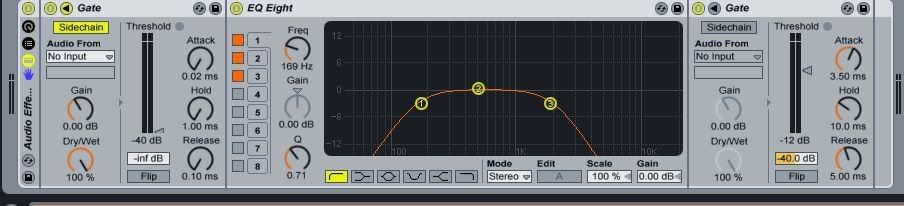
First gate uses it's sidechain to receive audio from whichever source you want. I expect that the minimum settings on it should allow all audio through without effecting it. EQ then should be set as you wish. Second gate acts as a gate on the eq'd audio. Macros could be easily mapped to the controls you want.
First gate uses it's sidechain to receive audio from whichever source you want. I expect that the minimum settings on it should allow all audio through without effecting it. EQ then should be set as you wish. Second gate acts as a gate on the eq'd audio. Macros could be easily mapped to the controls you want.