Page 3 of 7
Posted: Sat Jan 24, 2009 5:41 am
by oblique strategies
Jekblad wrote:So it's JUST AS FAST as a mouse once you get used to it? or a little slower...?
I find it much much faster. The trackball is really a refinement of the basic idea. Instead of moving the device that holds the ball, you can just move the ball itself. Plus you don't have to grip the mouse & pick it up & place it down over & over to place the cursor where you want it. All in all, much more control with much less strain.
I think that some people may have an initial negative reaction for two reason:
1. it's different, & like anything different it may take some getting used to.
2. they have not taken the time to edit & customize the action of the trackball, so they don't have any real feeling of control
With my trackball I have a number of parameters that I can adjust to customize the movement of the ball.
Editable parameters: Acceleration:
1. Pointer Speed: Adjusts the speed of the pointer movement. For fine control, change the sliders in Fine Tuning section below.
2. Fine Tuning: When Moving the Mouse Slowly: Adjusts the speed of the pointer movements in response to slow movement.
3. Fine Tuning: When Moving the Mouse Quickly: Adjusts the speed of the pointer movements in response to quick movement.
These offer a very wide range of action. There are also parameters & assignments for Buttons, Scrolling, & Click Speed.
I'm currently traveling & left my trackball at home, so I am having to use the mouse where I am staying. Ugh! I'm going to get a smaller trackball for traveling.
Jekblad wrote: I think the thumb makes sense for drag and drop and scroll wheel, but finger trackball seems better for moving the mouse around.
I opted for a trackball rather than a thumb ball because I find that using two fingers & a thumb on the ball offers more precise control than just a thumb. Also, you can rest your hand on it sideways & use it just like a thumb ball; so you get the best of both worlds. It's fine for drag & drop, & anything else you do with a mouse.
Plus the ring around the ball is a scroll wheel/ring!

Posted: Tue Jan 27, 2009 12:52 am
by Jekblad
with the logitech's finger balls do you have to secure it to the desk? i feel like when i would click with my thumb it'd move the mouse over. scuse me, the trackball over.
the kesington looks way cool, but these are out of my price range right now... lame.
I don't see way live Abeltons don't just get a wireless trackball to set next to their midi controllers, no more bending over. that sounds bad
Posted: Tue Jan 27, 2009 1:11 am
by Jekblad
Posted: Tue Jan 27, 2009 4:01 am
by madhattared
Jekblad wrote:with the logitech's finger balls do you have to secure it to the desk? i feel like when i would click with my thumb it'd move the mouse over. scuse me, the trackball over.
It was doing exactly that when i first started using it. Since then i put an ergonomic gel-pad under it, and it no longer slides around. It takes about a week to get used to, I don't even think about it anymore and it most definitely lowers the stress on your hand. The hand no longer moves with the forearm for movement and control. A flick of the fingers moves the cursor around, much better.
Posted: Tue Jan 27, 2009 5:53 am
by lerky
iJust ordered one of the kenington expert mouse
How does the whole click and drag thing work with them, cant get my head around the thought of holding down button while moving trackball
Posted: Tue Jan 27, 2009 11:16 am
by oblique strategies
lerky wrote:iJust ordered one of the kenington expert mouse
Congratulations! Once you go track you never go back! When you get the hang of it you'll wonder why everyone doesn't use one. Of course the Expert Mouse is the cream of the crop, & really gives the best user experience.
lerky wrote:How does the whole click and drag thing work with them, cant get my head around the thought of holding down button while moving trackball
It's easy: your thumb usually rests on or over the lower left button. The default setting for the lower left buttons is click, just like for a typical left mouse button. Just hold it down with your thumb while you roll the ball around with your fingers.
You you also can set up any button (or buttons) to drag: just click with the drag button & you don't have to hold it down; then roll the item where you want, press the drag button again or left click to release the item where you want it to stay.
Plus you can hold down 2 buttons for what Kensington calls a 'chord', which is basically another button. You have settings to 'chord' the 2 top buttons, & the 2 bottom buttons which gives you a total of 6 buttons.
I have mine configured as follows:
-lower left = click
-lower right = right click
-upper left & upper right = I configured both buttons to drag. I did this to accommodate my hand in a variety of positions as it rests on the trackball.
-chord 1 = I have the two upper buttons set up to 'chord' to change the scroll ring from vertical to horizontal scrolling in OS X.
-chord 2 = I have the two lower buttons set up to 'chord' to launch Spotlight in OS X.
I used to have one of the top buttons set up to double-click, but changed it to be a drag so I could have 2 drags buttons to choose between give my hand some variety.
More coolness: you can set it up to do different things in different applications, or to perform keystrokes (keyboard shortcuts, etc.), open your applications menu, & many more options.
'Tis mighty!

Posted: Tue Jan 27, 2009 11:44 am
by lerky
thanks for the info man, feeling better about it now
+ my wrist is absolutely screwed right now
Posted: Tue Jan 27, 2009 1:12 pm
by oblique strategies
lerky wrote:thanks for the info man, feeling better about it now
+ my wrist is absolutely screwed right now
Happy to help.
Another big plus is that is it really easy to use with either the right or left hand. I switch back & forth to prevent overuse of one hand/wrist.
I've used trackballs constantly for years, & very rarely feel any discomfort even after long sessions. You'll probably start feeling better soon.
Use the provided soft wrist support that attaches to the bottom end of the trackball -now you're in the lap of luxury!
They also come with a 5 year warranty -pretty good.
Posted: Tue Jan 27, 2009 6:32 pm
by Kodama
I use shift + tab a lot on mine to switch between viewing a clip in session.
Posted: Tue Jan 27, 2009 10:15 pm
by NapalmBob
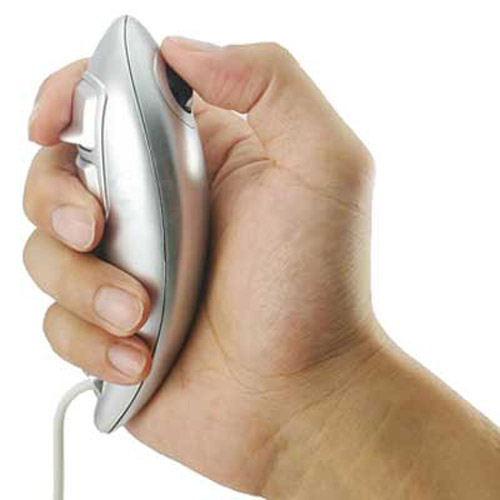
I have a cheap little thing from china that hass a little tiny trackball on the top and two triggers on the front, its like half a playstation controller, you just hold it in your hand rather than put it on a desk, I guess it would be handy for live use too.
Posted: Tue Jan 27, 2009 10:28 pm
by bendybones
NapalmBob wrote:I have a cheap little thing from china that hass a little tiny trackball on the top and two triggers on the front, its like half a playstation controller, you just hold it in your hand rather than put it on a desk, I guess it would be handy for live use too.
Would u have a link?
Posted: Tue Jan 27, 2009 11:07 pm
by oblique strategies
NapalmBob wrote:I have a cheap little thing from china that hass a little tiny trackball on the top and two triggers on the front, its like half a playstation controller, you just hold it in your hand rather than put it on a desk, I guess it would be handy for live use too.
I tried something like that before that had an even smaller trackball. Unfortunately, I found that the smaller the ball, the less the control. How do you find it's usefulness?
I'd like to find something like that as a controller option for certain types of performances.
Posted: Wed Jan 28, 2009 12:35 am
by djsynchro
The trackball is a keeper! I still feel I'm a bit faster more precise on the mouse but I have been using a mouse for... since the Atari ST came out and a trackball for a couple of weeks, my skills are improving.... if your wrist is hurting definitely give it a go, my wrist don't hurt no more. It's also nice for adjusting ableton paramters, because your hand doesn't move, you just move your fingers it's actually more similar to adjusting a knob on an analogue mixer. Using a mouse for live performance is shit, trackball is way better.
Posted: Tue Feb 03, 2009 9:44 pm
by Jekblad
hey hey!
i've "acquired" a trackball mouse. AKA stole it off a friends desk.
http://members.arstechnica.com/x/archan ... ckball.JPG
the microsoft explorer. ha. It plays nice with my mac via USB overdrive. cool.
I'm LOVIN it so far, will let you know how long it lasts!
Posted: Sat Feb 14, 2009 6:47 am
by SpaceDub Productions BC
djsynchro wrote:I just found this one:
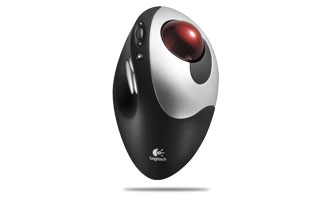
It has seven buttons total, and a scroll wheel.
The LogiTech software lets you map buttons to keystokes, also since it's wireless I can pick it up and put it on my music keyboard, so I could stop/start overdub/record using the extra buttons.... think i might have to get this.
Any users?
I have this one its great !! Saves my wrists for sure !! Best addition to my set up in years !
