the os x tips thread
-
john doe by choice
- Posts: 1085
- Joined: Fri Sep 19, 2008 4:21 am
Re: the os x tips thread
You can also drag your applications folder to the dock - saves me some time when I don't already have a finder window open.
Re: changed: Put all your awesome non audio os x tips here.
if you change the app by command+tab, you can easily get back to the previous app by just pressing command and then the tab-key SHORTLY. then again, and you are switching between the last two apps you´ve choosen. so it´s a memory effect to switch back and forth between two apps.oblique strategies wrote:Yes mon, plus you can use command+shift+tab to reverse direction!hangar17 wrote:im not sure if this one's widely used by i use command+tab alot to switch in between apps
Re: the os x tips thread
^ yep. also if you have a hell lot of apps open you can open the 'menu' with command+tab and hover with the mouse over it to select, if you then release the command+tab the app will be in front where the mouse was standing at last.
anyone again, how to make a screen shot without opening grab? i forgot that one...
anyone again, how to make a screen shot without opening grab? i forgot that one...
***  GAFM ***
GAFM ***Re: the os x tips thread
Just command-shift-3 instead of 4.
-
stringtapper
- Posts: 6321
- Joined: Sat Aug 28, 2004 6:21 pm
Re: the os x tips thread
And of course you can do the command+shift+4 and then click drag to make a selection you'd like to take a picture of. But another cool thing is if you do the same command+shift+4 and then hit the space bar it will make the cursor look like a camera and it will take a picture of any window you hover over and only that window.
Unsound Designer
Re: the os x tips thread
^^^ wow, that one is new to me... THANKS, very handy indeed.
p.s. feeling like getting onto a little Windows vs. OSX war... here, it is still so much fun to do!
come on... pick a fight.
p.s. feeling like getting onto a little Windows vs. OSX war... here, it is still so much fun to do!
come on... pick a fight.
*** GAFM ***
GAFM ***-
epiphanius
- Posts: 221
- Joined: Thu Jul 11, 2002 10:32 pm
Re: the os x tips thread
>>come on... pick a fight
Ok - in XP I can tell the cursor to jump to the default button a dialog, an option which improves workflow considerably. On a Mac - you have to pay a 3d party developer $20.00, for the same functionality.
Another: I could not find any way to turn off the stupid distracting highlights in Preview. To even change the colour, you have to use the command line: http://web.ipac.caltech.edu/staff/hoard ... ight_color which is pretty arcane.
Also - there's no way to increase the size of screen fonts:
http://macosx.com/tech-support/how-to-i ... /3190.html
Apple is just as arrogant and heavy handed as Microsoft. That said, I am enjoying the new Macbook I bought - but the fanboy stuff can go away.
Sorry for the derail - but there was a challenge!
e.
Ok - in XP I can tell the cursor to jump to the default button a dialog, an option which improves workflow considerably. On a Mac - you have to pay a 3d party developer $20.00, for the same functionality.
Another: I could not find any way to turn off the stupid distracting highlights in Preview. To even change the colour, you have to use the command line: http://web.ipac.caltech.edu/staff/hoard ... ight_color which is pretty arcane.
Also - there's no way to increase the size of screen fonts:
http://macosx.com/tech-support/how-to-i ... /3190.html
Apple is just as arrogant and heavy handed as Microsoft. That said, I am enjoying the new Macbook I bought - but the fanboy stuff can go away.
Sorry for the derail - but there was a challenge!
e.
Last edited by epiphanius on Sat May 30, 2009 9:25 pm, edited 1 time in total.
Re: the os x tips thread
he he, i don't believe someone jumped on it, what a fun!
you made my evening, thanks!
you made my evening, thanks!
*** GAFM ***
GAFM ***Re: the os x tips thread
In Safari, bookmarks 1-9 (folders don't count) in the bookmarksbar are assigned to cmd-1-9.
If you' re often annoyed by stupid myspace backgrounds drag the colorszapper bookmarklet from the link below to your bookmarksbar (a green plus sign appears) and give it a shorter name like 1CZ (if it's the first one), hit cmd-1 & background is gone.
There is another nice one in the link:
http://www.usingmac.com/2008/6/1/bookma ... mac-safari
steko
If you' re often annoyed by stupid myspace backgrounds drag the colorszapper bookmarklet from the link below to your bookmarksbar (a green plus sign appears) and give it a shorter name like 1CZ (if it's the first one), hit cmd-1 & background is gone.
There is another nice one in the link:
http://www.usingmac.com/2008/6/1/bookma ... mac-safari
steko
Rahad Jackson wrote:My Awesome Mix Tape #6
-
oblique strategies
- Posts: 3606
- Joined: Thu Nov 02, 2006 9:57 pm
- Location: Another Green World
Re: changed: Put all your awesome non audio os x tips here.
Nice. Do you feel it's safe enough to have running when you do a gig?Pitch Black wrote:Sorry, gonna bend the rules of the thread title here... an awesome non osx audio tip.
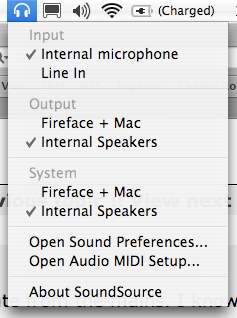
SoundSource lets you switch audio hardware from your menu bar and provides quick shortcuts to Audio and MIDI prefs.
http://www.rogueamoeba.com/freebies/
Re: the os x tips thread
For Leopard only:
Quicklook-Plugins:
http://sourceforge.jp/projects/fjnwebarchive/ (watch downloaded Safari webarchives with QuickLook)
http://homepage.mac.com/xdd/ (Flash Video FLV Quicklook Plugin)
For FLV Quicklook Plugin you also need Perian (free, open source QuickTime component that adds native support for many popular video formats): http://perian.org/
Before installing read: http://perian.org/#support
Drag the QuickLook Plugins in: Library/QuickLook & restart.
steko
Quicklook-Plugins:
http://sourceforge.jp/projects/fjnwebarchive/ (watch downloaded Safari webarchives with QuickLook)
http://homepage.mac.com/xdd/ (Flash Video FLV Quicklook Plugin)
For FLV Quicklook Plugin you also need Perian (free, open source QuickTime component that adds native support for many popular video formats): http://perian.org/
Before installing read: http://perian.org/#support
Drag the QuickLook Plugins in: Library/QuickLook & restart.
steko
Rahad Jackson wrote:My Awesome Mix Tape #6
-
oblique strategies
- Posts: 3606
- Joined: Thu Nov 02, 2006 9:57 pm
- Location: Another Green World
Re: the os x tips thread
Flip4Mac
http://www.telestream.net/flip4mac-wmv/overview.htm
Play Windows Media files on your Mac using QuickTime Player or Safari Web Browser
http://www.telestream.net/flip4mac-wmv/overview.htm
Play Windows Media files on your Mac using QuickTime Player or Safari Web Browser
Re: the os x tips thread
http://www.bombich.com/software/ccc.html
http://www.manytricks.com/namemangler/
http://www.apple.com/pro/tips/
http://www.apple.com/business/theater/
http://www.mactricksandtips.com/
steko
http://www.manytricks.com/namemangler/
http://www.apple.com/pro/tips/
http://www.apple.com/business/theater/
http://www.mactricksandtips.com/
steko
Rahad Jackson wrote:My Awesome Mix Tape #6