I agree that people mess with audio in all kinds of ways and then edit it, but I doubt glitch plugins are used much. Sorry, I just think there's no comparison and no substitute for composing using intense editing. The difference is striking. Happy accidents are always welcome and wonderful for sure, but at the same time glitch Is not generative music. "You can't beat a computer" This isn't chess. "What happens next?" is part of songwriting, plugins don't write songs. Edit: I thought the op asked about streamlining editing workflow more than shortcuts. Try everything though.
My 2 cents.
Tell me your workflow for producing glitchy stuff!
-
anybody human
- Posts: 1049
- Joined: Fri Jun 05, 2009 2:27 pm
Re: Tell me your workflow for producing glitchy stuff!
Personally i like to create the glitches randomly, then render, slice them up and assign them to keys. That way you have the best of both worlds, fast but your still in control. I find glitch a bit tiresome these days though, its become very mainstream, even pop songs use glitching these days. It was never the glitching and fast edits that made people Like Aphex twin good anyway, it was the melodies and ambience. I'm glad he does more tuneful simple stuff these days
http://www.youtube.com/watch?v=0hjB9up1SUk
http://www.youtube.com/watch?v=0hjB9up1SUk
Re: Tell me your workflow for producing glitchy stuff!
Damn it...I tried the idea but it doesn't work for small snippets (I was looking for synced snippets of equal length...)#1thelark wrote:
http://vimeo.com/8208829
Cosm you're the man!
That midinote to recordbutton tip will help a lot when trying to integrate the launchpad into that glitchy business... Very nice and efficient. Just run that miditrack and it will record your sample into tiny synced bits which then can be triggered by the lp or whatever or pulled over to the arrangement view...
But if you are looking for glitchy results, it's a very good idea!
I used 8 audio tracks for horizontal recording and another miditrack that plays notes that are mapped to the recordbuttons. All audiotracks get the audio from audiotrack 9 which contains the sample that is meant to be chopped up. After the "recording notes" I played another note that is mapped to the stop clips button.
Although I did not get the results I wanted, it's still a nice technique to get different glitchy bits of the original sample. You just play the first scene and get 8 variations of glitches, which you can play with the lp or select them all and drag them one line down (next scene) and record another variation of glitches. Each row contains different variations of 1/8th bits from the original sample.
Re: Tell me your workflow for producing glitchy stuff!
when I want glitch this is my go to method....-slice-to-midi using the presets from the covertoperators opens a universe of glitch. I think it was a pack called "slice of winter".
IMHO glitch is very close to jumping the shark and taking a wobble bass along for the ride.
MacBook Pro; Live 8 Suite, Reaktor; '77 Fender Jazz Bass; Apogee One;
-
senator adam
- Posts: 397
- Joined: Wed Feb 15, 2006 12:14 am
- Location: Seattle
- Contact:
Re: Tell me your workflow for producing glitchy stuff!
How I usually do it is..
Brew up some coffee.
Make a beat and rock out on it for a while.
Turn off quantize, or turn down to 1/32 (the beat is already quantized so edits don't need to be)
Go crazy with CTRL D, CTRL C, CTRL V (do really small bits, and large bits)
Go back into all those edits and reverse, pitch, replace with other samples, etc.
It's a lot of manual work, but nothing a beer can't help... Glitch Plug ins help but they sound like 99% of the rest of the people.
Brew up some coffee.
Make a beat and rock out on it for a while.
Turn off quantize, or turn down to 1/32 (the beat is already quantized so edits don't need to be)
Go crazy with CTRL D, CTRL C, CTRL V (do really small bits, and large bits)
Go back into all those edits and reverse, pitch, replace with other samples, etc.
It's a lot of manual work, but nothing a beer can't help... Glitch Plug ins help but they sound like 99% of the rest of the people.
-
Big Mister Music
- Posts: 30
- Joined: Sat Apr 11, 2009 11:56 am
- Location: Leeds, UK
- Contact:
Re: Tell me your workflow for producing glitchy stuff!
I think its really important to remember that both techniques CAN be successful. There is no one technique that you can always use and reference. For example, when writing I will often spend hours manually adjusting and composing glitches, edits and beats. This is fun and rewarding but sometimes I enjoy the fluid nature of building up a great effect rack and seeing where it takes me. Live gives us the workflow opportunity to operate like that so why not use it for inspiration from time to time?
This approach has lead to some 'happy mistakes' that have then inspired hours and hours of manual programming to develop further.
For me it is all about what works for a given situation - and what feels right at that moment in time.
This approach has lead to some 'happy mistakes' that have then inspired hours and hours of manual programming to develop further.
For me it is all about what works for a given situation - and what feels right at that moment in time.
Big Mister Doom - Check out our music & blog (free tracks & mixes):
http://www.bigmisterdoom.co.uk
http://www.soundcloud.com/bigmisterdoom
http://www.bigmisterdoom.co.uk
http://www.soundcloud.com/bigmisterdoom
Re: Tell me your workflow for producing glitchy stuff!
sounds like some people aren't used to the middle ground here - and there is one in glitch processing.
one person is advocating letting a random glitch plugin munge up the audio and then editing afterwards.
Another advocates painstakingly piecing together little slivers of audio in microedits.
I would like to advocate *playing* your edits, in real-time. That lovingly wraps up serendipity and control into one neat bundle that you end up feeling good about.
Load up your beat repeat setups, dblue glitch, whatever. And don't have them at any sort of random setting. Just enable/disable effects. With some (most?) the best way is to just have them always processing the audio, and then control the wet/dry with a controller. Want variations on the effects? Load several instances with different tweaks on them.
Then record pass after pass where you manually slice and dice with these tools and pick out your favourite parts.
one person is advocating letting a random glitch plugin munge up the audio and then editing afterwards.
Another advocates painstakingly piecing together little slivers of audio in microedits.
I would like to advocate *playing* your edits, in real-time. That lovingly wraps up serendipity and control into one neat bundle that you end up feeling good about.
Load up your beat repeat setups, dblue glitch, whatever. And don't have them at any sort of random setting. Just enable/disable effects. With some (most?) the best way is to just have them always processing the audio, and then control the wet/dry with a controller. Want variations on the effects? Load several instances with different tweaks on them.
Then record pass after pass where you manually slice and dice with these tools and pick out your favourite parts.
mbp 2.66, osx 10.6.8, 8GB ram.
Re: Tell me your workflow for producing glitchy stuff!
this on an aux :
and a special gate rack I have on the master...
and a special gate rack I have on the master...

Re: Tell me your workflow for producing glitchy stuff!
sounds like some people are having trouble understanding what's being said.Machinate wrote:sounds like some people aren't used to the middle ground here - and there is one in glitch processing.
one person is advocating letting a random glitch plugin munge up the audio and then editing afterwards.
Another advocates painstakingly piecing together little slivers of audio in microedits.
I would like to advocate *playing* your edits, in real-time. That lovingly wraps up serendipity and control into one neat bundle that you end up feeling good about.
Load up your beat repeat setups, dblue glitch, whatever. And don't have them at any sort of random setting. Just enable/disable effects. With some (most?) the best way is to just have them always processing the audio, and then control the wet/dry with a controller. Want variations on the effects? Load several instances with different tweaks on them.
Then record pass after pass where you manually slice and dice with these tools and pick out your favourite parts.
namely that there's generally a stronger link between high-quality, musical & engaging results...and manual composition.
Pasha wrote:Thanks dum for being so precise.
Re: Tell me your workflow for producing glitchy stuff!
first of all: Testy much?dum wrote:sounds like some people are having trouble understanding what's being said.Machinate wrote:sounds like some people aren't used to the middle ground here[...]
namely that there's generally a stronger link between high-quality, musical & engaging results...and manual composition.
secondly - my argument is that "manual composition" *can be achieved with glitch-type VSTs* You get to that point by eliminating most of or all of the random aspects and then controlling it with your mouse or a controller. This preserves the artistic *intention*, while still allowing some remnants of happy accidents - much like what full on manual splicing gets you every now and again.
I am dreadfully sorry that that point obviously didn't get across. Hope it's clearer now?
I'd love to hear some of the techniques that sets Renoise apart from what can be done in Live though. I sorta get the tracker element of each new note having its own full set of parameters to mess with. Is that the main feature referred to in this discussion?
a
mbp 2.66, osx 10.6.8, 8GB ram.
Re: Tell me your workflow for producing glitchy stuff!
Patronise much?Machinate wrote: secondly - my argument is that "manual composition" *can be achieved with glitch-type VSTs* You get to that point by eliminating most of or all of the random aspects and then controlling it with your mouse or a controller. This preserves the artistic *intention*, while still allowing some remnants of happy accidents - much like what full on manual splicing gets you every now and again.
I am dreadfully sorry that that point obviously didn't get across. Hope it's clearer now?
I'd love to hear some of the techniques that sets Renoise apart from what can be done in Live though. I sorta get the tracker element of each new note having its own full set of parameters to mess with. Is that the main feature referred to in this discussion?
a
ya. i understood your post entirely. you seem to think that having more of a 'connection' with the aleatoric suppatrigga process makes for more rewarding results as a producer - so you feel like you contributed more to the composition, which would be true in a manner of speaking.
That's not what I'm talking about though, I'm simply talking about the final result - the actual tune - sounding quality and/or inspiring listeners to dance, and play it again and again and again. Having some kind of inspiring rhythmic merit, not just a meandering montage of snappy edits that sound cool but as a whole leave you feeling unfulfilled.
For the umpteenth time, I'm saying that there is a stronger link between the high-quality tunes and actually composing the edits step-by-step, with focus & intention.
If you are into doing it manually, Renoise expedites that process no-end with it's tracker concept and keyboard orientated workflow.
In terms of what each host can do to a sample, they can both do the exact same stuff to samples. That's not what's being discussed however.
It's a two-parter. [1] manual stuff sounds better as a rule [2] renoise is better for doing it manually
IMO of course, but I'm willing to argue the point.
Also, just to make it abundantly clear - no one, at least not myself, is trying to moot the aleatoric process.
Pasha wrote:Thanks dum for being so precise.
Re: Tell me your workflow for producing glitchy stuff!
no. See this is why I was going through such pains to explain myself. It's only patronizing if the other person actually gets what you're sayingdum wrote:Patronise much?
ya. i understood your post entirely. you seem to think that having more of a 'connection' with the aleatoric suppatrigga process makes for more rewarding results as a producer
 Again, this is my fault.
Let me start over:
I *HATE* aleatoric processes. Can't stand them.
If I am not wrong This is where I agree with you
In fact, even aleatoric processes that I coded from scratch are annoying. It quickly stops feeling like an artform to me, and any sense of virtuosity or achievement evaporates much faster than I'd like.
Who else loathes the sound of a freely running Beat Repeat?
*raises hand*
and the point I was trying to make is that:
glitch app != aleatoric process.
glitch app with plenty of control = totally different thing.
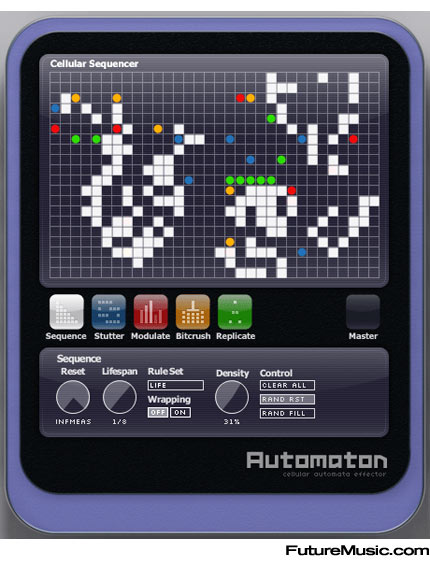
it's usually an otherwise lovely glitch-app with some retarded internal "RANDOMIZE" or "CHANCE" or "GAME OF LIFE" function that just juggles things about.
Now, what I still do like is the ability to get things done QUICKLY, and renoise certainly looks the business in that respect (even though I must admit my experience with trackers was in a previous millenium, so I can't really say much)
This is why I prefer having you know, a reverser button, a chopper slider where I can select the size of the chop, and why I prefer manipulating variable delay buffers with a lot of feedback for my scrambling - I can actually control it and play it and get, down to a relatively acceptable resolution, precisely what I intended to happen.
cheers,
A
mbp 2.66, osx 10.6.8, 8GB ram.
Re: Tell me your workflow for producing glitchy stuff!
Gotcha.

Still though, I don't think I'm jaded, but alot of the glitchy stuff I encounter through my penchant for netlabel output bores me after a short amount of listening, and mercifully I forget the tune quite quickly - but remember enough not to revisit it.
I still enjoy a good knees-up at a breakcore gig and I refuse to believe those breaks from the well-knowns & heros are the result of foraging through the rendered results of a (semi) aleatoric process. I could be wrong, but if so - then I doth my cap to those who pull it off with such authentic swagger & pizazz.
Still though, I don't think I'm jaded, but alot of the glitchy stuff I encounter through my penchant for netlabel output bores me after a short amount of listening, and mercifully I forget the tune quite quickly - but remember enough not to revisit it.
I still enjoy a good knees-up at a breakcore gig and I refuse to believe those breaks from the well-knowns & heros are the result of foraging through the rendered results of a (semi) aleatoric process. I could be wrong, but if so - then I doth my cap to those who pull it off with such authentic swagger & pizazz.
Pasha wrote:Thanks dum for being so precise.
Re: Tell me your workflow for producing glitchy stuff!
010011011101101
010101011010110
111010110101011
010110111101001
END OF LINE_
010101011010110
111010110101011
010110111101001
END OF LINE_
Re: Tell me your workflow for producing glitchy stuff!
I had no idea I would need a dictionary to follow this conversation. 
Ableton’s engineers are hard
at work developing code that will allow our software to predict the future, but we don’t
anticipate having this available until at least the next major release.
at work developing code that will allow our software to predict the future, but we don’t
anticipate having this available until at least the next major release.