Learn about building and using Max for Live devices.
-
S4racen
- Posts: 5987
- Joined: Fri Aug 24, 2007 4:08 pm
- Location: Dunstable
-
Contact:
Post
by S4racen » Tue Jul 05, 2011 10:32 am
I'll let the manual do the talking...
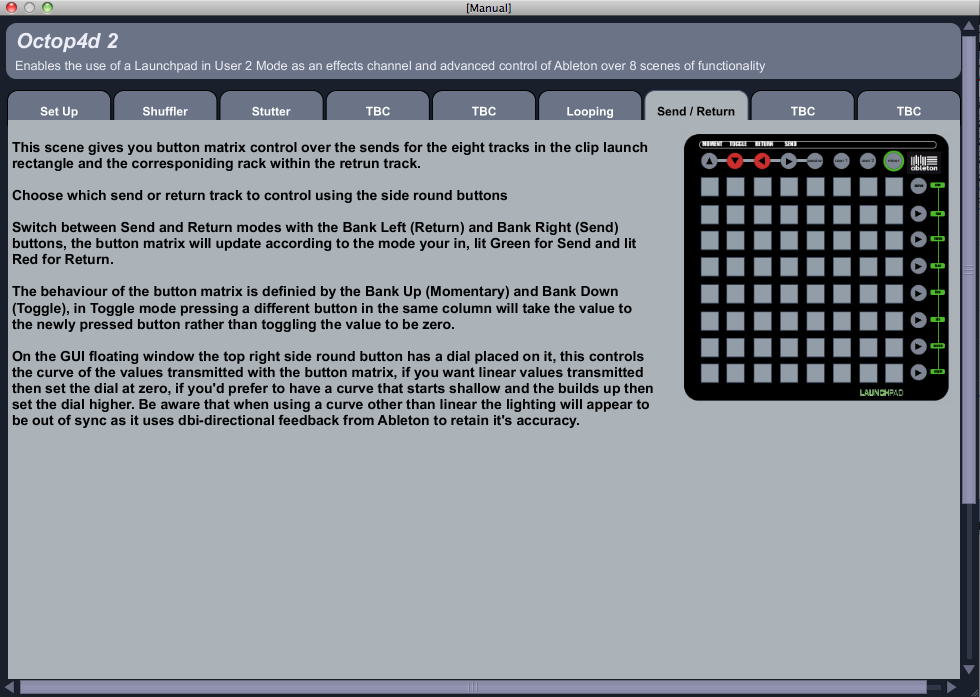
Uploading now....
Cheers
D
-
ytsek
- Posts: 196
- Joined: Tue Jul 26, 2005 3:22 pm
- Location: Rotterdam
-
Contact:
Post
by ytsek » Wed Jul 06, 2011 11:38 am
Can I get the manual without buying?
-
S4racen
- Posts: 5987
- Joined: Fri Aug 24, 2007 4:08 pm
- Location: Dunstable
-
Contact:
Post
by S4racen » Wed Jul 06, 2011 6:28 pm
It's part of the device, although the first three scenes are all detailed in the lite version that theres a link for within this thread at the start....
Any questions let me know....
Cheers
D
-
andreas_g
- Posts: 30
- Joined: Mon Nov 23, 2009 4:14 pm
Post
by andreas_g » Mon Jul 18, 2011 8:18 pm
have you changed something in 2.4? i have some problems with this patch (not displaying the settings as desribed in your manual etc)
is there a new docu (yes, i know, there's a build in manual.. i mean a complete docu.. ) do i need the reciever and the master?
-
S4racen
- Posts: 5987
- Joined: Fri Aug 24, 2007 4:08 pm
- Location: Dunstable
-
Contact:
Post
by S4racen » Thu Jul 21, 2011 7:51 am
Hi Andreas,
The manual in the device is the only one that's available so the device should be as described? I'm not sure what you mean by settings as theres relatively little to set?
There is only one device for Octop4d 2 currently, you maybe looking at the wrong manual....
Cheers
D
-
andreas_g
- Posts: 30
- Joined: Mon Nov 23, 2009 4:14 pm
Post
by andreas_g » Thu Jul 21, 2011 5:14 pm
do i need only the octop4d or do i need the reciever and the master max tools as decribed in your (older) pdf manual? sure, i have found the manual in the device

-
S4racen
- Posts: 5987
- Joined: Fri Aug 24, 2007 4:08 pm
- Location: Dunstable
-
Contact:
Post
by S4racen » Thu Jul 21, 2011 5:35 pm
Octop4d 2 is currently just the master device as it has only got the 4 scenes at the moment, Octop4d 1 needs the recover to do the step sequencer style scene...
Cheers
D
-
docprosper
- Posts: 1193
- Joined: Sat Apr 24, 2010 11:20 am
- Location: Fredericksburg, VA
Post
by docprosper » Fri Jul 22, 2011 11:01 am
Darren,
Finally got around to using this thing, and so far it seems more stable than the original. Where do you prefer to get comments - both bug reports & requests - as you continue to develop this? I thought you had a blog going on your site but couldn't find it. For now, some quick notes:
1) I still seem to get some crosstalk at times between user1 and user2; I have various things midi mapped to user1 and as times I think I get user2 effects when in user1. This seemed like a bit of an issue with Octop4d 1, and is much less frequent in the newer version but seems to still happen at times.
2) I miss the old effect of the "bank up" button in the Shuffl3r; it used to reset the screen and now enables a cue. I was thinking a good function for the Shuffl3r would be to retain this feature but allow a second button press to revert to the last setup; this way you could toggle quickly between fx on and off. I need to play more to figure out the best way to use the cue feature.
everyone else - don't let any of this dissuade you from trying this out. It's still the only Ableton/M4L device I've spent actual money on and I have no regrets!
-Hamish
Funk N. Furter wrote:Post properly.
Ableton Live Suite | M4L | Powerbook | Launchpad | APC40 | Faderfox | 2x1200 | Xone:96 | ...
--->
http://soundcloud.com/kilcraft
-
S4racen
- Posts: 5987
- Joined: Fri Aug 24, 2007 4:08 pm
- Location: Dunstable
-
Contact:
Post
by S4racen » Fri Jul 22, 2011 11:07 am
Hi Hamish,
Here is good for comments etc. i have nothing that i wouldn't want anyone knowing...
I'd love to narrow the crosstalk thing down, Octop4d uses no midi mappings and will only listen to button presses when in User 2 mode... if you can give some more details so i can reproduce it there maybe a gate that i haven't included or wired correctly that should stop this....
With the cue feature you can turn it on and reset the steps, albeit manually, without it effecting the audio as you do....
I can make an event happen if a button is pressed and held or a combination of buttons, perhaps press and hold user two and then bank up button at same time acts as a master reset for all scenes? This could work quite effectively....
What do you think??
Cheers
D
-
docprosper
- Posts: 1193
- Joined: Sat Apr 24, 2010 11:20 am
- Location: Fredericksburg, VA
Post
by docprosper » Fri Jul 22, 2011 5:56 pm
IMO, some sort of master reset would be nice - even a button combo - if for nothing more than a fallback in case something locks up. Another example: sometimes the tapestop effects seem to stick down. I'll try to re-create the crosstalk thing and get back to you with something that I can readily recreate.
-hamish
Funk N. Furter wrote:Post properly.
Ableton Live Suite | M4L | Powerbook | Launchpad | APC40 | Faderfox | 2x1200 | Xone:96 | ...
--->
http://soundcloud.com/kilcraft
-
S4racen
- Posts: 5987
- Joined: Fri Aug 24, 2007 4:08 pm
- Location: Dunstable
-
Contact:
Post
by S4racen » Fri Jul 22, 2011 6:06 pm
Cool, i'll have a look at the tapestop issue, its something i've managed to get rid of with the rewinds, it's all about timing...
And button combo for the master reset will be in the next release i think... seems like a cracking idea...
I've just been blown away by the guy in the Hadron device though, that may take me off on a distracting journey for a bit lol!
Cheers
D
-
docprosper
- Posts: 1193
- Joined: Sat Apr 24, 2010 11:20 am
- Location: Fredericksburg, VA
Post
by docprosper » Fri Jul 22, 2011 7:54 pm
Another question / request:
Right now the rightmost round buttons toggle sends into the octop4d, assuming it is in the proper return track. If these buttons also toggled sends for another (clean, no fx) return track in an inverted fashion simultaneously each track could be switched through your device without the audio stopping on the master. I have my main tracks set to "sends only" so that when I do use octop4d it is not overlaid with the clean version of the audio. Right now the rightmost buttons only toggle between audio with octop4d fx or no audio hence my problem.
Please note that I'm not well versed with return tracks so this may be something I can fix with a mod to my setup instead of your octop4d.
Hamish
Funk N. Furter wrote:Post properly.
Ableton Live Suite | M4L | Powerbook | Launchpad | APC40 | Faderfox | 2x1200 | Xone:96 | ...
--->
http://soundcloud.com/kilcraft
-
docprosper
- Posts: 1193
- Joined: Sat Apr 24, 2010 11:20 am
- Location: Fredericksburg, VA
Post
by docprosper » Sun Jul 24, 2011 11:00 am
A big thing lacking right now is a way to view the currently playing clip for a given track in session view. This is (for me) key when DJing, and was the only reason i was reaching for the mouse when testing out Octop4d 2 the other day. I know this is possible with the APC40 but not with Launchpad or Octop4d, unless I'm missing something. Unfortunately, I think your M4L code is limited to user 2 so I might be barking up the wrong tree on this one.
-Hamish
Funk N. Furter wrote:Post properly.
Ableton Live Suite | M4L | Powerbook | Launchpad | APC40 | Faderfox | 2x1200 | Xone:96 | ...
--->
http://soundcloud.com/kilcraft
-
S4racen
- Posts: 5987
- Joined: Fri Aug 24, 2007 4:08 pm
- Location: Dunstable
-
Contact:
Post
by S4racen » Sun Jul 24, 2011 11:22 am
docprosper wrote:Another question / request:
Right now the rightmost round buttons toggle sends into the octop4d, assuming it is in the proper return track. If these buttons also toggled sends for another (clean, no fx) return track in an inverted fashion simultaneously each track could be switched through your device without the audio stopping on the master. I have my main tracks set to "sends only" so that when I do use octop4d it is not overlaid with the clean version of the audio. Right now the rightmost buttons only toggle between audio with octop4d fx or no audio hence my problem.
Please note that I'm not well versed with return tracks so this may be something I can fix with a mod to my setup instead of your octop4d.
Hamish
Yeah thats something you'll need to code for yourself i'm afraid... but it doesn't seem necessary as Octop4d has an internal phase cancellation effect so anything you send to it isn't doubled in the usual way that happens when using return tracks...
Cheers
D
-
S4racen
- Posts: 5987
- Joined: Fri Aug 24, 2007 4:08 pm
- Location: Dunstable
-
Contact:
Post
by S4racen » Sun Jul 24, 2011 11:25 am
docprosper wrote:A big thing lacking right now is a way to view the currently playing clip for a given track in session view. This is (for me) key when DJing, and was the only reason i was reaching for the mouse when testing out Octop4d 2 the other day. I know this is possible with the APC40 but not with Launchpad or Octop4d, unless I'm missing something. Unfortunately, I think your M4L code is limited to user 2 so I might be barking up the wrong tree on this one.
-Hamish
Yes Octop4d is limited to using User 2, the way it works on the APC40 is that the cip/track button acts as a modifier, disabling the clip launch buttons and then jumping to the waveform based on the button pressed in conjunction...
The Launchpad doesn't have a modifier button that will allow this as as soon as you press any of the bank buttons or the mode buttons it switches the lights of the button matrix to a different view so it's really a physical limitation rather than a coding one in this case sadly....
Cheers
D