iPad

Discuss anything related to audio or music production.
beats me
Posts: 23319
Joined: Fri Mar 30, 2007 6:39 pm

Re: iPad

Post by beats me » Thu Oct 13, 2011 1:58 pm

starving student wrote:well while you guys are waiting lets talk about the macbook air a bit shall we :)
I wanna install leopard on mine and win xp as well as keep lion (tri boot). I guess
I've gotta use bootcamp for xp right but what about leopard how do I go about that, I've got the leopard disk from my old blackbook do I just insert and go or is there anything special I need to know, and should I do it before or after bootcamping xp if it matters?

I don't like what you're trying to do there. :x

And really at this point I think Apple should put one of those time expiration kill dates on running Windows on a Mac, maybe something like a year from install you'll get a message that says "We appreciate you might have been new to OSX when you purchased your Mac and needed a transition period. It's now been a year and if you still want to use Windows kill yourself, much like we will be doing to your Windows install right now."

:x

LoopStationZebra
Posts: 10586
Joined: Sat Jan 17, 2009 5:57 pm
Contact:

Re: iPad

Post by LoopStationZebra » Thu Oct 13, 2011 2:43 pm

stringtapper wrote:
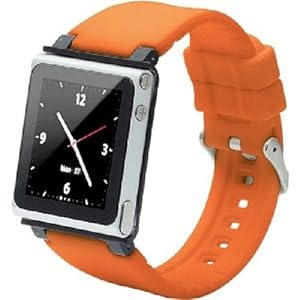
beats me wrote:Apple working in concert with international delivery carriers just put my carriage before the horse. I just received my iPod Nano watch band but my Nano hasn’t been delivered yet. :x
Which band did you get?

I sport this:

Image


Jebus that is a MANLY fucking watch band.

This is the one I just ordered:

Image


:x
I came for the :lol:
But stayed for the :x

steko
Posts: 3411
Joined: Thu Jan 22, 2009 8:29 pm

Re: iPad

Post by steko » Thu Oct 13, 2011 2:47 pm

starving student wrote:well while you guys are waiting lets talk about the macbook air a bit shall we :)
I wanna install leopard on mine and win xp as well as keep lion (tri boot). I guess
I've gotta use bootcamp for xp right but what about leopard how do I go about that, I've got the leopard disk from my old blackbook do I just insert and go or is there anything special I need to know, and should I do it before or after bootcamping xp if it matters?
Don't install a version of Mac OS X earlier than what came with your Mac

Special case would be the newest machines, which originally shipped with Snow Leopard & now come with Lion installed. These should be fine running Snow Leopard with the latest build of 10.6.8. But sure not Leopard (hardwarespecific drivers etc.)!
Rahad Jackson wrote:My Awesome Mix Tape #6

steko
Posts: 3411
Joined: Thu Jan 22, 2009 8:29 pm

Re: iPad

Post by steko » Thu Oct 13, 2011 2:52 pm

Hey Loops, you mong wanna get this: http://www.subtraction.com/2011/10/11/b ... jobs-issue :x
Rahad Jackson wrote:My Awesome Mix Tape #6

beats me
Posts: 23319
Joined: Fri Mar 30, 2007 6:39 pm

Re: iPad

Post by beats me » Thu Oct 13, 2011 3:35 pm

scutheotaku wrote:
beats me wrote:I'm now on hour 5 and counting of updating my iPad. The worst part of it is not being able to use my iPad for 5 hours (and counting) :x
Hour 5?

I guess I'm confused...I have DSL internet that PEAKS at 1.5 mbps (but is more often in the sub 1 range), and it only took me 2 1/2 hours to download it...while I was downloading, I backed up my iPad, and then once it was done downloading it only took about 1 to 1 1/2 hours to install, restore, and transfer back my music (around 7 or 8 gbs), 11gb of video, and 137 apps. Did you guys get in late (when I guess the server would be overloaded)? I started my download at about 1:30 PM EST.

I started about 5 PM PST. The download took about 3 or so hours. I went away for a couple hours and when I came back it was mostly done with the app restore. Keep in mind I have a 64G iPad with only about 2G of free space and almost no media. That’s a lot of apps. 8O

I’ll probably do my iPhone tonight when I go to bed.

With all the OSX updates, app updates, application updates, iOS 5 updates, and iCloud syncing on multiple computers I have to do this week I might for the first time ever buy some kind of book about the features of the current state of OSX/iOS because there’s just too much going on in there right now. :x

My main computer is still running Snow Leopard and my main hesitation with upgrading to Lion was potential issues with music software, but given the rare time I work on music or get anything done, fuck it, I’m going to upgrade it to Lion. I’ve already run into an application in the App Store I couldn’t purchase because my main computer isn’t running Lion and I think I’m going to run into more situations where I’m going to run into compatibility issues because one computer in my personal 4 Mac and 3 idevice ecosystem is running Snow Leopard. :x

Khazul
Posts: 3185
Joined: Wed Feb 23, 2005 5:19 pm
Location: Reading, UK

Re: iPad

Post by Khazul » Thu Oct 13, 2011 4:15 pm

Took my iPad about 6 hours to download and update. iPhone took about 15 minutes after the iPad was done - guess half the damn planet must have been updating as well...

Now got 400gigs of shit to reinstall on my MBP - Urrrrgh!!!!!

Then the other bit fo fun and games, after installng Lion - it wouldnt let me install any Mac app sore puchases as it bthought they were all already installed - turned out the damn thing had found the app either in my old time machine drive or the still connected clone drive. Was fine after unmounted them both after an hour of sifting round the net to figure WTF was wrong with the app store - grrr!
Last edited by Khazul on Thu Oct 13, 2011 4:21 pm, edited 1 time in total.
Nothing to see here - move along!

beats me
Posts: 23319
Joined: Fri Mar 30, 2007 6:39 pm

Re: iPad

Post by beats me » Thu Oct 13, 2011 5:40 pm

I saw Apple recently added the “purchased” button to the App Store app on the iPad. Within there you can see which apps you purchased that aren’t installed. My count of apps that aren’t installed is 209. 8O

I seriously need to find a support group for uncontrollable app purchases, but just like with any support group I’d most likely pair up with another abuser, quit going to the group and instead together we’d go further down the spiral of irresponsible app purchases. :x

starving student
Posts: 7129
Joined: Thu Dec 09, 2004 6:13 pm
Location: right here

Re: iPad

Post by starving student » Thu Oct 13, 2011 6:58 pm

steko wrote:
starving student wrote:well while you guys are waiting lets talk about the macbook air a bit shall we :)
I wanna install leopard on mine and win xp as well as keep lion (tri boot). I guess
I've gotta use bootcamp for xp right but what about leopard how do I go about that, I've got the leopard disk from my old blackbook do I just insert and go or is there anything special I need to know, and should I do it before or after bootcamping xp if it matters?
Don't install a version of Mac OS X earlier than what came with your Mac

Special case would be the newest machines, which originally shipped with Snow Leopard & now come with Lion installed. These should be fine running Snow Leopard with the latest build of 10.6.8. But sure not Leopard (hardwarespecific drivers etc.)!
I wouldn't have to if there weren't these mysterious midi problems, I need to run Aurex apps for the launchpad and lion which my macbook air came with is not the business. I never had snow leopard, I only had leopard before hence the reason for wanting to tri-boot
got allot of windows only apps that are useful as well.

beats me
Posts: 23319
Joined: Fri Mar 30, 2007 6:39 pm

Re: iPad

Post by beats me » Thu Oct 13, 2011 8:03 pm

LoopStationZebra wrote:
stringtapper wrote:
beats me wrote:Apple working in concert with international delivery carriers just put my carriage before the horse. I just received my iPod Nano watch band but my Nano hasn’t been delivered yet. :x
Which band did you get?

I sport this:

Image


Jebus that is a MANLY fucking watch band.

This is the one I just ordered:

Image


:x

I'm considering this watch band now.


Image


:x

Khazul
Posts: 3185
Joined: Wed Feb 23, 2005 5:19 pm
Location: Reading, UK

Re: iPad

Post by Khazul » Thu Oct 13, 2011 10:00 pm

scutheotaku wrote:Has anybody tried this out?:
http://www.seagate.com/goflexsatellite/

Could be very useful for long trips...

"Anytime. Anywhere..." yeh except on a plane - dont think they be too happy about you running your own little wifi network :)

Still - other than that - good a way as any to get a hard drive working with an iPad.
Nothing to see here - move along!

Khazul
Posts: 3185
Joined: Wed Feb 23, 2005 5:19 pm
Location: Reading, UK

Re: iPad

Post by Khazul » Thu Oct 13, 2011 10:03 pm

beats me wrote:Image


:x
Hmm - thats actually quite decent looking!

The fundamental problem with these things is that if im out and got a watch on, then Ive probably got my iphone with me anyway, so dont need an ipod. So until they cram a phone in them - not game for one.
Nothing to see here - move along!

Tarekith
Posts: 19140
Joined: Fri Jan 07, 2005 11:46 pm
Contact:

Re: iPad

Post by Tarekith » Thu Oct 13, 2011 10:13 pm

Yeah, but if it had a phone in it, you'd look like Inspector Gadget everytime you took a call. :)

So far iOS5 has been working great here on both my devices. My only complaint is that you can't put Newstand in a folder, what kind of crap is that?

stringtapper
Posts: 6321
Joined: Sat Aug 28, 2004 6:21 pm

Re: iPad

Post by stringtapper » Thu Oct 13, 2011 11:22 pm

Tarekith wrote:My only complaint is that you can't put Newstand in a folder, what kind of crap is that?
Noticed that too, WTF? :x


Something I just figured out with iOS 5:

On an iPhone's home screen put your finger on the time and pull down. Awesome! :x
Unsound Designer

steko
Posts: 3411
Joined: Thu Jan 22, 2009 8:29 pm

Re: iPad

Post by steko » Thu Oct 13, 2011 11:57 pm

Rahad Jackson wrote:My Awesome Mix Tape #6

steko
Posts: 3411
Joined: Thu Jan 22, 2009 8:29 pm

Re: iPad

Post by steko » Fri Oct 14, 2011 12:02 am

starving student wrote:
steko wrote:
starving student wrote:well while you guys are waiting lets talk about the macbook air a bit shall we :)
I wanna install leopard on mine and win xp as well as keep lion (tri boot). I guess
I've gotta use bootcamp for xp right but what about leopard how do I go about that, I've got the leopard disk from my old blackbook do I just insert and go or is there anything special I need to know, and should I do it before or after bootcamping xp if it matters?
Don't install a version of Mac OS X earlier than what came with your Mac

Special case would be the newest machines, which originally shipped with Snow Leopard & now come with Lion installed. These should be fine running Snow Leopard with the latest build of 10.6.8. But sure not Leopard (hardwarespecific drivers etc.)!
I wouldn't have to if there weren't these mysterious midi problems, I need to run Aurex apps for the launchpad and lion which my macbook air came with is not the business. I never had snow leopard, I only had leopard before hence the reason for wanting to tri-boot
got allot of windows only apps that are useful as well.
http://support.apple.com/kb/HT4818#3

https://discussions.apple.com/thread/3176433?start=0
Rahad Jackson wrote:My Awesome Mix Tape #6

Post Reply