Re: Note Mode for the APC40 - Python Scripts
Posted: Wed May 26, 2010 3:23 pm
it's probably got something to do with inappropriately using multiple ifs?
flippo wrote:rightio.
Python (and coding) noob here.
I'm trying to achieve a note grid that uses the full 8 columns, as apposed to two groups of 4.
like so
36 37 38 39 40 41 42 43
44 45 46 47 48 49 50 51
52 53 54 55 56 57 58 59
60 61 62 63 64 65 66 67
68 69 70 71 72 73 74 75
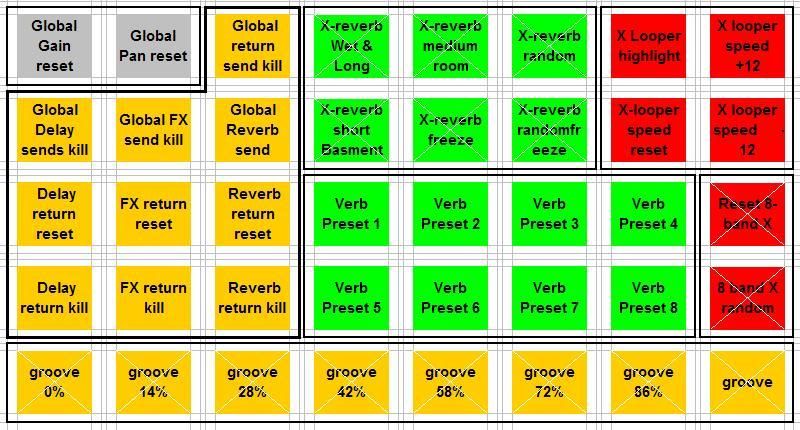
and, I also want the lights to look like this (the ones with white bars over them are flashing)
with my rudimentary coding skills I had a go and this is what I came up with. However, when I use this Live fails to connect with the APC40 at all.
I assumed, rightly or wrongly, from looking at the existing code that the top-most scene and the left-most track = 0, not 1?Code: Select all
    def _on_note_mode_changed(self):
        if not self._master_button != None:
            raise AssertionError
        if self.is_enabled() and self._invert_assignment == self._toggle_pressed:
            if self._note_mode_active:
                self._master_button.turn_on()
                for scene_index in range(5):
                    #TODO: re-map scene_launch buttons to note velocity...
                    scene = self._session.scene(scene_index)
                    for track_index in range(8):
                        clip_slot = scene.clip_slot(track_index)
                        button = self._matrix.get_button(track_index, scene_index)
                        clip_slot.set_launch_button(None)
                        button.set_enabled(False)
                        button.set_channel(9) #remap all Note Mode notes to channel 10
                        if track_index < 8:
                            button.set_identifier(36 + (8 * scene_index)  + track_index))
                            if (scene_index == 4):
                                button.send_value(6)
                            if ((scene_index < 4) and (scene_index > 0)) and (track_index < 3):
                                button.send_value(5)
                            if (scene_index ==  0 and track_index == 2):
                                button.send_value(5)
                            if (scene_index < 1) and ((track_index == 3) or (track_index == 4) or (track_index == 5)):
                                button.send_value(2)
                            if (scene_index > 1 and scene_index < 4) and (track_index > 3 and track_index < 7):
                                button.send_value(1)
                            if (scene_index > 1 and track_index < 2):
                                button.send_value(3)
                            if (scene_index == 2 or scene_index == 3) and (track_index == 7):
                                button.send_value(4)
                            else:
                                button.send_value(0)
                self._rebuild_callback()
            else:
                self._master_button.turn_off()
        return None
I'm sure I've done some very basic coding error. I will do some more reading on python, but I thought in the meantime someone might be able to shortcut me

Code: Select all
                    for track_index in range(8):
                        clip_slot = scene.clip_slot(track_index)
                        button = self._matrix.get_button(track_index, scene_index)
                        clip_slot.set_launch_button(None)
                        button.set_enabled(False)
                        button.set_channel(9) #remap all Note Mode notes to channel 10
                        button.set_identifier(36 + (8 * scene_index) + track_index)
                        if (scene_index == 4):
                            button.send_value(6)
                        elif (scene_index > 0) and (track_index < 3) or (scene_index ==  0 and track_index == 2):
                            button.send_value(5)
                        elif (scene_index < 2) and ((track_index == 3) or (track_index == 4) or (track_index == 5)):
                            button.send_value(2)
                        elif (scene_index > 1) and (track_index > 2 and track_index < 7):
                            button.send_value(1)
                        elif (scene_index < 2 and track_index > 5):
                            button.send_value(3)
                        elif (scene_index == 2 or scene_index == 3) and (track_index == 7):
                            button.send_value(4)
                        else:
button.send_value(0)  (I thought there would be some bad maths, I was half asleep
  )
)
Hi eka,ekalavyadas wrote:Hanz, this looks exciting.
Will this work on Mac?
Any advise to get these to work in 8.0.9? Once selected in the midi pref the apc stays darkHanz_Petrov wrote:Hi eka,ekalavyadas wrote:Hanz, this looks exciting.
Will this work on Mac?
Yes, it's platform independent. If you can run Live 8, then you can use these scripts.
Best,
Hanz

cheers Hanz. Yes you are right about the note mode. What i intend to do is, for example with the bottom row, is to have a rack of midi effects that send notes back to the APC (original notes) in set patterns, and then use a chain selector on said rack to remote control the light feedback simultaneously to the parameter that they represent. The idea of having the master button send out a note is to toggle on/off all those LED feedback message racks in sync with toggling the note mode itself. I do something similar with my padkontrol, only using blinking speeds and patterns to represent different states instead of colours.Hanz_Petrov wrote: @flippo: Based on your observations, I had a quick look at MIDI feedback in Note Mode. It would seem that feedback sort of works, but maps back to the original note and channel values for the various buttons, and not to the translated Note Mode values, as I suspected. So, for example, if you use the Note Mode grid to send out note 52 on channel 10, then bounce it back to the APC on channel 1, it will light up the first button of the first row (since note 52 channel 1 is the default value for this button). Not sure if the real APC20 Note Mode is any different. On the other hand, it should be possible to add code which translates incoming Note Mode notes to light up the corresponding LEDs, but this would be a lot of work. It would also be possible to have the Master button send out a MIDI note on each press, if that’s what you want, but it might be easier to forward the default note for this button, since it’s already sending out a note on each press.
Just had a look; unfortunately, these scripts only work with 8.1 and higher, due to subtle changes made to the Live API between ver 8.0 and 8.1. Sorry if I caused any confusion.Markemark wrote: Any advise to get these to work in 8.0.9? Once selected in the midi pref the apc stays dark :cry:
I'll try to take a look at options for implementing some kind of feedback - or alternatively, a way of forwarding the Master button's MIDI messages (since they are currently getting swallowed...), when I get a chance.flippo wrote: As for the 'but it might be easier to forward the default note for this button, since it’s already sending out a note on each press' - did not think that was thew case? When looking through midi-ox, it seems to prompt the device control knobs to send out an update of their CC values for channel 9, rather than actually sending out its own note. As these values are constantly different I cant use bomes to trigger a note