Page 4 of 5
Posted: Sun Dec 30, 2007 3:07 pm
by Namihei
musicmachine wrote:Ahh that explains why i can't find it;i have a remote zero so i take it's the same button to the left?
there isn't shift button on the zero SL.but there is a similar function.
what do you want to do?
Posted: Sun Dec 30, 2007 11:30 pm
by musicmachine
Namihei wrote:musicmachine wrote:Ahh that explains why i can't find it;i have a remote zero so i take it's the same button to the left?
there isn't shift button on the zero SL.but there is a similar function.
what do you want to do?
Is it #?
I want to try it out with plugins,see how well it works,let you know if there are any bugs.

Posted: Mon Dec 31, 2007 12:26 am
by Namihei
musicmachine wrote:
Is it #?
I want to try it out with plugins,see how well it works,let you know if there are any bugs.
"#"+ select = plugin select
1.select a track
2.press "plugins" button
3."#" turn on
4.select a plugin
now you can control plugin parameters.
Posted: Mon Dec 31, 2007 5:20 am
by Namihei
compact 0.2 release(currently mac only)
-added
time display
control key
-changed
B2 > button group mute
shift+B2 > button group solo
shift+channel button > V-select(plugin select) in any button groups (exclude B4)
preset does not change
windows version will be available within few days.
Posted: Mon Dec 31, 2007 6:54 am
by OriginalSpaceMan
Very cool... I'm excited to see the changes. I have the current windows compactMCESL version running and noticed a few things. 1) The reaction in Live to the controller is jittery. Is this normal? 2) Sometimes the display on the SL does not update properly and I have to switch screens and switch back a couple of times for it to work.
MIDI Ports: ON and OFF ?
Posted: Sun Jan 13, 2008 5:55 am
by transology
Hi,
I'm so please to see that post !! I'm owning an Sl for about 6 months and a MCU for about 4 years
So I can compare. But before, I need a confirmation about my MIDI ports ON/OFF. I'm getting weird reaction, like if some buttons was always getting pushed in again and again

Here my midi preferences
http://i182.photobucket.com/albums/x222 ... bleton.gif
What means mode reprise ?
Plus, does it matter if it put the sysex in the template 36 or 40 ?
Thanks
Pascal
Posted: Sun Jan 13, 2008 7:50 am
by transology
OK, 4 hours later .. I've just update to the ReMOTE SL Installer 4.1 -> 4.1.09 firmware.
Waiting for MIDI port settings
The fader in Live updates really faster. It's
real realtime
Thanks
Pascal
Posted: Sun Jan 13, 2008 10:12 am
by TequilaKez
Whipped up a printable template to stick to my SL coz I keep forgetting what's what. Print with scaling off and have a sharp raozr and a board handy.
http://rapidshare.com/files/83422193/MC ... e.pdf.html
Posted: Sun Jan 13, 2008 5:01 pm
by transology
Hey guys, can you confirm my MIDI ports setup please. What's ON/OFF ?

I'll take a look of your print when my SL it will work perfectly.
Thanks
Posted: Sun Jan 13, 2008 7:32 pm
by anti-banausic
Namihei,
Do you still host the preset files for the MCE and the BCR2000? Do you know from where I could download them. Sorry to hijack.
AB
Posted: Tue Jan 15, 2008 1:57 am
by TequilaKez
transology, if you're using Namihei's MCESL, you shouldm't have the 'Remote SL' port's setup. Just use the first one.
Posted: Tue Jan 15, 2008 2:11 am
by thelike5
Namihel,
Do you accept paypal donations?
Keep up the good work.
Posted: Tue Jan 15, 2008 7:52 pm
by Namihei
thelike5 wrote:Namihel,
Do you accept paypal donations?
Keep up the good work.
thank you.
I don't have the paypal account though I don't have the reason to refuse your donation.
If you sent to me any message ,I will be glad.
Posted: Fri Feb 08, 2008 8:55 pm
by jr
Am i've something wrong?
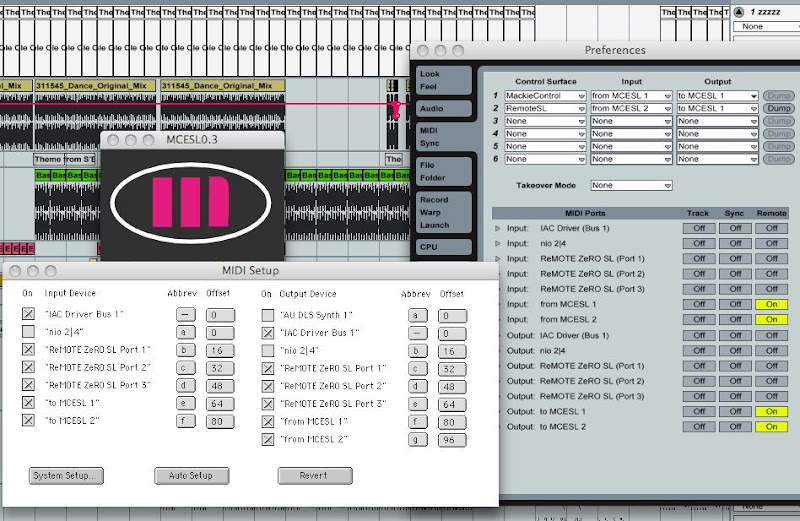
It's out of control when i choose mackiecontrol output to MCESL1. It'll jump to arrange view from session view automatic, and can't back to session view. If i set mackiecontrol output to "none", it's seem to be work, but the led only display "MCESL 0. ***WAIT***". When i start to play, the tempo will jump to 16260
Posted: Sat Feb 09, 2008 9:29 am
by jr
I'm using MBP MA611 C2D 2.33, OS10.5.1, Live 6.10. Is it incompatible with MacOS 10.5.1?