This makes an expensive piece of kit much more value for money than the default script.
I am still learning Ableton and the controller but already can see it is worth it's weight in gold.
Well done!


Please let me know how you get on - You are nearly there!!To set the mode on a Behringer X-Touch controller, turn off the device, then press and hold the "Select" button on channel 1 while powering it back on; use the rotary encoder on channel 1 to choose the desired mode (like Mackie Control or HUI) and then release the "Select" button to confirm the change.

Fun fact: some time ago I experimented with flipping between colors as quickly as possible – I was hoping to expand the limited palette (black, red, green, blue, cyan, magenta, yellow and white) by "mixing" colors using persistence of vision. You know, flip between red and white to create pink etcetera. Unfortunately, it's just not possible to send the SysEx commands quickly enough, so it just looked like flickering. Oh well.RobrechtV wrote: ↑Fri Jan 24, 2025 8:16 pmBy the way, I've added a fifth page to Track mode. The first four pages already existed in the Mackie Control script: they allow you to set each track's input and output type and channel using the rotary knobs. Press the Track button one more time and you enter the new color mode: each track's scribble strip displays the name of the current color and you can use the rotary knob to change it.
 I still think the eight colors really help to identify tracks at a glance, especially if you make sure not to use shades of the same color in a row.
GREAT! I didn't know that.RobrechtV wrote: ↑Fri Jan 24, 2025 8:16 pm
By the way, I've added a fifth page to Track mode. The first four pages already existed in the Mackie Control script: they allow you to set each track's input and output type and channel using the rotary knobs. Press the Track button one more time and you enter the new color mode: each track's scribble strip displays the name of the current color and you can use the rotary knob to change it.

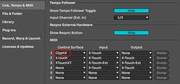
jellybelly57 wrote: ↑Fri Feb 28, 2025 7:31 pmYour X-Touch needs to be set to Mackie Control (MC) mode and the Ableton midi control surface to the updated X-Touch scripts. This is mine but please ignore the highlighted entry.
Here is how to change the X-Touch Mode:To set the mode on a Behringer X-Touch controller, turn off the device, then press and hold the "Select" button on channel 1 while powering it back on; use the rotary encoder on channel 1 to choose the desired mode (like Mackie Control or HUI) and then release the "Select" button to confirm the change.
Yes, mine does this. Basically I suspect Ableton is polling the X-Touch and providing real time feedback so that the X-Touch indicators and time displays are always correct. This is common in other sorts of communication between 2 devices.I've been noticing a curious behavior and wondering if anyone else has seen this. When selecting this XTOUCH profile in the midi devices, the MIDI out signal indicator in Ableton (blue) is flashing rapidly and continuously regardless of what's happening in the daw or on the device - the MIDI in indicator (yellow) is behaving normally.
(And yes, it's surprisingly useful even with the limited color palette, isn't it?)