Page 4 of 16
Re: Remote Script for Behringer X-Touch
Posted: Sun Feb 23, 2025 11:10 pm
by jellybelly57
Thanks to all that have contributed and provided updated scripts for the Behringer X-Touch/Ableton integration.
This makes an expensive piece of kit much more value for money than the default script.
I am still learning Ableton and the controller but already can see it is worth it's weight in gold.
Well done!

Re: Remote Script for Behringer X-Touch
Posted: Thu Feb 27, 2025 9:21 am
by shpongled
Hugely appreciate responses from @RobrechtV and @StefanL but I still can't get a response from my X Touch in anything other than Mackie Control mode.
I have flipped the X Touch to "HUI" and "usb".
The python remote scripts are exactly where you suggest current user\documents\Ableton\user library\remote scripts\XTouch.
And Live options are set as Behringer-x-touch-for-ableton-main checked track/sync/remote both input and output.
X Touch just entirely blank.
Can anybody see what is wrong here?
Live updated to 12.1.10 - no difference to this issue.
Thanks again to both.
Re: Remote Script for Behringer X-Touch
Posted: Thu Feb 27, 2025 7:50 pm
by jellybelly57
Dear shpongled.
I'm no expert but the updated X-Touch scripts need to be here: C:\ProgramData\Ableton\Live 12 Standard\Resources\MIDI Remote Scripts or wherever your Ableton application resides. Here you will find a whole list of compatible controllers including the default Mackie scripts.
Hope this works for you

Re: Remote Script for Behringer X-Touch
Posted: Thu Feb 27, 2025 8:05 pm
by jellybelly57
Hello All
I have an X-Touch and Ableton and have updated to the coloured scribble scripts which are great! I would like to use a footswitch with the X-Touch to be able to Start/Stop Recording whilst holding a guitar etc. The X-Touch has 2 sockets for a footswitch but they don't appear to do anything. I managed to map the footswitch via the Ableton edit Midi map but this has to be done per project and would be a pain if you have several things mapped.
I was wondering if our clever friends out there could include this in the next script?
Meanwhile I have managed to achieve a workaround by using ClyphX and a lot of trial and error. If anyone wants any further info on what I did, please let me know.
Re: Remote Script for Behringer X-Touch
Posted: Fri Feb 28, 2025 9:25 am
by shpongled
Hi.
and thanks for your reply @Jellybelly57
That's a rather different path to where the XTouch scripts currently reside - I initially followed the path in this -
https://help.ableton.com/hc/en-us/artic ... ace-script. But that didn't work.
And then another copy in documents\Ableton\user library\remote scripts\ as per advice here.
Looks like neither are being referenced (but the latter has "Behringer-X-Touch-for-ableton-main" scripts in there)
So I now copied to "C:\ProgramData\Ableton\Live 12 Suite\Resources\MIDI Remote Scripts" and as you say behold the other midi scripts for other gear.
So I got optimistic and copied both XTouch and Behringer-X-Touch-for-ableton-main folders to that location and restarted. Still nothing

I am correct setting the XTouch firmware to HUI and USB?
I am going to get this going - it sounds like its well worth it!
Re: Remote Script for Behringer X-Touch
Posted: Fri Feb 28, 2025 7:31 pm
by jellybelly57
Hello shpongled.
Your X-Touch needs to be set to Mackie Control (MC) mode and the Ableton midi control surface to the updated X-Touch scripts. This is mine but please ignore the highlighted entry.
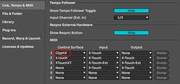
Here is how to change the X-Touch Mode:
To set the mode on a Behringer X-Touch controller, turn off the device, then press and hold the "Select" button on channel 1 while powering it back on; use the rotary encoder on channel 1 to choose the desired mode (like Mackie Control or HUI) and then release the "Select" button to confirm the change.
Please let me know how you get on - You are nearly there!!

Re: Remote Script for Behringer X-Touch
Posted: Sat Mar 01, 2025 6:16 am
by shpongled
You my friend are a star! Yep that was it.
I knew how to switch between modes and had tried both HUI and MC but at that time my scripts weren't in the correct place - obviously they are now and at the path you specified.
I somehow convinced myself that the scripts weren't using Mackie mode - hopelessly wrong there! In my defence I was feeling pretty rough with strep throat and normally my approach is a lot more engineer-like. But I just wasn't thinking straight....
VERY grateful for your help - you are a credit to the forum .
I will now dig in and take better advantage of the XTouch which has already been a really useful tool - about to get better.
Thanks again.,
Re: Remote Script for Behringer X-Touch
Posted: Sat Mar 01, 2025 2:30 pm
by RobrechtV
Hurray! Glad you got it working, thanks to jellybelly57! And yes, for use in Live, the Xtouch was meant to simply piggyback on the Mackie Control scripts, and the updated scrips are still based on that.
Anyone tried this yet? Press Track five times to reach a new mode where the rotary knobs set the color for each track!
RobrechtV wrote: ↑Fri Jan 24, 2025 8:16 pm
By the way, I've added a fifth page to Track mode. The first four pages already existed in the Mackie Control script: they allow you to set each track's input and output type and channel using the rotary knobs. Press the Track button one more time and you enter the new color mode: each track's scribble strip displays the name of the current color and you can use the rotary knob to change it.
Fun fact: some time ago I experimented with flipping between colors as quickly as possible – I was hoping to expand the limited palette (black, red, green, blue, cyan, magenta, yellow and white) by "mixing" colors using persistence of vision. You know, flip between red and white to create pink etcetera. Unfortunately, it's just not possible to send the SysEx commands quickly enough, so it just looked like flickering. Oh well.

I still think the eight colors really help to identify tracks at a glance, especially if you make sure not to use shades of the same color in a row.
Re: Remote Script for Behringer X-Touch
Posted: Sat Mar 01, 2025 7:58 pm
by jellybelly57
RobrechtV wrote: ↑Fri Jan 24, 2025 8:16 pm
By the way, I've added a fifth page to Track mode. The first four pages already existed in the Mackie Control script: they allow you to set each track's input and output type and channel using the rotary knobs. Press the Track button one more time and you enter the new color mode: each track's scribble strip displays the name of the current color and you can use the rotary knob to change it.
GREAT! I didn't know that.

Re: Remote Script for Behringer X-Touch
Posted: Tue Mar 04, 2025 6:28 pm
by Kik07L
hello everyone !
If u want to help making this project better & add features, you can discuss with the main dev here or try pushing your edits on the github project :
https://github.com/Kik07L/Behringer-X-Touch-for-ableton for the github users.
have a greate day !
Re: Remote Script for Behringer X-Touch
Posted: Sat Mar 08, 2025 11:19 pm
by astridsumpter
I have a X-Touch One and I'm getting no response from it at all. It turns on and that's all. I did install the scripts but so far nothing. Any ideas?
Re: Remote Script for Behringer X-Touch
Posted: Sun Mar 09, 2025 9:12 am
by RobrechtV
Is your X-Touch in MC mode and did you set the remote script correctly in the settings?
jellybelly57 wrote: ↑Fri Feb 28, 2025 7:31 pm
Your X-Touch needs to be set to Mackie Control (MC) mode and the Ableton midi control surface to the updated X-Touch scripts. This is mine but please ignore the highlighted entry.
Here is how to change the X-Touch Mode:
To set the mode on a Behringer X-Touch controller, turn off the device, then press and hold the "Select" button on channel 1 while powering it back on; use the rotary encoder on channel 1 to choose the desired mode (like Mackie Control or HUI) and then release the "Select" button to confirm the change.
Re: Remote Script for Behringer X-Touch
Posted: Fri Mar 14, 2025 2:28 am
by Badpixel
AMAZING work. Thanks so much for this. Been using an older version of this profile for some time. Just recently upgraded my setup and had to re-install everything. .. The addition of the coloured strips is something I thought would be minor but from a workflow standpoint it's such a massive improvement!
I've been noticing a curious behavior and wondering if anyone else has seen this. When selecting this XTOUCH profile in the midi devices, the MIDI out signal indicator in Ableton (blue) is flashing rapidly and continuously regardless of what's happening in the daw or on the device - the MIDI in indicator (yellow) is behaving normally. When the MC profile is selected the flashing stops and both in and out signal indicators appear to behave normally. I'm probably missing something and the behavior doesn't appear to currently be affecting anything but any help would be appreciated.
Thanks!
Re: Remote Script for Behringer X-Touch
Posted: Fri Mar 14, 2025 8:27 am
by jellybelly57
I've been noticing a curious behavior and wondering if anyone else has seen this. When selecting this XTOUCH profile in the midi devices, the MIDI out signal indicator in Ableton (blue) is flashing rapidly and continuously regardless of what's happening in the daw or on the device - the MIDI in indicator (yellow) is behaving normally.
Yes, mine does this. Basically I suspect Ableton is polling the X-Touch and providing real time feedback so that the X-Touch indicators and time displays are always correct. This is common in other sorts of communication between 2 devices.
Re: Remote Script for Behringer X-Touch
Posted: Fri Mar 14, 2025 1:52 pm
by RobrechtV
Huh, so the normal MC script doesn't show those continuous MIDI messages? I'll see if I can find a reason for that in the X-Touch script.
Badpixel wrote: ↑Fri Mar 14, 2025 2:28 am
The addition of the coloured strips is something I thought would be minor but from a workflow standpoint it's such a massive improvement!
(And yes, it's surprisingly useful even with the limited color palette, isn't it?)