Page 5 of 9

Re: Ableton 9.1 Dual Monitor Support + more

Posted: Thu Sep 05, 2013 5:16 pm
by 102455
mholloway wrote:as for your assertion that 'bitwig is around the corner...' Right. Right.

It's a VERY BIG corner!

Re: Ableton 9.1 Dual Monitor Support + more

Posted: Thu Sep 05, 2013 5:53 pm
by Timbeaux
maybe a round corner

Re: Ableton 9.1 Dual Monitor Support + more

Posted: Thu Sep 05, 2013 7:19 pm
by TheCoil
H20nly wrote:
petit nuage wrote:i dont bought live 9 until PDC/timing is not here ...
102455 wrote:Re PDC, see the comments here.
I see no mention of PDC in that link, am I just not seeing it?

Re: Ableton 9.1 Dual Monitor Support + more

Posted: Thu Sep 05, 2013 7:43 pm
by Evengy
TheCoil wrote:
H20nly wrote:
petit nuage wrote:i dont bought live 9 until PDC/timing is not here ...
102455 wrote:Re PDC, see the comments here.
I see no mention of PDC in that link, am I just not seeing it?
read the comments ;)

Re: Ableton 9.1 Dual Monitor Support + more

Posted: Thu Sep 05, 2013 8:44 pm
by H20nly
102455 wrote:
mholloway wrote:as for your assertion that 'bitwig is around the corner...' Right. Right.

It's a VERY BIG corner!
the corner at the intersection of Milky Way and Andromeda.

Re: Ableton 9.1 Dual Monitor Support + more

Posted: Thu Sep 05, 2013 8:59 pm
by Hermanus
now joke mode off.
Seriously I think it's good to see a bit of competition. it doesn't go further from me.

I'm glad to see bitwig being polished but I'm not amongst those who can't wait for it.
We'll see when it will be out there... maybe at the end of 2013 or 2014 or ?

as a user, I'm even glader that ableton staff is working hard to make live 9 better.

for the "who gonna win?" it was simply a silly joke.
not a good one ok so don't take it too seriously

cheers everyone :wink:

Re: Ableton 9.1 Dual Monitor Support + more

Posted: Sat Sep 07, 2013 5:12 am
by thewednesdayexperiment
so when is 9.1 going to be released? Is it this year?????

Re: Ableton 9.1 Dual Monitor Support + more

Posted: Sat Sep 07, 2013 7:33 am
by yur2die4
Come back on April 1st. There will be a dress like a ninja turtle theme and refreshments.

Don't be the one that shows up wearing the wrong costume...

Re: Ableton 9.1 Dual Monitor Support + more

Posted: Sat Sep 07, 2013 10:26 am
by Cowlash
thewednesdayexperiment wrote:so when is 9.1 going to be released? Is it this year?????
Great first post. :roll:

Re: Ableton 9.1 Dual Monitor Support + more

Posted: Sat Sep 07, 2013 1:07 pm
by sporkles
Finally! :)

I think I might need to invest in a new computer, so that I can have three monitors, out of which one will be my Wacom Cintiq; then I can get all the benefits of the update AND keep using one monitor for VST GUIs. I forget what the current status is on Live and tablet pens, though - still a mess?

As for the improved render quality - I wish they would add multiple track rendering while they're at it (e.g. "render selected tracks individually").

But the window split alone is going to be great. Constantly having to flip back and forth between views has always been a speed bump.

Re: Ableton 9.1 Dual Monitor Support + more

Posted: Sat Sep 07, 2013 2:16 pm
by loydb
As a long-time bitcher about single monitor, let me say a heap of "thanks" with a sprinkling of "about freaking time".

Add retina support so I can actually *see* the damn thing and we're perfect!

Re: Ableton 9.1 Dual Monitor Support + more

Posted: Sat Sep 07, 2013 2:51 pm
by Angstrom
I can only hope they fix the browser to go on this multimonitor, otherwise I'm just going to be rage smashing two screens rather than one. And yeah, if you can tolerate the browser lucky you. I tried L9 again last night and spent over an hour slowly building up to a rage quit. I have never experienced that in any other version of Live.

I'd sacrifice multimonitor in a heartbeat for a non-shit browser. The note snapping is at least laughable when it tries to put my notes wherever it wants to, but there's nothing funny about that browser. It hates music making.

Re: Ableton 9.1 Dual Monitor Support + more

Posted: Sat Sep 07, 2013 3:48 pm
by 102455
Angstrom wrote:I'd sacrifice multimonitor in a heartbeat for a non-shit browser.
+1 for a constipated browser.

:wink:

Re: Ableton 9.1 Dual Monitor Support + more

Posted: Sat Sep 07, 2013 3:56 pm
by mr.ergonomics
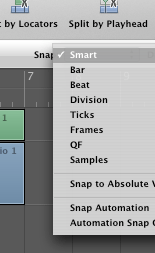
Angstrom, I did not like smart snap too much at the beginning. I was for an option, I had to change my workflow completely because of it. But I can say I have adapted and I'm as fast as before. I have found workarounds for all my problems. When I want the note to snap to the grid I just move the note one grid line left/right to get snapping back for example.

May I ask what your current annoyance with smart snap is?

Re: Ableton 9.1 Dual Monitor Support + more

Posted: Sat Sep 07, 2013 6:03 pm
by Angstrom
mr.ergonomics wrote:Angstrom, I did not like smart snap too much at the beginning. I was for an option, I had to change my workflow completely because of it. But I can say I have adapted and I'm as fast as before. I have found workarounds for all my problems. When I want the note to snap to the grid I just move the note one grid line left/right to get snapping back for example.

May I ask what your current annoyance with smart snap is?
I have a few issues which crop up,

First - note creation by clicking is much much slower with the new system, I have many gifs uploaded and sent many mails to Ableton about this. Double click to create notes in L8 : instant. In L9 there's a weird little dance the note and my cursor does. Sometimes notes aren't even created. It is a lot, lot, lot slower than the old note method. It feels buggy as hell in use.

Example: big animated gif >>>link<<< Look at the note being created, flickering like that. Awful. Never mind the freaky CPU jumps, who knows what causes that!?

secondand most important : because the off-grid behaviour can activate accidentally and so will be un-noticed by me, it's only a lot later that I'll be zoomed in and see off-grid notes. That will be after I have duplicated that clip all across my timeline. Examples of ways to accidentally trigger snap-off: Move notes upwards diagonally. Move a selected group of notes accidentally forwards a smidgeon (not a grid division), and then say "ah shit", and move them back to the line. They will be off grid

third: the method of trying to get them to be on-grid: move them across a grid line. This fails because if I have contiguous notes, D3, D3, D3, D3 and I accidentally move one then "dragging it across a line" to trigger snapping this action will momentarily delete the following note. Of course it's temporary deletion, but it's note deletion. You see - It now requires an ACTION to make notes be on time, from their new default of being OFF time! Which leads me to.

fourth It is ass-backwards. I'd say musical timing convention is on time, or in computer terms "snap unless conditions are followed", while the L9 snap is "no snap unless conditions are followed". I'd say that for musical timing we think of "on time" (or on grid) as the basis, most music is on the grid of time, and that off-grid is a decision made, or a modifier to that basis. I often use the Alt-drag modifier in Live 8 AND Live 9, because this makes perfect sense. On time, unless I specifically say otherwise.

fifth No option for the basics!
Now, sure some people will love this Smart-Snap and that's great. But personally I like the basics of on-time notes. Always snap and use alt-drag. This is perfect for me. In L9 I have had many songs where I have discovered off-time notes because of this magical note position system which is trying to GUESS where I want my notes, and getting it wrong. Yet I can't turn it off!
on-grid notes are not even an option

The competition know that you can't just leave magical note-positioning as the ONLY option, and remove the basics of snapping. However, Ableton seem convinced they know better as to where my notes ought to land.

I just want the option of On-time notes as a basis. Is that so weird?
Image

However - the L9 ass-backwards flickery snapping is merely laughable, when considered in scope next to the browser. That thing makes me rage quit. It is so against my methods of working.