Page 5 of 6
Re: multi point envelope draw (idea)
Posted: Sat Mar 15, 2014 10:50 pm
by clydesdale
Here's a upgraded device. It includes some linked patchers so if you have trouble let me know since I may not have bundled it correctly.
https://drive.google.com/file/d/0BzptcH ... sp=sharing
Upgrades:
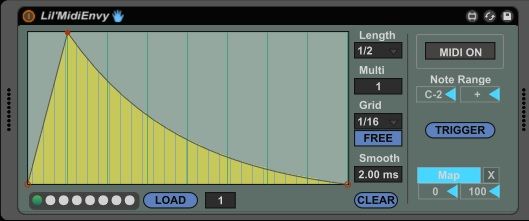
- Incoming midi trigger can be confined to a range of notes (or single value).
- There are 8 storable presets. Shift-click one of the circles on the bottom left to store device, click to recall. (MIDI ON is the only thing not stored as part of the preset)
- Updated mapping function that uses the same code as the MultiMap device
- Preset LOAD button. Allows a way to recall presets by using mappable preset number and button. I discovered you can chain this too. Since the preset number is saved within the preset itself, you can set the load value for the current preset to the next preset e.g. use Load 2 in the #1 preset, Load 3 in the #2 preset, etc. By clicking LOAD it will cycle through to the next preset and then back around if you set preset #8 to Load 1.
Re: multi point envelope draw (idea)
Posted: Sat Mar 15, 2014 11:28 pm
by dna598
This is really cool man, thanks Clydesdale.
Do you think you could put the Output box back though? It's useful. I need to see when it's at 50%, for returning a pitch to zero, for example.
Re: multi point envelope draw (idea)
Posted: Sat Mar 15, 2014 11:43 pm
by clydesdale
sure thing
Re: multi point envelope draw (idea)
Posted: Sun Mar 16, 2014 12:08 am
by dna598
I notice that when i go to store a preset in the browser, the presets (the dots) don't save with it. Is that to be expected?
Re: multi point envelope draw (idea)
Posted: Sun Mar 16, 2014 12:23 am
by clydesdale
[delete]
Re: multi point envelope draw (idea)
Posted: Sun Mar 16, 2014 12:27 am
by clydesdale
You're right it doesn't seem to save the preset, it also doesn't seem to save to the Live set either. I'll see if I can figure out what the deal is.
[edit] There's more work for me to do, I added an object that needs support from other objects that I didn't put in. I'll give a try tonight and post an update when it works.
[edit again] Fixed and ready to test. Here's the current link:
https://drive.google.com/file/d/0BzptcH ... sp=sharing
Re: multi point envelope draw (idea)
Posted: Sun Mar 16, 2014 11:55 am
by dna598
Excellent! Thank you!!

Re: multi point envelope draw (idea)
Posted: Mon Mar 17, 2014 12:54 am
by Valiumdupeuple
I think there's a problem with the map button now. Sometimes it won't map to some parameters, sometimes the scaling won't work as it should...
There's definitely something going wrong with this new M4L mapping button that came with the new L9 devices. They work great in native devices but are, for no reason, a real pain in the ass to include in other devices. I remember having hard time to make it work in my one of my patch, and now I can't remember what the trick was.
Re: multi point envelope draw (idea)
Posted: Mon Mar 17, 2014 1:08 am
by clydesdale
I had a similar experience but I thought it was a fluke. This code is slightly different than the MultiMap code since MultiMap only uses numeric data where the MidiEnvy uses a signal which requires ~ objects not in the original Map button. I only changed one object from a code to a code~ which required changing another dependent object of clip~ that couldn't accept a signal input. It could be possible that there are problems with what I did, no matter, the best thing for the moment would be for me to restore the original functionality. There were some errors upon freezing this device but the MultiMap showed the same errors so I thought they weren't relevant. I think it was the "live.object, device requires initialization use live.thisdevice ...blah blah".
If it's ok with you guys I'll put the other code back but without the dropdown menus (unless you want those too). I was hoping to keep the device small to facilitate multiple instances in a chain. If that's not a concern I'll put it all back.
-clyde
Re: multi point envelope draw (idea)
Posted: Mon Mar 17, 2014 2:12 am
by dataf1ow
The only reason the drop down menus are there is for advice I made a while back that mapped to eight macros, it was quicker to do it with the menus. Take out the menus!
I'm glad to hear other people have experienced difficulties with the 'map' button, because I did too.
Looking forward to seeing where this device goes fellas.
Re: multi point envelope draw (idea)
Posted: Mon Mar 17, 2014 6:20 am
by clydesdale
Ok, ready to be released back into the wild. Thanks for your patience and enthusiasm.
I replaced the newer map with the older jscript mapping which of course resets itself on preset load and wipes out the mapped parameter. So, rather than have you remap the parameter every stinking time you load a preset, I added some logic which should store the mapped parameter ID and prevent unmapping. The menus are gone but I kept the parameter box so you know what the device is mapped to.
https://drive.google.com/file/d/0BzptcH ... sp=sharing

A few of notes:
- loading a preset as a clip is playing can be done but the envelope is not smooth and the Live session will appear to pause for a moment. As near as I can tell if you are recording audio there is no break in either quantization or the audio stream but YMMV. While monitoring playback the audio did seem to pause at a somewhat unpredictable point and there could be artifacts, pops or clicks. I think this is a WYSIWYG sort of thing.
- it might be worth adding greater range to the multiplier. I had good luck with scaling the multiplier on an 1/8th note envelope which effectively allows you to time expand the envelope from 1/8th to 16x 1/8th = 2M. It works smoothly in real time.
- I don't know of a way to clear a preset. If anyone finds out how let us know.
- editing the envelope while it's running seems to work ok too. I know it's not the best interface but we can look into alternatives once the fundamental functions are solid.
Re: multi point envelope draw (idea)
Posted: Mon Mar 17, 2014 4:44 pm
by dna598
I am trying to find ways of changing the envelopes on the fly, preferably with midi note. I couldn't seem to get the note range down to 1 note with the range boxes?
Aside from racking up the device and keygrouping them,I attempted mapping the presets/dots to Momentary Pro, which I hoped would allow me to change envelopes for each note quite quickly:

Unfortunately it didn't seem to work. It didn't map properly.
any ideas?
(edit-scrap that idea, i ll use racks/keygroups)
edit again-Is it possible to send a note-off to the envelope? so it stops when key is let go.
Re: multi point envelope draw (idea)
Posted: Mon Mar 17, 2014 7:28 pm
by clydesdale
dna598 wrote:I am trying to find ways of changing the envelopes on the fly, preferably with midi note. I couldn't seem to get the note range down to 1 note with the range boxes?
Aside from racking up the device and keygrouping them,I attempted mapping the presets/dots to Momentary Pro, which I hoped would allow me to change envelopes for each note quite quickly:
{...}
Unfortunately it didn't seem to work. It didn't map properly.
any ideas?
(edit-scrap that idea, i ll use racks/keygroups)
edit again-Is it possible to send a note-off to the envelope? so it stops when key is let go.
I tested the note range and thought it worked properly, but it wasn't a thorough test so I'll check it again tonight. Keep in mind you need to set both values to the same value, i.e. C3 and C3 would only allow C3 to trigger an envelope. C3 and + would allow everything C3 and higher. C-2 and C3 would allow everything C3 and lower. This is simple enough logic that for the long term your envelope rack will work the best. If momentary_8 Pro is available as download I'll find it and follow up with your mapping issue. It might be indicative of other problems so it's worth understanding even if you don't use it later on. You can already probably tell that the preset function is too slow for it to work for your desired use.
Two things I think that are worth adding are retrigger mode which would allow or disallow retriggering from a new note and gate mode which would end the envelope on note-off just like you want. Maybe even a loop mode where the envelope restarts or reverses if the trigger note is still on (imagine an envelope as an LFO with custom piecewise curve construction). I can start researching those functions further. I had already tried a feedback loop by mapping envelope triggers to envelopes but it gets out of sync with quantization pretty quickly.
Re: multi point envelope draw (idea)
Posted: Mon Mar 17, 2014 9:55 pm
by dna598
yeah i figured the range worked like that.Even though i didn't have much success , I think I prefer to use racks for splitting over note range. I have been getting by duplicating chains (of chains)for specific keys, to make up for not being able to map the same parameter to multiple envelopes. powerful!
Looping and gate mode, best of luck with that! I think that's the way to go.
btw if youre interested heres a link to momentary8_pro (it's free):
http://www.maxforlive.com/library/devic ... tary-8-pro
Re: multi point envelope draw (idea)
Posted: Tue Mar 18, 2014 2:19 am
by clydesdale
The note range is fixed (I think

).
You won't be able to map to the preset object itself. The load button can be mapped, so can the load value which corresponds to the preset spot#. If you like I can make it so that changing the number causes the envelope to load. I purposefully disabled that to allow for rotary selection since you wouldn't want it to load every value as you pass by it.
https://drive.google.com/file/d/0BzptcH ... sp=sharing

