Page 7 of 7
Posted: Sun Nov 30, 2008 1:25 pm
by Michael Hatsis
did you enter the right osc prefix?
which version of MLR are you using? I really havent played around with this patch in a while, i but there are a bunch of MLR remixes out there with small differences...
Posted: Wed Dec 03, 2008 5:40 pm
by serotoninsteve
Hello,
I've already posted this in the trackteam forums,
but I think the chance to get a solution to my problem is better when posted here too.
I'm currently looking in a solution to get proper feedback of running clips in Live reflected to the PK lights.
After some difficulties on how to set up all this with monomulator I've it up and running.
I use the monome_midi_64 max patch from the monome base and it is working, as prefix I use: /midi.
Problem is that when I hit one pad after the other everything works fine, always the running clip lights up the respective Pad,
but when I bang on several pads together 2 or 3 pads stay lit up until retriggering them again.
I've tried the farmpad app before, and it did the same, so I hoped that with Monomulator and Max this would work flawlessly,
but it doesn't.
Does somebody know why this happens? Is the Midi traffic back and forth from Live to heavy that they get stuck? Or perhaps a problem in Live?
In the Monomulator Midi Setup I can adjust "Abbrev" and "Offset",
could this be helpfull? Unfortunately I didn't notice any difference when fiddling around with these values.
Any help or solution would be very helpful!
Greetings
Steve
Re: TrackTeam Audio-Monomulator for PadKontrol-*Source Included*
Posted: Fri May 15, 2009 8:46 pm
by scientist
anyone know the status with monomulator/mlr? i've got it all set up and it is functioning incorrectly...
leopard 10.5.6
monomulator 4.6.3
max/msp runtime 5.0.7
_mlr 2.27
OSC prefix: /mlr
followed the instructions to a t, and i've got some things working: volume knobs, go! button, and once got the pad lights to scroll with the playing audio, but concurrently other things do not function or give errors (lots of errors shown in the status window).
yeah, so not so much looking for troubleshooting as i am just wondering if ANYONE has the above combo working?
Re: TrackTeam Audio-Monomulator for PadKontrol-*Source Included*
Posted: Fri Jun 19, 2009 4:16 pm
by ohmpow
So I have Monumulator working with APC40 on a XP machine sp2 trying to use 7up!...but its glitchy...Most of the grid works but i seem to have problems with 2 rows...The "activator" row of buttons is random when pressing a button, sometimes i hear a sample sometimes it won't shut off...The row of buttons labeled "track selection" does not work at all....any ideas?
ohm
Re: TrackTeam Audio-Monomulator for PadKontrol-*Source Included*
Posted: Fri Jun 19, 2009 11:26 pm
by ohmpow
Got it working! frakin amazing!

Re: TrackTeam Audio-Monomulator for PadKontrol-*Source Included*
Posted: Thu Jul 02, 2009 10:01 am
by 1000errors
hi, im new here,
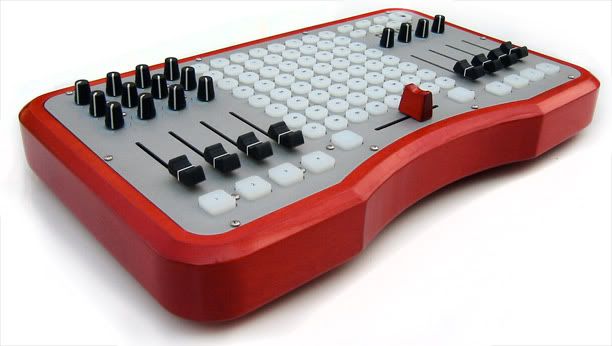
i was wondering if anyone as any plans on making the monomulator for the ohm 64 when it is released?
I shall be pre ordering mine very soon, but I know nothing about max/msp so was hoping someone with some experience with max will be thinking of adapting the monome pathes for it?
thanks
http://www.lividinstruments.com/hardware_ohm64.php
Re: TrackTeam Audio-Monomulator for PadKontrol-*Source Included*
Posted: Thu Jul 02, 2009 11:01 am
by Michael Hatsis
sure, send me one of those snappy Livid controllers and Ill set it up. Just need a reason to do it. The PK->APC->Monome hack is super simple, it just converts MIDI to osc. The source is all there for the taking...I'm more than happy to explain anything if you have questions.
Re: TrackTeam Audio-Monomulator for PadKontrol-*Source Included*
Posted: Wed Jul 22, 2009 1:16 am
by pivotal
ohmpow wrote:So I have Monumulator working with APC40 on a XP machine sp2 trying to use 7up!...but its glitchy...Most of the grid works but i seem to have problems with 2 rows...The "activator" row of buttons is random when pressing a button, sometimes i hear a sample sometimes it won't shut off...The row of buttons labeled "track selection" does not work at all....any ideas?
ohm
I am having the exact same problem on a vista box. Using monomulator w/ 7up. I've got everything else working but the "Track Selection" row only lights up but does nothing else. The "Activator" row works sporadically. How did you get those rows working?
Thanks
Re: TrackTeam Audio-Monomulator for PadKontrol-*Source Included*
Posted: Wed Jul 22, 2009 2:21 am
by Michael Hatsis
pivotal wrote:ohmpow wrote:So I have Monumulator working with APC40 on a XP machine sp2 trying to use 7up!...but its glitchy...Most of the grid works but i seem to have problems with 2 rows...The "activator" row of buttons is random when pressing a button, sometimes i hear a sample sometimes it won't shut off...The row of buttons labeled "track selection" does not work at all....any ideas?
ohm
I am having the exact same problem on a vista box. Using monomulator w/ 7up. I've got everything else working but the "Track Selection" row only lights up but does nothing else. The "Activator" row works sporadically. How did you get those rows working?
Thanks
Im gonna answer this in the APC40 Monomulator thread. just to attempt keep things consistent