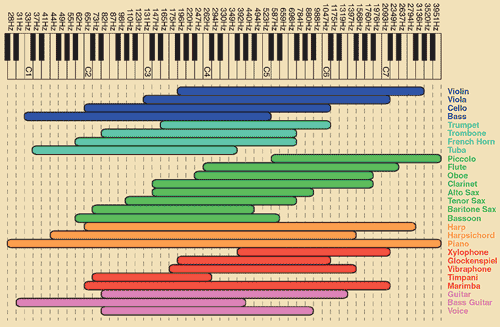
EQ chart
Posted: Wed Nov 19, 2008 3:16 am
StubledUpon this one, a guide to EQing, how it can be used.
http://www.recordingwebsite.com/articles/eqfreq.php
50Hz
1. Increase to add more fullness to lowest frequency instruments like foot, toms, and the bass.
2. Reduce to decrease the "boom" of the bass and will increase overtones and the recognition of bass line in the mix. This is most often used on loud bass lines like rock.
100Hz
1. Increase to add a harder bass sound to lowest frequency instruments.
2. Increase to add fullness to guitars, snare.
3. Increase to add warmth to piano and horns.
4. Reduce to remove boom on guitars & increase clarity.
200Hz
1. Increase to add fullness to vocals.
2. Increase to add fullness to snare and guitar ( harder sound ).
3. Reduce to decrease muddiness of vocals or mid-range instruments.
4. Reduce to decrease gong sound of cymbals.
400Hz
1. Increase to add clarity to bass lines especially when speakers are at low volume.
2. Reduce to decrease "cardboard" sound of lower drums (foot and toms).
3. Reduce to decrease ambiance on cymbals.
800Hz
1. Increase for clarity and "punch" of bass.
2. Reduce to remove "cheap" sound of guitars.
1.5KHz
1. Increase for "clarity" and "pluck" of bass.
2. Reduce to remove dullness of guitars.
3KHz
1. Increase for more "pluck" of bass.
2. Increase for more attack of electric / acoustic guitar.
3. Increase for more attack on low piano parts.
4. Increase for more clarity / hardness on voice.
5. Reduce to increase breathy, soft sound on background vocals.
6. Reduce to disguise out-of-tune vocals / guitars.
5KHz
1. Increase for vocal presence.
2. Increase low frequency drum attack ( foot / toms).
3. Increase for more "finger sound" on bass.
4. Increase attack of piano, acoustic guitar and brightness on guitars (especially rock guitars).
5. Reduce to make background parts more distant.
6. Reduce to soften "thin" guitar.
7KHz
1. Increase to add attack on low frequency drums ( more metallic sound ).
2. Increase to add attack to percussion instruments.
3. Increase on dull singer.
4. Increase for more "finger sound" on acoustic bass.
5. Reduce to decrease "s" sound on singers.
6. Increase to add sharpness to synthesizers, rock guitars, acoustic guitar and piano.
10KHz
1. Increase to brighten vocals.
2. Increase for "light brightness" in acoustic guitar and piano.
3. Increase for hardness on cymbals.
4. Reduce to decrease "s" sound on singers.
15KHz
1. Increase to brighten vocals (breath sound).
2. Increase to brighten cymbals, string instruments and flutes.
3. Increase to make sampled synthesizer sound more real.
http://www.recordingwebsite.com/articles/eqfreq.php
50Hz
1. Increase to add more fullness to lowest frequency instruments like foot, toms, and the bass.
2. Reduce to decrease the "boom" of the bass and will increase overtones and the recognition of bass line in the mix. This is most often used on loud bass lines like rock.
100Hz
1. Increase to add a harder bass sound to lowest frequency instruments.
2. Increase to add fullness to guitars, snare.
3. Increase to add warmth to piano and horns.
4. Reduce to remove boom on guitars & increase clarity.
200Hz
1. Increase to add fullness to vocals.
2. Increase to add fullness to snare and guitar ( harder sound ).
3. Reduce to decrease muddiness of vocals or mid-range instruments.
4. Reduce to decrease gong sound of cymbals.
400Hz
1. Increase to add clarity to bass lines especially when speakers are at low volume.
2. Reduce to decrease "cardboard" sound of lower drums (foot and toms).
3. Reduce to decrease ambiance on cymbals.
800Hz
1. Increase for clarity and "punch" of bass.
2. Reduce to remove "cheap" sound of guitars.
1.5KHz
1. Increase for "clarity" and "pluck" of bass.
2. Reduce to remove dullness of guitars.
3KHz
1. Increase for more "pluck" of bass.
2. Increase for more attack of electric / acoustic guitar.
3. Increase for more attack on low piano parts.
4. Increase for more clarity / hardness on voice.
5. Reduce to increase breathy, soft sound on background vocals.
6. Reduce to disguise out-of-tune vocals / guitars.
5KHz
1. Increase for vocal presence.
2. Increase low frequency drum attack ( foot / toms).
3. Increase for more "finger sound" on bass.
4. Increase attack of piano, acoustic guitar and brightness on guitars (especially rock guitars).
5. Reduce to make background parts more distant.
6. Reduce to soften "thin" guitar.
7KHz
1. Increase to add attack on low frequency drums ( more metallic sound ).
2. Increase to add attack to percussion instruments.
3. Increase on dull singer.
4. Increase for more "finger sound" on acoustic bass.
5. Reduce to decrease "s" sound on singers.
6. Increase to add sharpness to synthesizers, rock guitars, acoustic guitar and piano.
10KHz
1. Increase to brighten vocals.
2. Increase for "light brightness" in acoustic guitar and piano.
3. Increase for hardness on cymbals.
4. Reduce to decrease "s" sound on singers.
15KHz
1. Increase to brighten vocals (breath sound).
2. Increase to brighten cymbals, string instruments and flutes.
3. Increase to make sampled synthesizer sound more real.