Page 1 of 1
[4513] Live 8.0b2 - Can't jump in previewed audio file
Posted: Fri Jan 23, 2009 12:57 pm
by Bunky Freaks
Info view states that jumping in the currently previewed audio file in the browser only works in non-raw mode. But it doesnt seem to work at all. Preview playback works but no clicking and jumping in the waveform preview display. This is on winxp.
Posted: Fri Jan 23, 2009 2:43 pm
by Tarekith
Working great here on OSX.
Re: Live 8.0b2 - Can't jump in previewed audio file
Posted: Fri Jan 23, 2009 2:46 pm
by Amaury
Bunky Freaks wrote:Info view states that jumping in the currently previewed audio file in the browser only works in non-raw mode. But it doesnt seem to work at all. Preview playback works but no clicking and jumping in the waveform preview display. This is on winxp.
Hi,
As in clips, scrub only works for warped clips. So, if the clip you are previewing was saved with Warp OFF, you won't be able to scrub.
Regards,
Amaury
Posted: Fri Jan 23, 2009 2:53 pm
by Bunky Freaks
so the scrubbing/jumping function essentially only works for prepared clips? that would be kind of disappointing. What are the reasons to not allow jumping in unwarped files and in raw mode? Always want to present the preview in sync to the project?
Posted: Fri Jan 23, 2009 2:58 pm
by Angstrom
Hi Amo,
see this clip - it is warped and saved as such, the icon has the little 'analysed' icon. But preview is grey and non-jumpy.
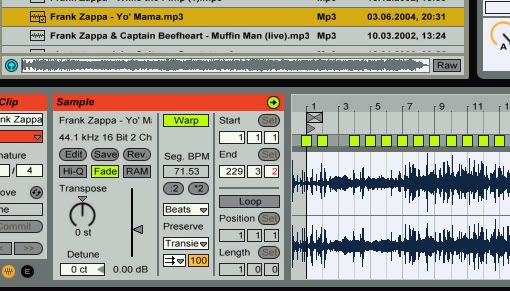
Posted: Fri Jan 23, 2009 3:40 pm
by Amaury
Angstrom wrote:Hi Amo,
see this clip - it is warped and saved as such, the icon has the little 'analysed' icon. But preview is grey and non-jumpy.
Do you get the scrub icon at all in the Preview pane? Does it appear if you press SHIFT?
Regards,
Amaury
Posted: Fri Jan 23, 2009 3:53 pm
by Angstrom
Hi Amo,
I don't get the preview icon as default when I hover or click on the preview wave display, I just see the default arrow cursor.
However, I DO get the 'speaker' when I press shift. I can also 'jump to that point' when shift is held
Damn, I thought I tried that!
Did I forget that I need to press shift to 'scrub'

it doesn't mention this in the manual you know.
Live Manual wrote:Click on a sample to select it. Click in the Tab’s scrub area to make playback jump to that point. (Note that it is not possible to scrub clips that have been saved with Warp turned off.)
only "click", not "shift & Click"
Posted: Fri Jan 23, 2009 4:16 pm
by Amaury
Angstrom wrote:Hi Amo,
I don't get the preview icon as default when I hover or click on the preview wave display, I just see the default arrow cursor.
However, I DO get the 'speaker' when I press shift. I can also 'jump to that point' when shift is held
Damn, I thought I tried that!
Did I forget that I need to press shift to 'scrub'
it doesn't mention this in the manual you know.
Live Manual wrote:Click on a sample to select it. Click in the Tab’s scrub area to make playback jump to that point. (Note that it is not possible to scrub clips that have been saved with Warp turned off.)
only "click", not "shift & Click"
Of course the scrub in the Preview pane shouldn't be dependent on the new preference. It's now filed.
For those who do not know: there is now a preference in the "Look and Feel" section, named "Permanent scrub areas". When OFF, you must use SHIFT to scrub. That is meant for people not wanting to accidentally scrub while on stage, and that concerns clip detail view and the arranger.
Regards,
Amaury
Posted: Fri Feb 06, 2009 1:37 pm
by Amaury
Hi,
This is fixed in the latest beta: the scrub in the preview pane doesn't depend on the "permanent scrub areas" preference anymore.
I'll lock this thread.
Regards,
Amaury