Page 1 of 1
Legato on looping clip
Posted: Sun Mar 15, 2009 7:05 pm
by leinad
Hi!
I just can't get past this problem:
I enjoy playing long arpeggiated sequences of sounds which have portamento on them, in order to obtain a melodic continuously evolving sound.
More often than not the triggering of that sound is something that should only happen in the beginning, else it would reset the entire oscillators istead of just letting them evolve on the sound.
Also the attack, well, the entire starting phase of the sound would repeat, which is s.th I absolutely do not want.
Back then, in the times of Seq-303, or be it Rebirth, as well as the step sequencer inside of Kore2, a glide could occur at the last step and the sequence would continue playing again the first note of the sequence with the legato and portamento applied to it, that is without a retriggering the sound.
I usually keep the low octaves constant while changing only the sounds of the higher octaves, done by just keeping keys pressed in the low area of the keyboard, for minutes. Only the upper keys vary and if none of them are pressed, the legato just falls down to the low keys without retriggering the sound. Also a change in the lower keys should not retrigger the sound.
So, how on earth can I arrange that notes at the beginning of a clip don't get retriggered if a note get's past the end of the clip (and therefore overlap with the first note in the clip upon a loop, thus creating a slide). Is this possible?
If not, what do I have to do to get such an effect.
Kind regards,
Daniel
Re: Legato on looping clip
Posted: Sun Mar 15, 2009 10:45 pm
by gustavo bravetti
Hi Leinad,
I'm not completely sure but if understood... what about having 1 track with the instrument and two tracks with the midi notes. One track can have a clip with the low notes, and clip loop's start position must be after notes starts, clip loop's end position must be before notes ends, in that way those notes will sound forever without re-triggering while the clip is playing. On the other track you can put a clip with the high notes, then route both to the instrument track.
I already did that for live playing to avoid loose the Arp intention by not holding them enough, for that I used an extra track for the lower notes, while I played the high notes live and all was in harmony an peace.
bets,
gustavo
Re: Legato on looping clip
Posted: Mon Mar 16, 2009 12:54 am
by leinad
Hola Gustavo,
well that`s not exactly what I`m after. Ive done that splitting of high and low octaves before just to have clips keep the notes pressing for me, but the problem boils down to this:
start a new live set
load a vst synth capable of playing in mono legato
create one clip of a length of 1 bar, place a note of the length of the clip.
let that clip loop.
now, as soon as the clip ends it sends a note off to the synth, followed immediately by a note on as soon as the clip starts playing again (which is immediately, since it`s looping). Therefore the synth will retrigger the sound, causing all envelopes to start from the beginning.
If that note off message would not have been sent, the received note on message would have no effect since we´re in mono legato and playing the same note again (a note with another pitch and some portamento on the synth would have caused a pitchbending sound).
Basically what I want is that that final note off does not get sent. I thought that the solution would be to increase the length beyond the loops end, but to no avail; that note off message is sent anyway, and thus spoiling the sequence.
Kind regards,
Daniel
Re: Legato on looping clip
Posted: Mon Mar 16, 2009 2:40 am
by longjohns
rats
it makes me think of this:
http://www.covops.org/index.php/The-Cov ... notes.html
maybe it can be achieved by not only extending the last note past the loop end, but also extending the first note (same??) before the loop start
?
Re: Legato on looping clip
Posted: Mon Mar 16, 2009 10:00 am
by leinad
Hi longjohns,
The link you provide comes very close to the solution, but it does definitely not solve the problem.
As said before, the problem is that a midi off is sent at the end of the loop, regardless of the note having a length which makes it pass over the end of the loop. So, no matter how long your note is - as long as it passes over the loop end -, it will send a midi-off exactly when the loop ends. Then, at the beginning of the loop another note (maybe of the same pitch) triggers, therefore having the loop generate a midi-off, midi-on sequence which retriggers the envelopes.
The behaviour I'd expect would mean that the note at the end of the loop would continue to play for as long as is needed to consume it's entire length, thus letting the note at the beginning of the loop send it's midi-on before the midi-off of the note at the end of the loop is issued
after it's duration has ended, not after the end of the loop has reached.
Call this a new mode a
legato clip with a new checkbox, in order not to break existing sets.
The link you provide has the following problems: 1) Your clip contains double the data (repeated) since it's twice as long. You also need to tweak twice as many notes if you decide to change something. 2) As soon as the pitch of the note changes between loop end and loop start, it won't work. So no glides there... 3) it doesn't work across clips: it only works while you loop that single clip, you can't create a legato between 2 different clips 4) it looks like instead of sending a midi-on, midi-off it doesn't send anything.
This looping with a pre-roll or whatever it is called does have it's legitimate reason for existing, but it's definitely not there to solve the legato problem.

Kind regards,
Daniel
Re: Legato on looping clip
Posted: Mon Mar 16, 2009 10:34 am
by pepezabala
move the loop bracket for a - what is it here? - 1/16th note to the right (so it starts after the note on of the first note but ends before the note off of the last note).
Leave the start flag in place.
does that solve your problem?
Re: Legato on looping clip
Posted: Mon Mar 16, 2009 1:30 pm
by leinad
Hi pepezabala,
thanks but that does not solve the issue, if I unterstood you correclty. The problem is that by enlarging the loop I also delay the start note of the loop, aside from getting the loop out of sync with the other tracks as well. The Loop 2 in the image is the second iteration or pass of the same clip which contains the Loop 1.
I tried another thing:
I placed a MIDI Effect Arpeggiator in a Track playing two polyphonic notes from the beginning to the end of the clip. I changed the Gate to 101%. This effectively enlargens the last played arpeggiated note by a very short time, enough to have it issue it's note-off just after the note-on from the beginning of the clip. This also allows to transpose or change patterns between different clips, mantaining the legato.
There are 2 problem though.
1) The clip being arpeggiated must have at least 2 notes playing both from beginning to the end of the clip.
2) If another clip playing in parallel on a non arpeggiated track having it's midi routed to the same instrument as the arpeggiated track - in order slightly modify the arpeggio by overlaying other notes onto the arpeggiated output stream - there is no guarantee that the other clip get's always played after the arpeggiated notes have been sent to the instrument, this causes the other tracks note-on's to be overwritten by the arpeggiated notes if they fall on the same tick. (see screencast)
http://tinyurl.com/ayjlj4
Re: Legato on looping clip
Posted: Tue Mar 17, 2009 2:09 am
by longjohns
leinad,
I do not claim that this completely solves your problem. however, I think you have not fully understood some of the suggestions above.
see the photo below... in this case, the clip is not doubled in length. it has merely an extra note at the end (referencing back to the beginning note)
this works fine here with an unlinked simpler filter envelope. so I would expect that it would work in your situation with any other parameter which would be automated.
it also works across multiple clips which are set to legato mode. so using multiple clips on a track is not an obstacle.

Re: Legato on looping clip
Posted: Tue Mar 17, 2009 9:31 am
by pepezabala
leinad wrote:Hi pepezabala,
thanks but that does not solve the issue, if I unterstood you correclty. The problem is that by enlarging the loop I also delay the start note of the loop, aside from getting the loop out of sync with the other tracks as well. The Loop 2 in the image is the second iteration or pass of the same clip which contains the Loop 1.
not enlarging, moving the whole bracket without chaningin it's lenght.
and: what longjohns says.
Re: Legato on looping clip
Posted: Tue Mar 17, 2009 10:18 am
by leinad
longjohns:
Oh I see, It was an error to think that moving the entire loop bracket would make the first pass of the clip a bit longer that the rest, and the issue with the double amount of notes is therefore not true, only the last one needs to be added to match the first one. I thought in order not to get out of sync one had to move the bracket an entire loop length backwards, as happens with audio clips when you freeze loops.
There is still one issue: If the last note, the one inserted to match the first note, doesn't match the frist note, as it may happen if you switch to anther clip playing another pattern, for example the same one but transposed a couple of notes down, then the extended ending note of the first pattern won't match the first note of the new pattern and then live won't do what it does to mantain a legato.
pepezabala: I'm sorry, I thought you meant the end of the loop bracket. So basically you would also end up with the same screenshot as longjohns did, right?
I mean this type of sequence, with glides in it, isn't that like the bread and butter of the scene? Most of us look at a TB-303 as the shrine on an altar, as that what drives our inspiration, partly because of it's ability to generate such smooth squeaking glides. I wonder why it is made so difficult to archive this with Live.
I guess this will be a job for Max for Live, in case if it's capable of altering/removing MIDI signals from the path.
Re: Legato on looping clip
Posted: Tue Mar 17, 2009 1:12 pm
by gustavo bravetti
so, if note off is removed from the equation that will solve the problem?
Re: Legato on looping clip
Posted: Tue Mar 17, 2009 1:37 pm
by leinad
gustavo:
Theoretically that should solve the problem, though the correct solution would be to delay the note off of that last note to some time after the first note had sent it's note on (just as I'm able to defer the note off of the other notes by just making them a bit longer so that a poliphonic state is entered.
But actually I guess you're right, deleting that note off would be the correct thing to do, since if the clip contains one single long note, that deferred note off would turn off that note on from the beginning of the loop. Right. Removing the note off of the last note would be the solution.
Re: Legato on looping clip
Posted: Tue Mar 17, 2009 4:36 pm
by gustavo bravetti
I thought this can be a workaround but...
Using a Note Length midi plug-in to enlarge just the last note, for that I did create an envelope for Time Length like this one:
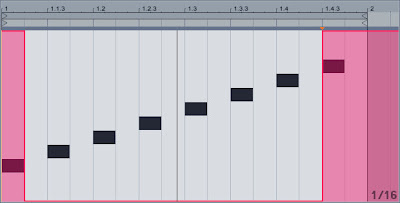
This seems to work but
it is not practical because it affects all notes lengths so you have to edit the envelope for each note that have a different lengths.
Then this solution comes to me:
Automate a Chain Select parameter to activate a Note Lenght just to enlarge the last note.
- Create a MIDI rack
- put a Pitch plug-in on the first rack Chain, this is just to have a neutral layer.
- put a Note Length plug-in on the second rack Chain.
- set Length to 150ms to 300ms depending how much you need the last note needs to overlap to the next one.
- set Note Length Chain zone to 1 (Pitch Chain zone is set to 0 by default)
- Go to the clip and automate Chain zone selector like this:
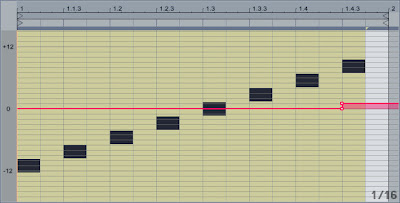
Hope this works for you, let me know if you want this on an .als file
Best,
gustavo
Re: Legato on looping clip
Posted: Tue Mar 17, 2009 7:47 pm
by leinad
Hi Gustavo,
thanks for your input. Your solution is the best to work around the problem.
I played with the note length plug-in, but I left that route after seeing how it messed up the other notes and didn't know about the possibility to add an envelope to the chain selector. Smart move.
I also managed to solve the random track evaluation order problem by simply adding a track delay of 1 sample to the high octave track.
One thing which still annoys me a bit is that the chain selector needs to be adapted to any change in the last note's length. I'd still prefer a checkbox which would make the note-off be dependent on the note length rather that having the loop end fore a note-off event.
I don't realize what sense it makes to force a note-off at loop end. Wouldn't it actually be more reasonable to let the note keep on playing past the end and issue a note-off when the note would actually end? To me it feels like a bug the way it is now.
Re: Legato on looping clip
Posted: Tue Mar 17, 2009 8:54 pm
by gustavo bravetti
I agree