Page 1 of 2
Okay Newbie question....
Posted: Tue Jun 23, 2009 6:24 pm
by Staticc
Okay so I got a Live set done, slightly different than what most of the links on these boards are showcasing for styles of music, More of a Straight forward rock track, 2 Guitar track, 1 Bass track, 1 Drum track, using the VST plugin Guitar Rig for the guitars and bass, recorded with Real (would hate to use the word "Live" on these boards and get someone confused....like....me) instruments, and the Drums recorded thru MIDI. Now here is the problem, I got my Mix good, a Master effects chain, I like where the track is at, but when I render it, it goes the length of the song, but with Zero sound, I spent around 20 hours yesterday trying different things, and trying to read up on how to fix this, so can anyone give me a Step by step of how to export my song as a wav file so I can hear it without having to load up Ableton?
ANY and ALL help would be GREATLY appreciated
Re: Okay Newbie question....
Posted: Tue Jun 23, 2009 6:59 pm
by Staticc
Okay, so now when I tell it to render All Tracks, I get a Drum track that is fine and a Bass track that is fine, but no guitars, now I'm using the Same plugin for both the guitars as I am the bass, I think its simply laughing at me now
Re: Okay Newbie question....
Posted: Tue Jun 23, 2009 7:02 pm
by jez3122
can you post a screen shot just b4 you render(with the render box visible)
Re: Okay Newbie question....
Posted: Tue Jun 23, 2009 7:05 pm
by jez3122
try rendering the master
Re: Okay Newbie question....
Posted: Tue Jun 23, 2009 7:52 pm
by Staticc
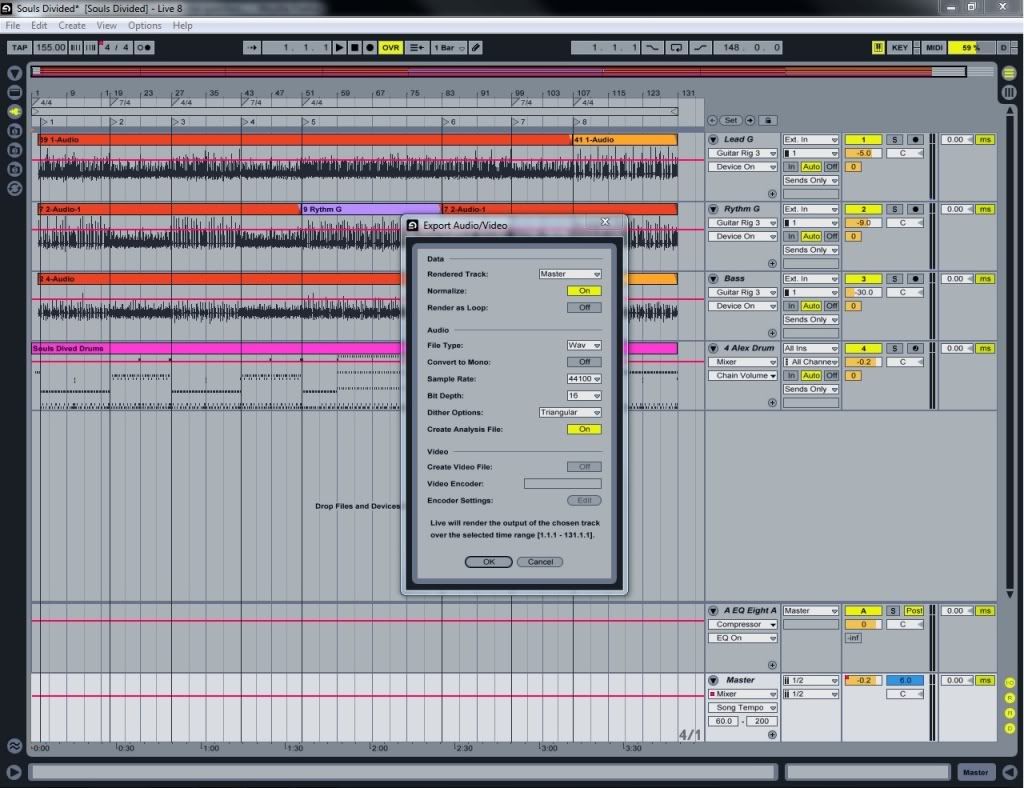
Here is the screen when I hit the Export button this is how I have been trying to render it, when I got the individual track to come, half way out, i.e. I got the Drums/bass, but no guitar I was trying to render all track just to see if that would make a difference.
Re: Okay Newbie question....
Posted: Tue Jun 23, 2009 8:32 pm
by Staticc
Bump of Desperation
Re: Okay Newbie question....
Posted: Tue Jun 23, 2009 8:38 pm
by Hidden Driveways
What I do is highlight everything in the track. Start at the lower right corner of the Arrangement screen, click in the master track and drag upward to the left - highlighting everything. When you have eveything highlighted, render it. Give it a go.
Re: Okay Newbie question....
Posted: Tue Jun 23, 2009 9:00 pm
by Staticc
Tried that...no go:/
Re: Okay Newbie question....
Posted: Tue Jun 23, 2009 9:07 pm
by Tone Deft
could it be the 'back to arrangement button'? in that shot session view has control. it's the button at the top center to the right of OVR.
Re: Okay Newbie question....
Posted: Tue Jun 23, 2009 9:08 pm
by Musashi
I always highlight the tracks I want to render. And maybe I use the loop bar at the top to select the full length of the song and then click on that, too. Somebody can correct me if I'm wrong, but I've been using Live since version 5 and thought you always had to do these things. Maybe that changed along the way, I dunno, but that's the habit I still have today and it works. If you want the track to extend beyond the last note or bit of audio in the track, y'know, to pick up reverb tails and delays and whatnot, you should highlight enough space beyond the final clip that's meant to be played so you capture all of that stuff, too.
Re: Okay Newbie question....
Posted: Tue Jun 23, 2009 9:13 pm
by Staticc
All that button does is revert back to a setting that you have changed, according to the little help box.
Re: Okay Newbie question....
Posted: Tue Jun 23, 2009 9:33 pm
by Tone Deft
suppose you have a saxophone in track 1 session view and guitar in track 1 arrange view.
hit play and saxophone is playing and that button turns red. hit the button and guitar plays.
IIRC.
it does revert parameters but also routes audio. if I was at home I'd check this.
it shouldn't matter because you can only render from arrange view, but if Live is set to play from session view that's another way of saying arrange doesn't play for that track.
Re: Okay Newbie question....
Posted: Tue Jun 23, 2009 10:16 pm
by Staticc
I do everything based off the arrangment View, the only thing I use session v for when mixing (the meters are easier on the eyes int hat view imo). And each track only has that instument with those notes being played thru them, I've learned a lot by fooling around with Ableton, but its bearley a drop in the bucket as to what the program is capable of, at least from a bunch the video's of how ppl are using Ableton. Atm, I'm really going Basic, track=Guitar amp Simulation plugin, hit record, same for track 2, track 3 same thing except a bass, track 4 MIDI Drum track, and I made the drum loop the length of the song, so, 131 or so measures, all of that goes to 1 return chan for EQ/Compessor/Reverb/Limiter, and then the Master track. now ealier when I had it render All track, it made a .wav file for each track, but only the Drums, and Bass tracks had sound in them, nothing else had anything.
I checked the back to arrangment view, but when I clicked it, nothing happened, it wasn't highlighted to begin with, and stayed unlit after I clicked it, also rendered after click, still same result.
btw, ty for the help, I R Noob with recording still.
Re: Okay Newbie question....
Posted: Tue Jun 23, 2009 10:25 pm
by dcease
looks like you got everything set up right... maybe a bug? anywho, add another track, and set it up to resample the master. give the track a clever name like "souls divided bounce" and arm the track (turn off monitoring). now hit global record, and let your song play. when finished, save your set. navigate to the project folder using your browser, and open it up, then open up 'samples', then 'recorded'. listen to the file "souls divided bounce", it should be what you are after.
fwiw, i hardly ever use render, i tend to bounce everything in real time as described above <shrugs shoulders> you can dither and such using another program.
Re: Okay Newbie question....
Posted: Tue Jun 23, 2009 11:01 pm
by TroyP
I've had this happen. I think it's a bug related to the Normalize button. Unchoose that and I'll bet it works fine (you can normalize later, if you really need to, using some tool that gives you more control over the level you normalize it to).
Troy