Page 1 of 1
APC40 how to make it stop changing "focus"
Posted: Thu Jan 21, 2010 12:29 am
by deerwolf
Whenever you fire a clip, the device control knobs (bank of lower 8 knobs) on the the APC40 switch automatically to represent the devices on whatever track a clip was just triggered. So for example, if I am tweaking the device control knobs and then I fire a clip on another track, the knobs have now all just changed to the devices on the track playing the most recently triggered clip. Essentially, I want it to not change focus ever automatically, only if I choose a track via the "track selection" buttons. This way I can keep focused on the master channel devices and hop onto individual channels only if I really want to, not every time I fire a clip. Any help is much appreciated! Thanks,
Kevin
Re: APC40 how to make it stop changing "focus"
Posted: Thu Jan 21, 2010 1:43 am
by deerwolf
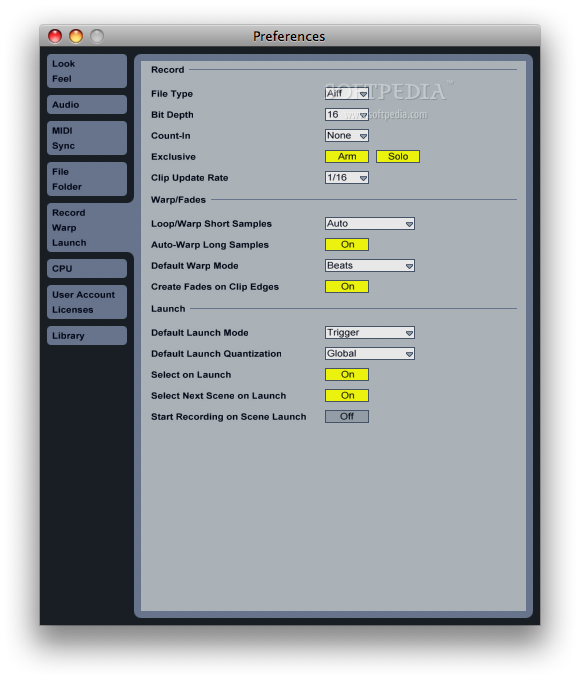
Ah! Figured it out, disable "select on launch" in live preferences, wow makes using the APC40 a lot better, I highly recommend turning this off.
Re: APC40 how to make it stop changing "focus"
Posted: Fri Jan 22, 2010 4:06 pm
by JEB
Also, you can right/cmd click "lock to control surface" so the knobs will always use the same rack or device.
Re: APC40 how to make it stop changing "focus"
Posted: Sun Jan 24, 2010 8:46 pm
by suburbmusic
in which menu do you exactly find : select on launch?
i couldn`t find it.
it would be soo cool if i can turn the focus of
Re: APC40 how to make it stop changing "focus"
Posted: Fri Jan 29, 2010 5:46 am
by suburbmusic
bump....sorry i need to know
Re: APC40 how to make it stop changing "focus"
Posted: Fri Jan 29, 2010 5:58 am
by mode:masters
It's in the RECORD/WARP/LAUNCH section of the prefs
Re: APC40 how to make it stop changing "focus"
Posted: Fri Jan 29, 2010 12:57 pm
by suburbmusic
...dooh....thx...i was blind sorry
Re: APC40 how to make it stop changing "focus"
Posted: Fri Jan 29, 2010 1:53 pm
by drakeyboy
was trying to work this one out myself.