Page 1 of 1
Clarification on the Audiofire 4
Posted: Mon Mar 15, 2010 2:23 am
by BoxDJ
Hello, I've emailed Echo quite a while ago about a question regarding the Audiofire 4.
FireWire (IEEE 1394a) interface with 8' cable
Bus powered with 6-pin FireWire interface
I'm not exactly sure if they are saying that the firewire cable is a IEEE 1394a cable or if the input that is going into the actual interface is a 6 pin firewire port.
Also, what is a IEEE 1394a port? On the front of my laptop I have a 1394 beside my firewire port which is a 4 pin firewire port.
Might I have to buy a firewire express card slot?
Thanks.
Re: Clarification on the Audiofire 4
Posted: Mon Mar 15, 2010 3:28 am
by leedsquietman
No. Just buy a 6 pin to 4 pin FW cable, as available at Best Buy, Staples, etc. Costs about 30 bucks.
Because your laptop only has a 4 pin (mini) FW port, you won't be able to run the Firewire interface from buss power.
6 pin fw ports provide buss power, 4 pin fw does not.
1394 is just another name for firewire. 1394a is Firewire 400.
Expresscard>FW adapters also do not provide buss powering. Most laptops (PC) only feature 4 pin FW, Mac laptops have a 6 pin FW port (although FW800, so requiring a FW800 to 400 cable in most cases).
Most desktop PCI>Firewire or onboard are of the 6 pin FW variety.
Re: Clarification on the Audiofire 4
Posted: Mon Mar 15, 2010 5:27 am
by BoxDJ
leedsquietman wrote:No. Just buy a 6 pin to 4 pin FW cable, as available at Best Buy, Staples, etc. Costs about 30 bucks.
Because your laptop only has a 4 pin (mini) FW port, you won't be able to run the Firewire interface from buss power.
6 pin fw ports provide buss power, 4 pin fw does not.
1394 is just another name for firewire. 1394a is Firewire 400.
Expresscard>FW adapters also do not provide buss powering. Most laptops (PC) only feature 4 pin FW, Mac laptops have a 6 pin FW port (although FW800, so requiring a FW800 to 400 cable in most cases).
Most desktop PCI>Firewire or onboard are of the 6 pin FW variety.
Will latency be affected if I buy a 6 to 4 pin cable? Is this actually a cable or an adapter?
Re: Clarification on the Audiofire 4
Posted: Mon Mar 15, 2010 5:32 am
by leedsquietman
Latency won't be affected by the cable (unless it's deficient).
I use an actual cable, Belkin 6 pin fw to 4 pin fw, I haven't seen an adapter. Cost about 30 bucks.
Works fine.
Latency is more determined by your computer specs, the efficiency of the audio driver (ASIO), and possibly the firewire chipset in your machine, with TI and VIA being recommended, but most PC laptops running cheaper, integrated circuits by Ricoh, o2 and others.
You should first of all run the DPC latency checker tool and make sure you use that to find out if your computer can handle real=time audio processing and if not, if turning off some device drivers will make it sufficient, typically turn off networking, wifi and occasionally CD/DVD or scale back hardware accelerated graphics a notch. You might also find the generic asio4all driver gives better performance than the audio drivers, although Echo usually write solid and decent performing drivers.
Re: Clarification on the Audiofire 4
Posted: Mon Mar 15, 2010 6:09 am
by BoxDJ
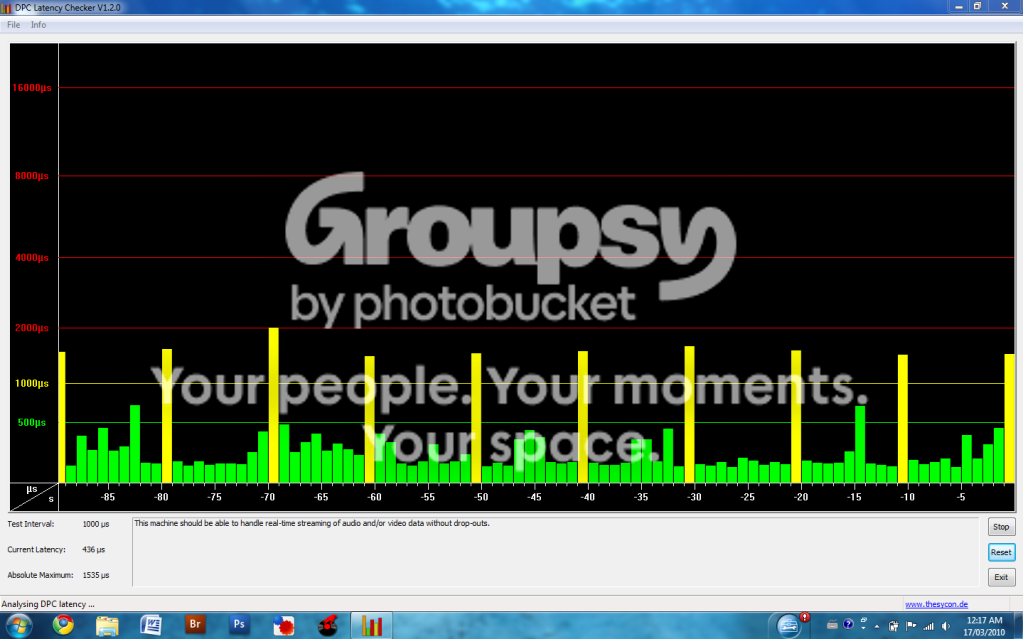
How do I analyze the graph on the DPC latency checker tool? I see 9 green bars about 1/3 to the way of the green light before there is just one yellow line.
Re: Clarification on the Audiofire 4
Posted: Wed Mar 17, 2010 4:18 am
by BoxDJ
Heres a photo. Would this laptop be able to handle some live performing with Ableton with a decently heavy set and with a relatively low latency for drumming?
Re: Clarification on the Audiofire 4
Posted: Wed Mar 17, 2010 5:53 pm
by BoxDJ
Bump. Any opinions on whether this is a stable enough or not laptop for live performing
Re: Clarification on the Audiofire 4
Posted: Thu Mar 18, 2010 3:09 am
by BoxDJ
b-b-b-ump
Re: Clarification on the Audiofire 4
Posted: Thu Mar 18, 2010 3:37 am
by leedsquietman
No. Those yellow bars are almost touching red. This will affect your ability to run low latency audio satisfactorily.
You need to do more optimizing work to get those yellow bars down. Go through all your drivers and disable one at time.
Disable network driver, wifi, CD/DVD rom driver.
Upgrade your graphic card driver and turn PhysX graphics off and hardware acceleration take down a notch, or move from performance to balanced, depending on your card.
Go into services and disable any services not necessary such as webcam, windows sidebar, any anti-spyware/anti-virus, anything such as HP update or things which schedule updates.
Re: Clarification on the Audiofire 4
Posted: Sat Mar 27, 2010 9:13 pm
by BoxDJ
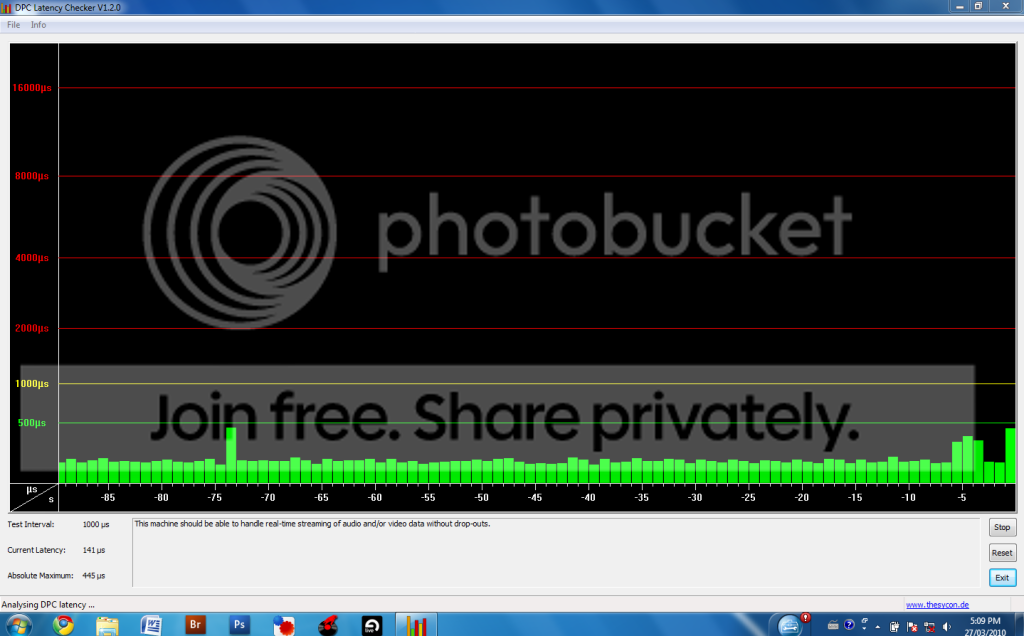
It doesn't really go to the green line that often, I was opening Ableton live but you can see there is drastic improvement from disabling the CD drive and wireless.
But is this good enough to run a good low latency setup?
Re: Clarification on the Audiofire 4
Posted: Sat Mar 27, 2010 9:17 pm
by leedsquietman
It OUGHT to be. That is a much better looking scenario.
There is still the issue of the driver efficiency, but that is typically not an issue with Echo and there is always ASIO4ALL if the Echo driver is not efficient.
Laptops are still a bit underpowered compared to desktops, so I wouldn't expect Live to run at super low latencies, but so long as you can get 256 samples or better (which hopefully you can, especially on lighter projects or ones not too loaded down with plugins) it should be fine.