Page 1 of 1
OK to delete previous versions as you update?
Posted: Sun Apr 25, 2010 7:55 pm
by TRS80
I just finished the update- all 700MB of it.
As I get these newer versions of Live, I've been keeping the previous versions. Is it OK to trash these earlier versions? For example, I want to throw away everything except the latest version I have of live-
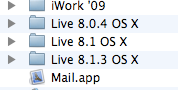
Also, where do all the instruments, midi files, and samples stay in Live? In the app itself? Somewhere else on the drive? If so where?
Thanks for helping me out, I know these questions are very basic to some of you!
Re: OK to delete previous versions as you update?
Posted: Sun Apr 25, 2010 8:02 pm
by 8O
Sure, no problem to delete previous versions, but recommend you hold on to your latest known good version until you're happy the new one is as good/no new bugs that affect you.
Everything else resides in the Library... on a Mac at <home>/Library/Application Support/Ableton
Re: OK to delete previous versions as you update?
Posted: Sun Apr 25, 2010 8:03 pm
by TRS80
Excellent. Thanks!
Re: OK to delete previous versions as you update?
Posted: Fri Apr 22, 2011 6:03 pm
by aidanpoulter
8O wrote:Sure, no problem to delete previous versions, but recommend you hold on to your latest known good version until you're happy the new one is as good/no new bugs that affect you.
Everything else resides in the Library... on a Mac at <home>/Library/Application Support/Ableton
Hi. Thanks for your answer about previous version. I've also got stuff in HD:users: my profile:Music: ableton: live recordings. Is this wrong? I don't seem to have very much in the locations you said 'everything' else resides in.
Thanks again for your knowledge.
Aidan.

Re: OK to delete previous versions as you update?
Posted: Fri Apr 22, 2011 6:05 pm
by aidanpoulter
Actually, sorry to have an afterthought, but I also made a shortcut on my desktop for a file for all my projects. Would this likely mess the way ableton is supposed to behave to open stuff.

Thanks again. Aidan.