Page 1 of 2
No sound from MIDI files
Posted: Tue Feb 15, 2011 6:26 pm
by RossB94
Hey all!
I'm a relative newbie to Abelton, only messed about with it for about a week so don't really know much about it.
I downloaded some MIDI files from various links and websites, but none of them appear to be playing in Abelton, the arrangement of the notes appear and are shown in the track display, but when I press play, the bar goes across and no sound comes from it... yet I can play the MIDI's in the sample..
Please help

Re: No sound from MIDI files
Posted: Tue Feb 15, 2011 9:59 pm
by pepezabala
you need to put an instrument into the midi channel. midi itself makes no sound, it's only a score, not an instrument.
Re: No sound from MIDI files
Posted: Wed Feb 16, 2011 4:44 pm
by RossB94
ohh then I'm stupid... how do you do that?
Re: No sound from MIDI files
Posted: Wed Feb 16, 2011 5:00 pm
by kjacobs
I'm new at this too, but I believe you go into browser at top left of live, select instruments, then instrument rack then any instrument. Double click on the midi track the double click the instrument, it should show as a device at bottom of screen. Maybe u figured this already. If you have not you should work thru the lessons that come with live.
Re: No sound from MIDI files
Posted: Fri Feb 18, 2011 9:41 pm
by RossB94
kjacobs wrote:I'm new at this too, but I believe you go into browser at top left of live, select instruments, then instrument rack then any instrument. Double click on the midi track the double click the instrument, it should show as a device at bottom of screen. Maybe u figured this already. If you have not you should work thru the lessons that come with live.
There are no instuments on my instument rack

Re: No sound from MIDI files
Posted: Sat Feb 19, 2011 11:52 am
by Sepp Ultura
MIDI is just controller information that tells your instruments what to do and what to play. Create a new MIDI Track, select it, go to the browser and go to the top folder that is named instruments. Double click an instrument. You can then see it in the track's chain. Now your midi files should tell your instrument what to play.
I'd strongly recommend doing the lessons that come with Live. And read the manual. I had to learn it myself too. The manual and the lessons are very good.
Re: No sound from MIDI files
Posted: Sun Feb 20, 2011 2:18 pm
by RossB94
Sepp Ultura wrote:MIDI is just controller information that tells your instruments what to do and what to play. Create a new MIDI Track, select it, go to the browser and go to the top folder that is named instruments. Double click an instrument. You can then see it in the track's chain. Now your midi files should tell your instrument what to play.
I'd strongly recommend doing the lessons that come with Live. And read the manual. I had to learn it myself too. The manual and the lessons are very good.
Yeah I am doing the lessons, this is when I noticed there were no Instruments in my Instrument rack, when the lesson told me to pick one of them..
So I downloaded a MIDI file from a Deadmau5 song, and it won't play either, now will it click in and the options and effect screen appear down at the bottom
HELP!
Re: No sound from MIDI files
Posted: Sun Feb 20, 2011 7:12 pm
by dentaku
So, if you click on the little triangle next to INSTRUMENTS in the browser (under where it says Live Devices) what do you see? You should at least have Analog, Drum Rack, Instrument Rack etc...
I like that Deadmau5 put the individual .mid files for Strobe online. More artists should do stuff like that.
Re: No sound from MIDI files
Posted: Tue Feb 22, 2011 5:47 pm
by RossB94
dentaku wrote:So, if you click on the little triangle next to INSTRUMENTS in the browser (under where it says Live Devices) what do you see? You should at least have Analog, Drum Rack, Instrument Rack etc...
I like that Deadmau5 put the individual .mid files for Strobe online. More artists should do stuff like that.
I see those three files, but inside my "Instrument Rack" I jsut have folders, with nothing inside them..
And yeah was pretty cool of him to do that, but too much of it would lead to copying original songs, and then jsut changing the beat or instrument IMO..
Re: No sound from MIDI files
Posted: Sat Feb 26, 2011 10:57 pm
by RossB94
bump!
Re: No sound from MIDI files
Posted: Sun Feb 27, 2011 12:37 am
by antarktika
you should have folders that say simpler, impulse etc... double click on one, then it will open in a new track, then you can drop your midi in it's note lane.
Re: No sound from MIDI files
Posted: Tue Mar 01, 2011 6:30 pm
by RossB94
Yes thats my problem.. the orignal Ableton MIDI notes aren;t there... and my downloaded MIDI's don't work either!
Re: No sound from MIDI files
Posted: Wed Mar 02, 2011 12:00 am
by antarktika
you seem REALLY confused about midi vs. audio, there shouldn't be original midi notes in ableton's instrument list, midi notes are what you would input from a keyboard to make an instrument play, you should have a track with an instrument on it, and on that instruments track, you can place midi notes, or midi files you have downloaded, and they will cause the instrument to play what notes you have put on it. there should not be midi files in the racks to the left of the sequencer.
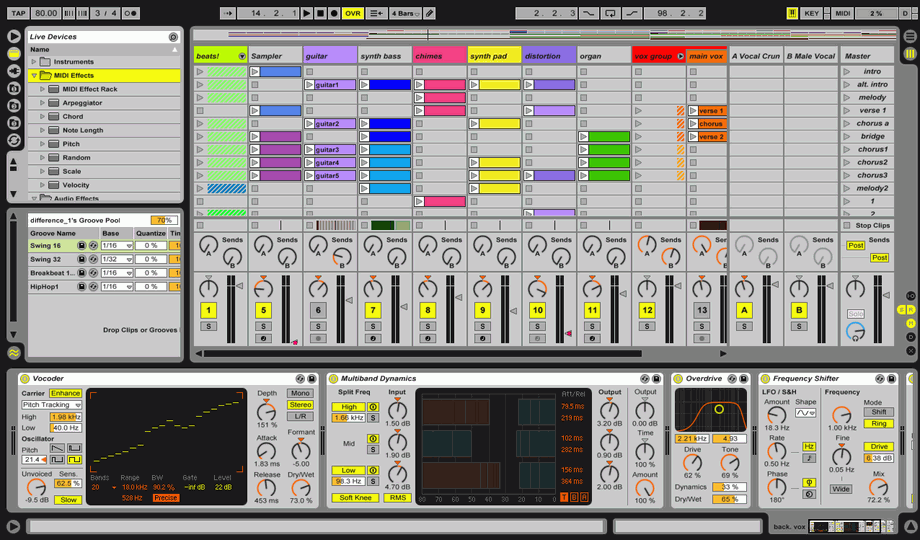
ok, look at this picture:
http://www.nanofunk.net/wp-content/uplo ... ivemax.png
see in the upper left hand corner, when you click on that highlighted folder (the yellow folder thing between the plug icon and the triangular icon) there should be a list of instruments in there, depending on what version you have, it might have stuff like operator and analog, or if you have a more basic version it might just have simpler and impulse, as well as a dropdown called "instrument rack".
open instrument rack and there will be a bunch of different types of instruments, find one you want, and drag it into the empty area in the session view window (where it says "drop files and devices here" in that pic), it should then have the name at the top of the column, indicating that on that track, that instrument is loaded.
now, take one of your midi files, and put it in one of the slots below that instrument in the same vertical column
see this picture:
http://getthatprosound.com/wp-content/u ... enshot.png
each row has a line of same colored clips in it, yes? that is where you drop your midi clips. now, when you click on the little triangle on the midi clips that are below that loaded instrument, they should play back.
Re: No sound from MIDI files
Posted: Thu Mar 03, 2011 6:19 pm
by RossB94
antarktika wrote:
open instrument rack and there will be a bunch of different types of instruments, find one you want, and drag it into the empty area in the session view window (where it says "drop files and devices here" in that pic), it should then have the name at the top of the column, indicating that on that track, that instrument is loaded.
Theres the problem... there are no instruments in my rack.. just empty folders?
Re: No sound from MIDI files
Posted: Thu Mar 03, 2011 11:43 pm
by antarktika
ignore the orange outlines in this pic
http://en.wikiaudio.org/images/0/05/Abl ... t_rack.png
do you have any of those folders? the ones that say simpler, impulse, etc?
if so, have you tried dragging them into the track area where it says drop files and devices here?
http://www.gearjunkies.com/view_image.php?id=11582
check out this video:
http://www.youtube.com/watch?v=R5CiyJVIfP4
does that help?
if you don't have presets in your instrument folders, you might have improperly installed your library
if so, open ableton and go to:
Live > preferences > Library > "Repair Library"
this will take a while!