Mixing: Sends Only, and going Creative
Posted: Tue Feb 15, 2011 9:30 pm
Hi.
This is a bit long, but its something thats been in the back of my mind a long time.
When mixing down your normal projects, im not talking about exerimental and sound design mixing with sends like Robert Henke does, but normal "bread and butter" song mixing with standard aux effects like reverb and delay.
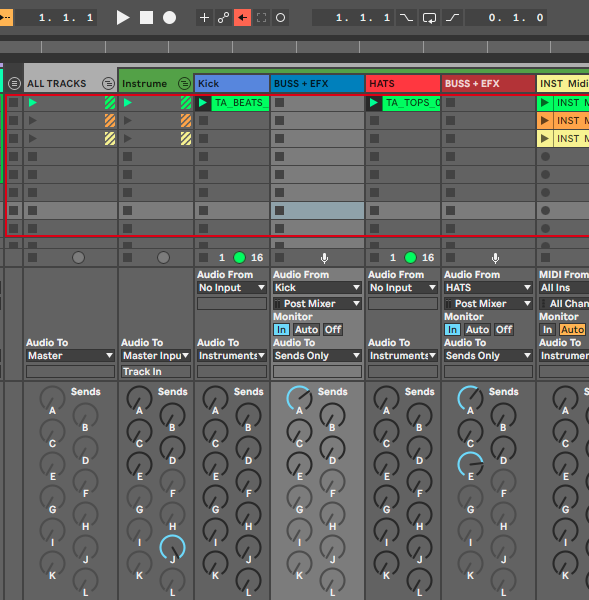
Some of my friends use Sends Only at the output on their tracks, when they mix down their song. Using one send to bring the level back up, so the volume fader can be used as normal.
Exapmle.
Send A: reverb
Send B: delay
Send C: empty
Tracks Audio To: Sends Only.
Tracks Send C to max, brings back the volume.
Send A and B will be wet signal only, adding volume to the mix, while the dry signal can be brought down by Send C.
What is really the benefit of this in a normal mixing situation?
For decades, the usual way has been to simply add parallel effects with the sends. This is in fact rather limited. Say that you add delay with send A and reverb on send B on a snare track: you will get one hit with only reverb, and another hit with only delays. This creates two individual rooms; a parallel effect. It would be more natural to have the delay inside the reverb room.
Say if you want to have the sends like this:
Send A: overdrive
Send B: delay
Send C: Reverb
And say you want some tracks to use them serial: overdrive to delay to reverb, and others just to delay, or overdrive do reverb. What can be done as a good work template that is a bit more creative then the standard paralell mixing of sends?
Sometimes I end up using a lot of duplicate effects on the tracks to archive different serial signals. And thats ok. But it would be cool to find a good simple solution with the sends, that could cut trim down the template. It would remove about 75% of my effects load.
For now, I just use the Sends in normal parallel mode. Delays and reverbs.
My tracks could look like this:
Snare: distortion-delay-chorus-eq, and might Send it to: reverb
Tabla: distortion-delay-autofilter-eq, and Send: reverb
When using cpu and ram intencive vsts, and say 8 or 10 tracks like this, it feels a bit of a waste. Especially if I use, say 6 instances of Guitar Rig 4, all with the same preset.
It would be nice to have at least GR4 on Send A, and be able to send any track to it, while adding serial amounts of delay or reverb individually for each track.
If sends could have their own sends and so forth, it could be archived. Like a second and thrid layer of sends. Like a cluster effect:
A to: B and/or C, and B to: D and/or E, or C to: D and/or E.
maybe its possible to build it with a combination of tracks and sends.
Hmm.
This is a bit long, but its something thats been in the back of my mind a long time.
When mixing down your normal projects, im not talking about exerimental and sound design mixing with sends like Robert Henke does, but normal "bread and butter" song mixing with standard aux effects like reverb and delay.
Some of my friends use Sends Only at the output on their tracks, when they mix down their song. Using one send to bring the level back up, so the volume fader can be used as normal.
Exapmle.
Send A: reverb
Send B: delay
Send C: empty
Tracks Audio To: Sends Only.
Tracks Send C to max, brings back the volume.
Send A and B will be wet signal only, adding volume to the mix, while the dry signal can be brought down by Send C.
What is really the benefit of this in a normal mixing situation?
For decades, the usual way has been to simply add parallel effects with the sends. This is in fact rather limited. Say that you add delay with send A and reverb on send B on a snare track: you will get one hit with only reverb, and another hit with only delays. This creates two individual rooms; a parallel effect. It would be more natural to have the delay inside the reverb room.
Say if you want to have the sends like this:
Send A: overdrive
Send B: delay
Send C: Reverb
And say you want some tracks to use them serial: overdrive to delay to reverb, and others just to delay, or overdrive do reverb. What can be done as a good work template that is a bit more creative then the standard paralell mixing of sends?
Sometimes I end up using a lot of duplicate effects on the tracks to archive different serial signals. And thats ok. But it would be cool to find a good simple solution with the sends, that could cut trim down the template. It would remove about 75% of my effects load.
For now, I just use the Sends in normal parallel mode. Delays and reverbs.
My tracks could look like this:
Snare: distortion-delay-chorus-eq, and might Send it to: reverb
Tabla: distortion-delay-autofilter-eq, and Send: reverb
When using cpu and ram intencive vsts, and say 8 or 10 tracks like this, it feels a bit of a waste. Especially if I use, say 6 instances of Guitar Rig 4, all with the same preset.
It would be nice to have at least GR4 on Send A, and be able to send any track to it, while adding serial amounts of delay or reverb individually for each track.
If sends could have their own sends and so forth, it could be archived. Like a second and thrid layer of sends. Like a cluster effect:
A to: B and/or C, and B to: D and/or E, or C to: D and/or E.
maybe its possible to build it with a combination of tracks and sends.
Hmm.