Page 1 of 1
NOT 1 BEEP from ABLETON !
Posted: Mon May 16, 2011 9:40 pm
by Birddy
After install, wich went well. and update to 822 also no problem..and manually installation of live packs.
im NOT able to EAR 1 Beep. i Followed instructions to configure the driver, Speakers ..and ? NOP !
My Computer run really fine, with all applications, its fast and stable ( win 7 64 BIT ) , actually ableton configuration tell me ( asio driver ) my HD audio speakers unavailable HU ??? i ear sound files using any players i have installed.
I didnt found ANY tutorials / trouble shooting showing me a HOW TO....i found tons of videos showing me how nice LIVE 822 works. hu ?...but I DIDNT get a BEEP.
I installed the CD version, and after downloading version 822 ( wich took 3 hours (pfff 45 kb/s DL speed ) LOOOL )
i hope of some help.
Tx a lot.
Re: NOT 1 BEEP from ABLETON !
Posted: Mon May 16, 2011 10:50 pm
by eddiex
where it says "live" at the top of your screen,click that.....then go to "preferences" then click on "audio" i am not too sure how the fender mustang amp works (most people here have a sound card or an interface)....but check to make sure your audio input device is set to your amp....your amp will probably have to be plugged into the usb at this point.....what are you listening to sound through?......so now make sure the "audio output device" is set to something like "built-in out" if you are listening through your lap-top.
after you have that set up exit out of there...and go to your "session view" you probably should have 1 audio and 1 midi track there....on the audio track click that button underneath the button with the "s" on it...this is your track's "arm" button....push that and hopefully you will be hearing some sound.....oh by the way make sure your guitar is turned down so it doesn't blow your speakers.
the preset instruments are all midi instruments....you will have to program in midi notes to be able to hear any instruments....to do that when you drop an instrument on a midi track...click the first box on the midi track and a "clip" will show up....click that clip twice...and a 1 measure piano roll will show up where you can program in notes...if there are no instruments on your midi track, you will not hear anything what so ever.
finally calm down a little bro.....the software is good....it just takes a little while to wrap your head around it.

Re: NOT 1 BEEP from ABLETON !
Posted: Tue May 17, 2011 12:13 am
by Z3NO
Re: NOT 1 BEEP from ABLETON !
Posted: Tue May 17, 2011 5:51 am
by Birddy
TY VM z3no !!
thats what i call . A real constructive and great help. It took ya for sure long to get that

We need more of you. UR UNBEATABLE

Re: NOT 1 BEEP from ABLETON !
Posted: Tue May 17, 2011 6:30 am
by Birddy
Hi eddiex,
Thank you very much for reply.Nice to have ppl that try to help. I appreciate.
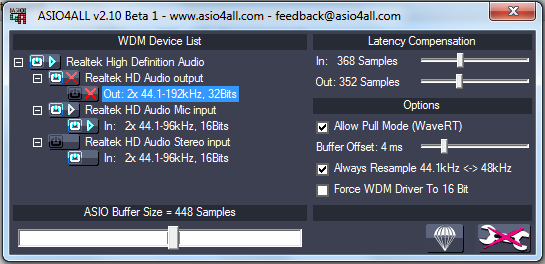
Well, yesterday , was pretty late ( german time 22 up to 24 pm ) ( and 3 hours before : download time for the update). Well, anyway,i tried of course all possibilities to configure the devices, aswell ASIO driver,ASIO4all, with and without driver.and whatever.I got few different "feedback" from both driver:
HD Audio speaker out unavailable
MS GS Wavetable Synth
HD Audio speaker out not installed
Application in use
Microsoft GS wavetable Synth
Well, all those , mostly NOT at same time.
I can drag a file to the midi track, none to the audio track.
On the left low corner, as i could see in different tutorials and videos, a "Pre-ear" with waves will start, showing you the file u could choose to drag on audio/ midi track. I cant ear or see anything there ( Only infos text )
I downloaded and installed several livespack from ableton website.
Is no audio included ? only MIDI ?
Do i ave to plug the amp to creat a file ? ( would be stupid, but why not )
Do i need to install ASIO at all ?
I installed ASIO first , then Ableton, maybe opposite better ?
TX for help
Re: NOT 1 BEEP from ABLETON !
Posted: Tue May 17, 2011 11:21 am
by sanosdole
I assume you are from germany and speak german...
Ich versuche dir ein bisschen zu helfen, aber ich glaube es wäre sehr hilfreich wenn du erst mal anfängst einige tutorials zu "Digital Audio" and "Digital Audio Workstations" sowie ASIO, MIDI & VST zu lesen. Das könnte dir helfen deine (simplen) Probleme selbst zu lösen.
Als erstes beschäftigen wir uns damit Ableton für deine Umgebung einzurichten.
Als erstes solltest du dir überlegen welche Audio Schnittstelle du über welchen Treiber verwenden möchtest. Nach deinen bisherigen Posts gehe ich davon aus das du lediglich über eine eingebaute HD Soundkarte verfügst.
Möchtest du diese Soundkarte mit Ableton benutzen ist die Verwendung von ASIO4All zu empfehlen aber nicht zwingend notwendig. Deshalb sollten wir als erstes die grundsätzliche Funktion deines Audio Setups testen. (Hoffe das ich später wenn ich daheim bin ein paar screenshots machen kann)
1. Öffne den Dialog mit den Voreinstellungen in Ableton Live.
2. Gehe auf die Registrierkarte Audio.
3. Wähle DirectSound als Treibertyp.
4. Wähle "HD Audio speaker" als Interface.
5. In dem Dialog gibt es einen Testton generator, er erzeugt einen Testton (BEEP
). Schalte ihn an.
6. Solltest du jetzt noch nichts hören, überprüfe ob der Ausgang korrekt verbunden und die Lautsprecher aktiviert sind.
7. Falls als korrekt angeschlossen und angeschalten ist überprüfe die Windows Sound Einstellungen.
Btw. Ich finde es seltsam das jemand mit so wenig Ahnung von digitaler Audio Technik ein so teures Software Produkt kauft um es dann über die eingebaute Soundkarte bzw. günstigen Laptop Lautsprechern zu betreiben. Ableton Live ist eine professionelle DAW Software die in der Medien-/Unterhaltungs-industrie vielseitig eingesetzt wird, sie kann töne erzeugen
Re: NOT 1 BEEP from ABLETON !
Posted: Tue May 17, 2011 12:22 pm
by Birddy
Hallo Sanosdole,
Danke für dein support.
Als ertes, ich habe die LIVE LIte version,nicht " gekauft" sondern als recording software bekommen mit mein Gitarre Amp. (fender mustang )
Ich würde nicht gerade sagen das ich keiner ahnung habe,ich bin schon vertraut mit komplexe umgebung,die lösungen die du vorschlägst habe ich schon ausgiebig probiert.leider eben ohne erfolg.lediglich die lösung " kein ASIO" installiert steht noch an.Da aber ALLE ( auch in musiker forum ) die installation der ASIO vorschlagen / empfehlen,habe ich auch so gemacht.Ich werde eventuel alles deinstallieren und erst die LIVE LITE ohne ASIO versuchen.danach kann ich immer noch ASIO4all installieren um zu sehen ob es geht.
Noch ein punkt wo event. LIVE und LIVE lITE sich unterscheiden : nach install, waren KEIN einziger Sound, MIDI, oder preset installiert. Muss man manuel machen ( das steht nirgendwo beschrieben..aber ok, so weit kein problem )
Nach install der packete und download von 2 LIVepacks und install. Ich habe irgendwo gelesen ( weiss nicht ob es war ist ) das mit LIVE LITE sehr viele sound / inst/ Sampler und preset einfach NICHT frei geschalten sind. Was natürlich auch nirgendwo zu lesen ist.
Bei die glücklichen , wo scheinbar LIVE LITE läuft, steh IMMER der Fender Mustang als audio device. Mein Install lief problemlos, Fender mustang wird erkannt.Aber , ASIO meldet " HD audio nicht verfügbar"...oder disable...oder blockiert durch andere application (eventuel Microsoft GS Wavetable Synth...)
Ich könnte der test ton nicht mal anwählen.Das vorschau fenster , unter der library zeigt nichts an.
Vielleicht geht es eben nicht so gut mit die FENDER version, LIVE LITE
Re: NOT 1 BEEP from ABLETON !
Posted: Tue May 17, 2011 12:34 pm
by Birddy
naja,ich habe gestern eben sehr viel zeit verloren : ab installation bis fertig download der update LIVE LITE 8.0.13 ( oder so ) zu 8.2.2 sind fast 5 stunden vergangen weil der download mit 40 KB/S einfach sch**** war.ich lade normal mit 380-400 KB/s.Die anmeldung von fender, ableton,und noch n software sind echt zeitraubend,und nicht gerade angenehm.So alles zusammen...ist n menge frustration hochgekommen.
Anyway,
Ich danke dir für deine bemühungen. Solltest du irgendeine idee haben,lass es mich wissen wenn du möchtest.
ahah: btw : ich wohne zwar in deutschland...bin aber nicht deutsch..also, mach dir keine grosse gedanken wegen mein schlechtes schreibweise .-)
Tx
Re: NOT 1 BEEP from ABLETON !
Posted: Tue May 17, 2011 3:52 pm
by Birddy
Additional post :
I found some thread on several forums, worth to try.
1 : at least i get now a BEEp...of the test ton. not more
2: ASIO : 2 imput disable : Line in, mic, SPDIF out disable
3 : still not able to ear anything else
Re: NOT 1 BEEP from ABLETON !
Posted: Tue May 17, 2011 5:07 pm
by Birddy
DONE !
All work fine now.
Re: NOT 1 BEEP from ABLETON !
Posted: Wed May 18, 2011 12:48 am
by ErnstEiswürfel
Birddy wrote:Additional post :
4 : Still not able to drag instrument ( in my mind audio ) from library to AUDIO track
anyway instruments are always MIDI. an audio track just takes recorded audio material (WAV, MP3, whatever..)
Re: NOT 1 BEEP from ABLETON !
Posted: Wed May 18, 2011 1:18 pm
by Birddy
Hallo ErnstEiswürfel
Danke. Ich hab jetzt einiges rausbekommen.erste loops einigermassen leicht entworfen.Dabei fiel mich auf dass LIVE LITE einige an einschräkungen mit sich bringt.ich werde aber damit leben können.Die menge an waves oder sampler is ja klein, aber waves können eh downgeloadet werden. Spät abend hab ich versucht meine gitarre am amp über USB aufzunehmen, ist mir aber nicht gelungen.
In ganz und grob, geht alles soweit.Sieht gut aus
Tx all for help .-)
Re: NOT 1 BEEP from ABLETON !
Posted: Sat Jun 11, 2011 1:09 pm
by tscoolberth
Was there a bit in there about enabling MS GS Wavesynth ? I'm getting red Xs on my main output.
I have been using Ableton for about three weeks and have made some recordings. This morning I was working on setting up sending a MIDI signal from my Line 6 amp. Kinda bailed on that project .. need to read up more on that. I think I screwed up some sort of setting.
Anyway, my PC can produce sound from YOUTUBE and what not but it is not picking up audio from Ableton. Need expert help!