Page 1 of 2
Possible bug?? Audio files go above zero when loaded in Live
Posted: Sun Jul 24, 2011 9:49 pm
by boston_bul
I tried to look up for something about this topic in the forums but fruitlessly. Sorry if its been already discussed...
When i load a mastered audio file in Live - like a track from beatport, juno, etc.(or any file that's been recorded close to 0dBFS - like a sample from a sound bank than has been compressed) - it goes above zero.
Furthermore, changing the Warp Mode makes a difference - usually when i choose Complex or Complex Pro (that one would usually use on an whole piece of music according to Live's recommendations) it goes a bit more above zero than in other Warp Modes. Just to clarify - this happens even with Warp function off.
Even stranger is that it DOES makes a difference whether the file is being played in Session or Arrangement View (in Arrangement View the effect is around 1-2 dB more depending on the track)
My question is - has anyone experienced this? How is it possible, without any gain added to it, for a digital file to go above 0dBFS? Even if this thing could be explained with the process of warping it doesnt explain how that occurres with the Warp function off?! (i've posted screen shots with the Warp on and off).
I know about Live's 32 bit floating point and that internally routed channels goin above zero is not really an issue, but when i want to remaster an already mastered track to my liking i have to compromise with either loosing loudness or further compress an already compressed track, because even with flat EQ (or whatever i'm "remastering" with) i'm goin in the red on the master channel, unless lowering down the corresponding mixer channel or using a limiter to avoid clipping
Any thoughts about this?
Here are the direct links to the screen shots if you want to zoom in:
http://i134.photobucket.com/albums/q97/ ... RP-ing.png
http://i134.photobucket.com/albums/q97/ ... LEXPRO.png
And here're the screen shots:
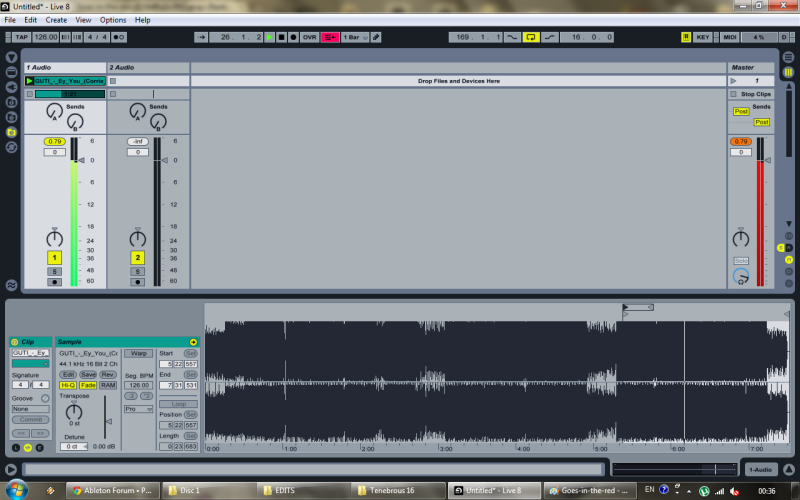
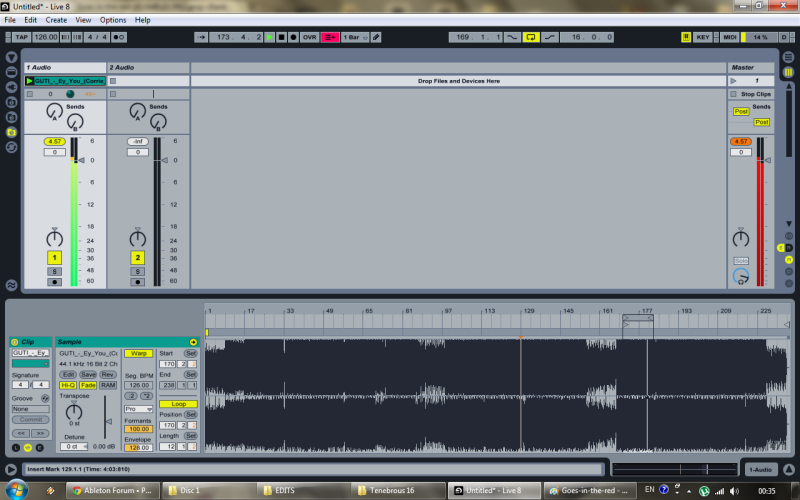
Re: Possible bug?? Audio files go above zero when loaded in Live
Posted: Sun Jul 24, 2011 10:19 pm
by boston_bul
I should add i'm using Live 8.1.1
Re: Possible bug?? Audio files go above zero when loaded in Live
Posted: Sun Jul 24, 2011 10:43 pm
by Khazul
Loading a mastered (ie limited) audio file in and processing it in some way will more than likely hchange the *peak* sample levels - its a nbaural consequence of the processing.
Live with it - drop you level by 3-6dB (or more depedning on what you are doing).
I doubt actual reconstruction filters are used, but equivalent and similar processes certainly occured during conversion to and from mp3, or during alot of the digital signal processing - ie they may reconstruct parts of a signal peak that was clipped previously by a limiter.
This seems to catch people out all over - theres another thread here where some is likely to suffereing due to the same for a different reason.
Maybe google for "analog reconstruction" you might find some good explanations etc.
Re: Possible bug?? Audio files go above zero when loaded in Live
Posted: Sun Jul 24, 2011 10:48 pm
by LeifonMars
boston_bul wrote:I should add i'm using Live 8.1.1
This is vital information indeed.
Re: Possible bug?? Audio files go above zero when loaded in Live
Posted: Sun Jul 24, 2011 11:04 pm
by oxygen23
I've noticed same problem with Live 8.2.2 as well, without any processing going on track or master channels..
I was confused because I can't remember I had that problem with earlier versions of Live

..

Re: Possible bug?? Audio files go above zero when loaded in Live
Posted: Mon Jul 25, 2011 5:51 pm
by kabelton
...turn off high-quality mode, that should fix it, i think.
Best
Re: Possible bug?? Audio files go above zero when loaded in Live
Posted: Mon Jul 25, 2011 9:54 pm
by concept_control
Try turning warp off.
When you warp audio with whatever setting, even keeping it at original tempo, warping distorts the audio. Not in a guitar amp fashion, but enough to create new peaks.
As mentioned, when warping, turn it down a bit to compensate.
Re: Possible bug?? Audio files go above zero when loaded in Live
Posted: Mon Jul 25, 2011 11:28 pm
by oxygen23
Hmm..Looks like I've detected what's the problem in my case .. It's EQ3

..
Everything is on zero, preset is default and I was using EQ3 just for kill switches (Low, Mid,Hi) during dj-ing ..
Now, I figured it out when I tried to turn it off, everything goes normal (no over-peak/red)..
This is new problem/bug to me, because I was using EQ3 for dj sets since Live 7 and never had problem with this until 8.2.2
(I also tried switching HiQ mode On/Off and Warp On/Off - doesn't change anything)

Re: Possible bug?? Audio files go above zero when loaded in Live
Posted: Tue Jul 26, 2011 8:24 am
by chapelier fou
oxygen23 wrote:Hmm..Looks like I've detected what's the problem in my case .. It's EQ3
..
Everything is on zero, preset is default and I was using EQ3 just for kill switches (Low, Mid,Hi) during dj-ing ..
Now, I figured it out when I tried to turn it off, everything goes normal (no over-peak/red)..
This is new problem/bug to me, because I was using EQ3 for dj sets since Live 7 and never had problem with this until 8.2.2
(I also tried switching HiQ mode On/Off and Warp On/Off - doesn't change anything)
EQ3 is known to be a non-neutral device. Somewhere in the manual.
Re: Possible bug?? Audio files go above zero when loaded in Live
Posted: Tue Jul 26, 2011 8:43 am
by Cezband
chapelier fou wrote:oxygen23 wrote:Hmm..Looks like I've detected what's the problem in my case .. It's EQ3
..
Everything is on zero, preset is default and I was using EQ3 just for kill switches (Low, Mid,Hi) during dj-ing ..
Now, I figured it out when I tried to turn it off, everything goes normal (no over-peak/red)..
This is new problem/bug to me, because I was using EQ3 for dj sets since Live 7 and never had problem with this until 8.2.2
(I also tried switching HiQ mode On/Off and Warp On/Off - doesn't change anything)
EQ3 is known to be a non-neutral device. Somewhere in the manual.
I was given an excellent description of exactly how it is non-neutral in a thread a while back, but I can't seem to find it

Essentially it's because at the overlap between each of the three bands, the freq is boosted due to that overlap.
Not sure if that's the OP's problem, considering no devices were mentioned though.
Re: Possible bug?? Audio files go above zero when loaded in Live
Posted: Tue Jul 26, 2011 10:58 pm
by oxygen23
Re: Possible bug?? Audio files go above zero when loaded in Live
Posted: Wed Jul 27, 2011 10:15 pm
by Cezband
As far as I know, it's always been non-neutral. I'm running 7.0.18 and it definitely colours the sound.
If I were you, I'd put it down to your production ear becoming even more super-honed and awesome over time, allowing you to pick up the differences more clearly than you did before

Re: Possible bug?? Audio files go above zero when loaded in Live
Posted: Sun Jul 31, 2011 6:24 pm
by boston_bul
Khazul wrote:Loading a mastered (ie limited) audio file in and processing it in some way will more than likely hchange the *peak* sample levels - its a nbaural consequence of the processing.
Live with it - drop you level by 3-6dB (or more depedning on what you are doing).
I doubt actual reconstruction filters are used, but equivalent and similar processes certainly occured during conversion to and from mp3, or during alot of the digital signal processing - ie they may reconstruct parts of a signal peak that was clipped previously by a limiter.
This seems to catch people out all over - theres another thread here where some is likely to suffereing due to the same for a different reason.
Maybe google for "analog reconstruction" you might find some good explanations etc.
I think you've nailed it, cause when i load a 24bit/48000 audio (for they are my internal bit depth and sample rate) i'm having ABSOLUTELY accurate metering - i limited one of my own tracks heavily and left the output of the limiter at -.024dB, as i'd normally do (short of the heavy limiting, of course) and then there were no peaks higher than -0.24dB, both WITH and WITHOUT WARP function and regardless of its WARP mode. "Mystery" solved - thanks a bunch!!!
You're suggesting to "live with it" and lower the gain. Since these peaks probably come from reconstruction is it safe to say that limiting them would take me back to the original master (of course, keeping in mind i'm probably using a different limiter plugin and probably different attack and release times than the original master which should have at least a mild effect on the final result)?
LeifonMars wrote:boston_bul wrote:I should add i'm using Live 8.1.1
This is vital information indeed.
Can you be more specific, please
Re: Possible bug?? Audio files go above zero when loaded in Live
Posted: Sun Jul 31, 2011 8:13 pm
by Hermanus
with EQ3 I always switch from 48 to 24 db avoiding the "color".
Sometimes it's cool but overall leave it at 24.
Re: Possible bug?? Audio files go above zero when loaded in Live
Posted: Mon Aug 01, 2011 6:14 pm
by LeifonMars
boston_bul wrote:I should add i'm using Live 8.1.1
This is vital information indeed.[/quote]
Can you be more specific, please[/quote]
Yeah, the current version is 8.2.2. Why upgrade does he not?
