Page 1 of 1
janky pitch bend wheel, midi filter vst plugin fix?
Posted: Thu Aug 04, 2011 7:27 am
by quandry
I've got a decent midi controller (StudioLogic VMK-161), but the pitch bend joystick tends to somehow send pitch bend info even when it's not being touched, so everything I play records unwanted pitch bend midi data and sounds like a drunken mess. I know I can fire up midi ox and filter the pitch bend data (on a pc here), but I'd rather just do it in Ableton if possible. Seems like the Ableton midi plugs don't have any filter features to just eliminate incoming pitch bend data, and neither does the keyboard.
Does anyone know of any vst plugins that can filter midi data like pitch bend? I found this useful suite of plugins, but can't seem to find one that simply filters midi pitch bend data out (though I admit I haven't tried super hard yet):
http://www.thepiz.org/plugins/?p=pizmidi
Any ideas???
Re: janky pitch bend wheel, midi filter vst plugin fix?
Posted: Thu Aug 04, 2011 7:38 am
by quandry
nevermind, the midi notch filter in the link I sent does the job, you just have to create an extra midi track with it on there, then use that track (post the midi notch effect) as the input on the midi instrument track you want to record on....saved a group track preset of the filter track, problem solved, cool set of midi plugins for free--nice!
Re: janky pitch bend wheel, midi filter vst plugin fix?
Posted: Mon Nov 28, 2011 7:01 pm
by spookydirt
just having same problem with my keyboard - will check out your solution, thanks!
Re: janky pitch bend wheel, midi filter vst plugin fix?
Posted: Mon Nov 28, 2011 7:15 pm
by spookydirt
this is slightly weird - just noticed you have a VMK-181 - my keyboard is a VMK-88...
there is some fault with the studiologic pitchbend chip?
Re: janky pitch bend wheel, midi filter vst plugin fix?
Posted: Mon Nov 28, 2011 7:25 pm
by quandry
yeah, something is messed up on the keyboard internally--I definitely have never damaged/bumped my pitchbend wheel. It's constantly sending out pitchbend info--really annoying when I'm trying to midi map controls in Ableton, and the PB always overrides the control I'm trying to map. I'm considering trying to disable/remove it somehow...I haven't looked into it on the StudioLogic side, to see if there is maybe some patch/update/fix, glad to know I'm not alone. The solution I have below works, but requires an extra midi track with just the notch filter, then you set your midi track with the vsti to recieve midi from the midi track with the notch filter--not ideal, but it works--no PB data is transmitted.
Re: janky pitch bend wheel, midi filter vst plugin fix?
Posted: Mon Nov 28, 2011 8:09 pm
by arafel
Nice to read your solution.. will keep in mind. TY

My Remote25 has 2 pots that send inaccurate data (like CC values from 2 surrounding pots). This occurs when the upper left corner of the Remote has any pressure on it (like using pots/ buttons in that area).
Good to know there is a solution other that manually deleting the data afterwards.
Re: janky pitch bend wheel, midi filter vst plugin fix?
Posted: Mon Nov 28, 2011 8:35 pm
by quandry
cool, happy to help. Your post inspired me to email StudioLogic's support in the USA, we'll see if they have any solutions. The free midi plugins in the link I sent are impressive--there must be at least 50 of them--pretty much anything you want to do with midi data, you can do it with these plug-ins--really a great resource both for problem-solving in our cases, or to get really creative!
Re: janky pitch bend wheel, midi filter vst plugin fix?
Posted: Mon Nov 28, 2011 9:03 pm
by spookydirt
I have a friend who is good with circuits (he builds guitar amps), I might ask his advice on taking or disabling the circuit.
I guess we need to find out somehow if it is the bend mechanism, or the chip it reports to that is responsible.
Re: janky pitch bend wheel, midi filter vst plugin fix?
Posted: Mon Nov 28, 2011 9:23 pm
by quandry
cool, let's stay in touch here and post any developments!
Re: janky pitch bend wheel, midi filter vst plugin fix?
Posted: Tue Nov 29, 2011 2:14 pm
by spookydirt
temp fix - I've disabled the bend altogether
now if you have a VMK-nn by studiologic, yopur circuits might look like this a little bit...
there are 3 wires running from the bend apparatus to the circuit, which I unplugged. (this is the centre socket in the photo) this didn't help, i was getting pitch changes still , but of full bends instead of smaller randon changes.
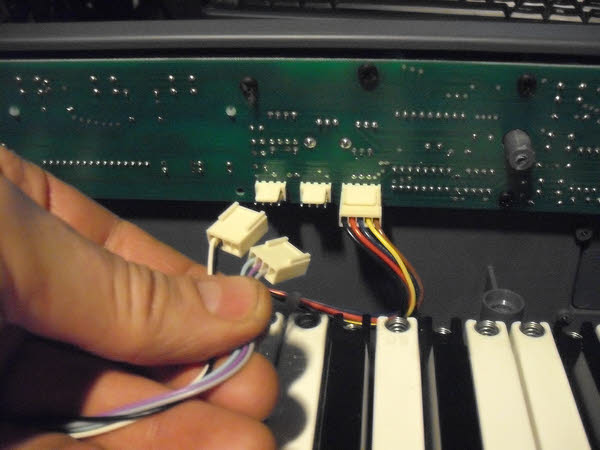
then i accidentally unplugged a pair of cables that originated at the same end of the board as the pitchbend (left-most socket in photo) this seems to completely disable the PB (with the other unplugged also). which will do for a quick fix.
Re: janky pitch bend wheel, midi filter vst plugin fix?
Posted: Tue Nov 29, 2011 6:55 pm
by quandry
You rule!!! I'm on this tonight, thanks for the fix, this is great--just what I needed!!!
Re: janky pitch bend wheel, midi filter vst plugin fix?
Posted: Tue Nov 29, 2011 7:05 pm
by spookydirt
your keyboard is a bit more fancy than mine - but i guess some of that might work! good luck!
Re: janky pitch bend wheel, midi filter vst plugin fix?
Posted: Tue Nov 29, 2011 8:30 pm
by Silverfish
This happened with my E-MU Xboard 25, I'm pretty sure it's a combination of shoddy pitch bend parts and bad wires, and I'm gonna replace them when I get some free time.
For as many midi controllers exist in the world, I still feel like there is a lack of a serious quality boards with just enough features.
Re: janky pitch bend wheel, midi filter vst plugin fix?
Posted: Tue Nov 29, 2011 9:04 pm
by spookydirt
I'm hoping it's just the potentiometer failing, as that could be easy to fix for one who knows how to use a soldering iron, or knows someone who does