Ableton Forum - user style
Posted: Fri Oct 26, 2012 12:16 am
If you don't really like the new style for the Ableton Forum I have made one you can use instead. (If you use either Chrome or Firefox) [updated instructions below]
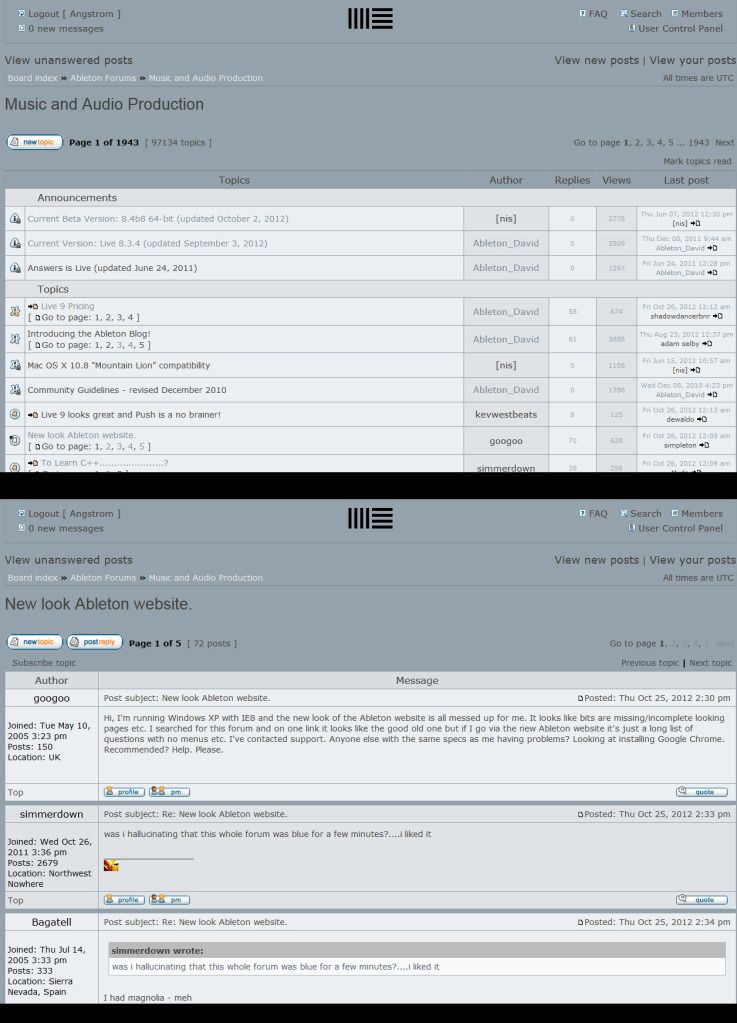
It looks like this
you need an add-on for either Firefox or Chrome
https://addons.mozilla.org/en-US/firefox/addon/stylish/
https://chrome.google.com/webstore/deta ... leoegfcffe (fixed link)
Firefox Instructions
add this user-style to the Stylish plugin
Chrome Instructions- it's quite similar ... but different. Add this user-style to the Stylish plugin
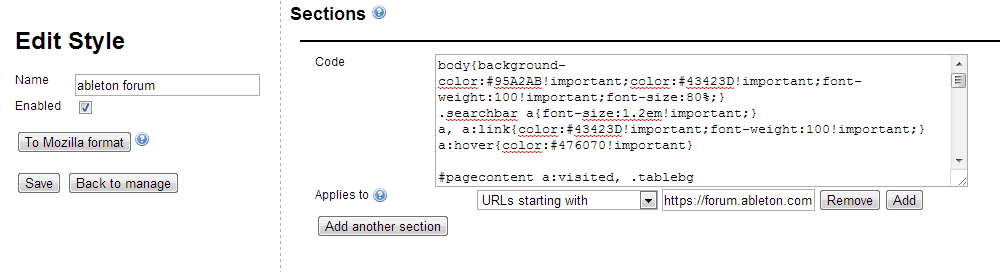
I suggest you pay close attention to this Chrome install box settings if you are using Chrome.
Notice the pulldown that says "Applies to [urls starting with] [https://forum.ableton.com]"
make sure that looks that way.
(updated nov2012 to fix quoteboxes)
It looks like this
you need an add-on for either Firefox or Chrome
https://addons.mozilla.org/en-US/firefox/addon/stylish/
https://chrome.google.com/webstore/deta ... leoegfcffe (fixed link)
Firefox Instructions
add this user-style to the Stylish plugin
Code: Select all
@namespace url(http://www.w3.org/1999/xhtml);

@-moz-document domain("forum.ableton.com") {
	body{
		background-color:#95A2AB!important;
		color:#43423D!important;
		font-weight:100!important;
		font-size:0.9em!important;
		}
	.searchbar a{font-size:1.2em!important;}
	a, a:link{color:#43423D!important;font-weight:100!important;}
	a:hover{color:#476070!important}

	#pagecontent a:visited, .tablebg a:visited{color:#7F8D98!important;}
	#wrapheader{padding:0!important;}

	div#menubar td{border:none!important;/*kills the hard black border at the top*/}
	div#menubar div table tbody tr.row1 td div.gensmall{display:none!important;/*hides useless "last visited time" message*/}
	td.row1 p.breadcrumbs a{color:#E9EAEF!important;font-weight:100!important;}

	.titles{font-weight:100!important;}
	.row1,html body.ltr div#wrapcentre div#pagecontent div table.tablebg tbody tr td.row1{background:#EBEFF2!important;}

	div#wrapheader div#menubar div table tbody tr.row1{
		background:transparent!important;
		box-shadow:0px 1px 1px #79858E;
		color:#E9EAEF;
	}

	html body.ltr div#wrapcentre div div table.tablebg{box-shadow:0px 1px 1px #79858E;}

	div#wrapcentre div div table.tablebg tbody tr td.row1{background:transparent!important;}
	#wrapcentre > br{display:none;}
	#wrapcentre > div {clear:both}
	#pageheader{padding:20px 0px!important}
	td { word-break: break-all;}
	.row2{background:#DFE3E6!important;}
	.row3 th{background:#95A2AB!important;border-top:2px solid #808D95}

	html body.ltr div#wrapcentre div#pagecontent div table.tablebg tbody tr td.row2 b.gensmall{
		font-size:1.2em!important;padding:10px
		50px!important;
	}

	.topicdetails{font-size:0.8em!important;color:#95A2AB!important;}
	.roundedtl{font-size:1.2em;}
	.profile, .roundedtl{background-image:none !important;}

	th{background:#D8DDE0!important;color:#403E39!important;font-weight:100!important;font-size:1.2em;}
	html body.ltr div#wrapcentre div#pagecontent table.tablebg tbody tr th{
		color:#43423D!important;font-size:1.2em;font-weight:100!important;
	}

	.genmed{padding: 10px 20px!important;}
	.cornerbr, .cornerbl, .cornertl{display:none!important;}

	.quotetitle, .codetitle{background:#95A2AB!important;border:none!important;}
	.quotecontent{border-color:#95A2AB!important;}
}
Chrome Instructions- it's quite similar ... but different. Add this user-style to the Stylish plugin
Code: Select all
body{background-color:#95A2AB!important;color:#43423D!important;font-weight:100!important;font-size:90%;}
.searchbar a{font-size:1.2em!important;}
a, a:link{color:#43423D!important;font-weight:100!important;}
a:hover{color:#476070!important}

#pagecontent a:visited, .tablebg a:visited{color:#7F8D98!important;}
#wrapheader{padding:0!important;}

div#wrapheader div#menubar div.gensmall{display:none;}
.titles{font-weight:100!important;}
.row1,
html body.ltr div#wrapcentre div#pagecontent div table.tablebg tbody tr td.row1{background:#EBEFF2!important;}
td.row1 p.breadcrumbs a{color:#E9EAEF!important;font-weight:100!important;}
div#wrapheader div#menubar div table tbody tr.row1{background:transparent!important;box-shadow:0px 1px 1px #79858E;
color:#E9EAEF;}

html body.ltr div#wrapcentre div div table.tablebg{box-shadow:0px 1px 1px #79858E;}

div#wrapcentre div div table.tablebg tbody tr td.row1{background:transparent!important;}

.row2{background:#DFE3E6!important;}
.row3 th{background:#95A2AB!important;border-top:2px solid #808D95}
html body.ltr div#wrapcentre div#pagecontent div table.tablebg tbody tr td.row2 b.gensmall{font-size:1.2em!important;padding:10px 50px!important; }
html body.ltr div#wrapcentre div#pagecontent div table.tablebg tbody tr td.row2{}
.topicdetails{font-size:0.8em!important;color:#95A2AB!important;}

.roundedtl{font-size:1.2em;}
.profile, .roundedtl{background-image:none !important;}

th{background:#D8DDE0!important;color:#403E39!important;font-weight:100!important;font-size:1.2em;}
html body.ltr div#wrapcentre div#pagecontent table.tablebg tbody tr th{color:#43423D!important;font-size:1.2em;font-weight:100!important;}

.genmed{padding: 10px 20px!important;}
.cornerbr, .cornerbl, .cornertl{display:none!important;}

.quotetitle, .codetitle{background:#95A2AB!important;border:none!important;}
.quotecontent{border-color:#95A2AB!important;}
I suggest you pay close attention to this Chrome install box settings if you are using Chrome.
Notice the pulldown that says "Applies to [urls starting with] [https://forum.ableton.com]"
make sure that looks that way.
(updated nov2012 to fix quoteboxes)


