Page 1 of 2
Midi trouble - can't get Ableton to speak to Nanozwerg synth
Posted: Sun Apr 21, 2013 8:53 pm
by Lockah
I know it's a long shot posting here but wondered if anyone had any advice to see if I can pinpoint exactly where i'm having trouble?
I recently picked up an MFB Nanozwerg

and I'm trying to sequence it via Ableton using this
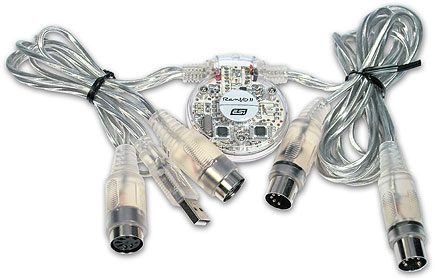
I have tried to set up a MIDI channel, and tested by routing the MIDI to outputs 1 and 2, and neither works. You can set the input MIDI channel on the Nanozwerg, but just to be safe I have changed the output MIDI channel to 1-16, on both outputs. None of these options gets a peep out of the synth. I can test the synth by setting its onboard sequencer to play a continuous tone, so the audio side is fine.
So basically the way I see it one of three things could be wrong:
1. The MIDI input of the synth is faulty. I don't have another bit of hardware with a MIDI in to swap the synth with.
2. The MIDI interface is faulty. It's brand new, but it could happen.
3. My Ableton settings are wrong. Looked it up a fair bit but they could be incorrect. Not sure.
Any suggestions?
Re: Midi trouble - can't get Ableton to speak to Nanozwerg synth
Posted: Sun Apr 21, 2013 9:03 pm
by #1thelark
just a shot in the dark...
check your midicable midiout needs to be connected to the nanozwerg.
check your midisettings, add a midiclip with a few notes, play them... if nothing comes out, play around with the midisettings.
usbcable is recognized by windows?
Re: Midi trouble - can't get Ableton to speak to Nanozwerg synth
Posted: Sun Apr 21, 2013 9:11 pm
by Lockah
#1thelark wrote:just a shot in the dark...
check your midicable midiout needs to be connected to the nanozwerg.
check your midisettings, add a midiclip with a few notes, play them... if nothing comes out, play around with the midisettings.
usbcable is recognized by windows?
Hi there,
I connected the MIDI out cable into the MIDI in on the Nanozwerg - the only way it can receive notes.
The MIDI settings look correct. I made a MIDI track in Ableton, hit a few notes in a clip but no noise comes out of the Nanozwerg. The Nanozwerg can be set to receive any MIDI channel from 1-16, but I tried setting the output in the track to every channel 1-16 and none of them work. I also tried using both output cables on the MIDI interface just in case one wasn't working but still, nothing.
The USB/MIDI interface/cable definitely seems to be recognised by Windows. The LED glows when it is plugged in and I can configure it as an output in the MIDI preferences in Ableton.
Re: Midi trouble - can't get Ableton to speak to Nanozwerg synth
Posted: Sun Apr 21, 2013 9:19 pm
by #1thelark
I also had some problems with some cheap usbmidicables.
Does the cable show up in midi preferences? Did you activate Track and Remote for the midiout?
If the Romio is built similar to the cheap cables I bought then there should be a led lighting up when there are midinotes played...
Just checked the manual... nanozwerg receives only notes from c1-c6
Re: Midi trouble - can't get Ableton to speak to Nanozwerg synth
Posted: Sun Apr 21, 2013 10:57 pm
by Lockah
#1thelark wrote:I also had some problems with some cheap usbmidicables.
Does the cable show up in midi preferences? Did you activate Track and Remote for the midiout?
If the Romio is built similar to the cheap cables I bought then there should be a led lighting up when there are midinotes played...
Just checked the manual... nanozwerg receives only notes from c1-c6
Here's my MIDI preferences, as you can see Ableton picks up the device and ins/outs.

Here's the Ableton MIDI track, and my Nanozwerg is set to receive on Channel 2. The clip is playing four D4 notes on loop. Surely there's nothing else to set up?

The cable LED seems to be on the whole time. Do you reckon it's this crappy cheap cable?
Re: Midi trouble - can't get Ableton to speak to Nanozwerg synth
Posted: Sun Apr 21, 2013 11:13 pm
by #1thelark
Do the notes in the midiclip play in the right keyzone (c1-c6)
can you play notes with the pc keyboard?
Re: Midi trouble - can't get Ableton to speak to Nanozwerg synth
Posted: Sun Apr 21, 2013 11:23 pm
by Lockah
#1thelark wrote:Do the notes in the midiclip play in the right keyzone (c1-c6)
can you play notes with the pc keyboard?
Yes, the note in the clip is just D4 hit a few times.
Yes, I can play notes with the PC keyboard, or with my M-Audio Keystation plugged in via USB to the laptop.
Both respond in the MIDI channel but no noise from the Nanozwerg. However, if I were to insert a VST or instrument into the same MIDI channel it would play fine.
Re: Midi trouble - can't get Ableton to speak to Nanozwerg synth
Posted: Sun Apr 21, 2013 11:27 pm
by #1thelark
try another usb-port and/or rebooting (obviously

)
do you have a proper midicable? that would solve the problem, I guess.
Still you could check the usbmidicable with the m-audio... plug the usbmidiinput to the output of the maudio. route the midi from the usbmidi-in to a vst. does it work?
Re: Midi trouble - can't get Ableton to speak to Nanozwerg synth
Posted: Mon Apr 22, 2013 12:29 am
by Lockah
#1thelark wrote:try another usb-port and/or rebooting (obviously
)
do you have a proper midicable? that would solve the problem, I guess.
Still you could check the usbmidicable with the m-audio... plug the usbmidiinput to the output of the maudio. route the midi from the usbmidi-in to a vst. does it work?
I did try rebooting and different USB, yeah.
Unfortunately even though I have a real MIDI cable, the keyboard only has USB connectivity. I guess the biggest likelihood is that the MIDI interface sucks. I'll get a better one ordered and see if it fixes the problem.
Re: Midi trouble - can't get Ableton to speak to Nanozwerg synth
Posted: Mon Apr 22, 2013 7:08 am
by #1thelark
Yeah a cable is one option but also check other usbports, maybe a powered usbhub. And try it on a different pc. Or go to a musicstore to check the nano with something that has midiout / cvout.
is there really no midiout on that maudio, that sucks...
Re: Midi trouble - can't get Ableton to speak to Nanozwerg synth
Posted: Tue Apr 23, 2013 9:40 pm
by Lockah
Got myself a new MIDI interface and MIDI is definitely sending. I can even route the cable to the MIDI input and send the MIDI data between ableton tracks. so the Nanozwerg is definitely at fault here!
Is there anything else that could be set up wrong here?
The notes are between C1 and C6 and I've tried using every channel ont he Nanozwerg's MIDI channel select AND testing every MIDI output channel too just to be certain, still nothing. The manual is very basic. Any final ideas on what could be wrong before I send this yellow nightmare back?

Re: Midi trouble - can't get Ableton to speak to Nanozwerg synth
Posted: Tue Apr 23, 2013 10:27 pm
by #1thelark
Strange, but yeah as I said try to get some sounds out of the Nano by using CV... go to a musicstore and ask if they can hook it up to a synth or interface with cvout and try that (and midi of course, too).
Re: Midi trouble - can't get Ableton to speak to Nanozwerg synth
Posted: Tue Apr 23, 2013 10:41 pm
by Lockah
It makes a sound if you use the nano's test tone. Good ones as well!
Just won't play notes from MIDI input.
Surely this indicates the input on the Nano is faulty.
Re: Midi trouble - can't get Ableton to speak to Nanozwerg synth
Posted: Tue Apr 23, 2013 11:13 pm
by #1thelark
There must be a internal switch between midi and cv-input... maybe it's locked somehow to cv-input or so... taking it to a nearby store would be the best way to make sure there is no problem on softwareside (like a fcked up windows/driver installation/configuration).
Re: Midi trouble - can't get Ableton to speak to Nanozwerg synth
Posted: Wed Apr 24, 2013 10:41 am
by dazzer
You're doing this via Live's External Instrument device yeah?