Page 1 of 2
Hidden Feature - WHY DIDNT I KNOW ABOUT THIS!
Posted: Sun May 12, 2013 10:44 am
by Fantismo
Why didnt i know about this...
Why on earth would ableton not give us a clearer option for this!
This company baffles me..
----------------
http://resoundsound.com/ableton-live-sh ... on-tracks/
SECRET FEATURE IN ABLETON LIVE: SHOW DEVICES / PLUGINS ON TRACKS
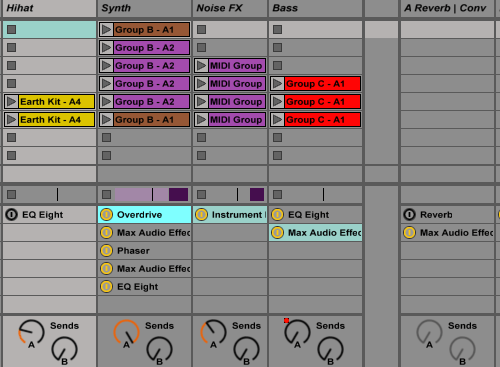
Re: Hidden Feature - WHY DIDNT I KNOW ABOUT THIS!
Posted: Sun May 12, 2013 11:20 am
by Sibanger
It's very handy, that's for sure. I first saw it in this thread.
viewtopic.php?f=4&t=177825&start=45
( Should be a sticky

)
Re: Hidden Feature - WHY DIDNT I KNOW ABOUT THIS!
Posted: Sun May 12, 2013 2:15 pm
by supamonsta
fun!
thanks for that, could be really helpful

incredible to let it hidden, strange choice from ableton?
Re: Hidden Feature - WHY DIDNT I KNOW ABOUT THIS!
Posted: Sun May 12, 2013 3:02 pm
by sowhoso
i'm glad they didn't wait to fix the little bug to include this feature
long time coming...other DAWs have had this
Re: Hidden Feature - WHY DIDNT I KNOW ABOUT THIS!
Posted: Sun May 12, 2013 9:45 pm
by Fantismo
The glitch is that new plugs doent show the name is that right?
Is there a workaround for this?
thanks
ben
Re: Hidden Feature - WHY DIDNT I KNOW ABOUT THIS!
Posted: Sun May 12, 2013 10:11 pm
by Fat_Stanley
By 'workaround' I don't know if you mean something more elaborate, but you can resize the track a touch and the plugin name will appear...
Re: Hidden Feature - WHY DIDNT I KNOW ABOUT THIS!
Posted: Mon May 13, 2013 7:39 am
by Sibanger

This......
Fat_Stanley wrote:By 'workaround' I don't know if you mean something more elaborate, but you can resize the track a touch and the plugin name will appear...
Re: Hidden Feature - WHY DIDNT I KNOW ABOUT THIS!
Posted: Mon May 13, 2013 7:44 am
by Jack McOck
I'm curious as to why people find this feature useful...
Re: Hidden Feature - WHY DIDNT I KNOW ABOUT THIS!
Posted: Mon May 13, 2013 7:48 am
by artpunk
Jack McOck wrote:I'm curious as to why people find this feature useful...
I guess, if you happen to have the screen real estate, it shows exactly what devices you have on any given track without having to go down to the bottom devices window and scroll the wee window... ?
Re: Hidden Feature - WHY DIDNT I KNOW ABOUT THIS!
Posted: Mon May 13, 2013 7:57 am
by Sibanger
^^ This is the number 1 reason.
Also, on some projects, I'll often have stuff turned off, for what ever reason, and this is a quick way to see if anything is switched on/off without having to open up and go searching.
Re: Hidden Feature - WHY DIDNT I KNOW ABOUT THIS!
Posted: Mon May 13, 2013 7:58 am
by Jack McOck
....So how does it handle Insane-Mega-Modular-FX-Groups-from-HELL?

Re: Hidden Feature - WHY DIDNT I KNOW ABOUT THIS!
Posted: Mon May 13, 2013 8:06 am
by Sibanger
12 slots max.
You can make it active,or hide it at the click of a button like send,returns,in/out etc. ( you probably know this already )
Re: Hidden Feature - WHY DIDNT I KNOW ABOUT THIS!
Posted: Tue May 14, 2013 9:25 am
by Jack McOck
Yup, your tutorial is solid. I actually followed it before I saw this thread.
Re: Hidden Feature - WHY DIDNT I KNOW ABOUT THIS!
Posted: Tue May 14, 2013 10:01 am
by sdmiddleton
Hi All,
I think i'm being really thick - But I can't find this file structure on my HD - Macintosh HD/Users/username/Library/Preferences/Ableton/Live 9.x.x/ ? I only get as far as Macintosh HD/Users/Username/ - There's no Library Folder undr my username - I can go into the Library root straight from my HD but inside I get to Prefrences there is no Ableton Folder? Some help would be much appreciated?
Cheers

Re: Hidden Feature - WHY DIDNT I KNOW ABOUT THIS!
Posted: Tue May 14, 2013 10:14 am
by Jack McOck
sdmiddleton wrote:Hi All,
I think i'm being really thick - But I can't find this file structure on my HD - Macintosh HD/Users/username/Library/Preferences/Ableton/Live 9.x.x/ ? I only get as far as Macintosh HD/Users/Username/ - There's no Library Folder undr my username - I can go into the Library root straight from my HD but inside I get to Prefrences there is no Ableton Folder? Some help would be much appreciated?
Cheers
From the Finder,
Cmd+Shift+G. This will open a GO-TO-FOLDER tab that will allow you in input that address, or simply enter "~/library", which will open your user Library, from which you can then browser to the desired location.
Since Lion, Apple have hidden the user library in order to make people like you feel really thick. Their bad, not yours.