Page 1 of 2
Lock piano roll to key scale & mode
Posted: Mon Aug 31, 2015 2:41 am
by TaoEntropy
I would like Ableton to have the ability to lock the piano roll to a particular key scale and mode, especially the key the Push controller is locked to, and for the piano roll to show the correct name of the note letter along the left side according to that scale.
I realize that you can load/draw in the notes of the scale and fold, but this is kind of a lot of unnecessary steps and it still displays the wrong note letter name. A drop down menu to select scale would be much easier. You should be able to toggle this locking behavior on and off quickly for incedental notes that don't fall within the scale.
Thanks!
Re: Lock piano roll to key scale & mode
Posted: Mon Aug 31, 2015 4:59 am
by re:dream
have you tried clyphx as workaround?
viewtopic.php?p=1581077#p1581077
Re: Lock piano roll to key scale & mode
Posted: Mon Aug 31, 2015 11:37 am
by Richie Witch
It seems like most of what you're asking for is already in the Scale MIDI effect native to Ableton.
If I remember correctly, you can adjust the setup of Scale to create your own custom scales, which would allow you to set up each of the key modes your looking for and save them as presets.
Displaying the correct note name would still be an issue.
Re: Lock piano roll to key scale & mode
Posted: Mon Aug 31, 2015 12:16 pm
by TaoEntropy
I want the left hand side of the piano roll to display the correct note name accirding to the scale I'm in. If I'm in B flat minor, I don't want it to display A sharp next to the b flat note. Etc...
Re: Lock piano roll to key scale & mode
Posted: Mon Sep 21, 2015 11:14 pm
by Quez
TaoEntropy wrote:I want the left hand side of the piano roll to display the correct note name accirding to the scale I'm in. If I'm in B flat minor, I don't want it to display A sharp next to the b flat note. Etc...
That would be sweet.
Re: Lock piano roll to key scale & mode
Posted: Sun Sep 27, 2015 5:06 pm
by Warmonger
Oh yes, Push-style piano roll would be incredibly helpful!
Re: Lock piano roll to key scale & mode
Posted: Sat Dec 26, 2015 5:37 pm
by mzero
Bump: Is this still not possible in 9.5? I really don't want to look at sharps when my key has flats...
Re: Lock piano roll to key scale & mode
Posted: Tue Mar 29, 2016 10:05 pm
by bleblans
+1 for this feature request. Would be really handy.
Re: Lock piano roll to key scale & mode
Posted: Tue Mar 29, 2016 11:23 pm
by TaoEntropy
Furthermore, I would like to see Live develop key/scale features similar to or better than what Cubase has been implementing where tracks can be easily transposed to other keys and scales with a single assignable "global project key" parameter change and other tracks can be harmonized / put in key instantly.
Re: Lock piano roll to key scale & mode
Posted: Wed Apr 06, 2016 9:15 am
by Idonotlikebroccoli
+1 for global project key - this would often make things even easier than my most wanted feature, layered MIDI editing.
Re: Lock piano roll to key scale & mode
Posted: Sun May 08, 2016 8:55 am
by delpeche
I think this is what you are looking for?
Not the solution but a quick workaround..
https://youtu.be/UHObRwb_FYw
Re: Lock piano roll to key scale & mode
Posted: Sat Jul 06, 2019 7:06 pm
by svankov
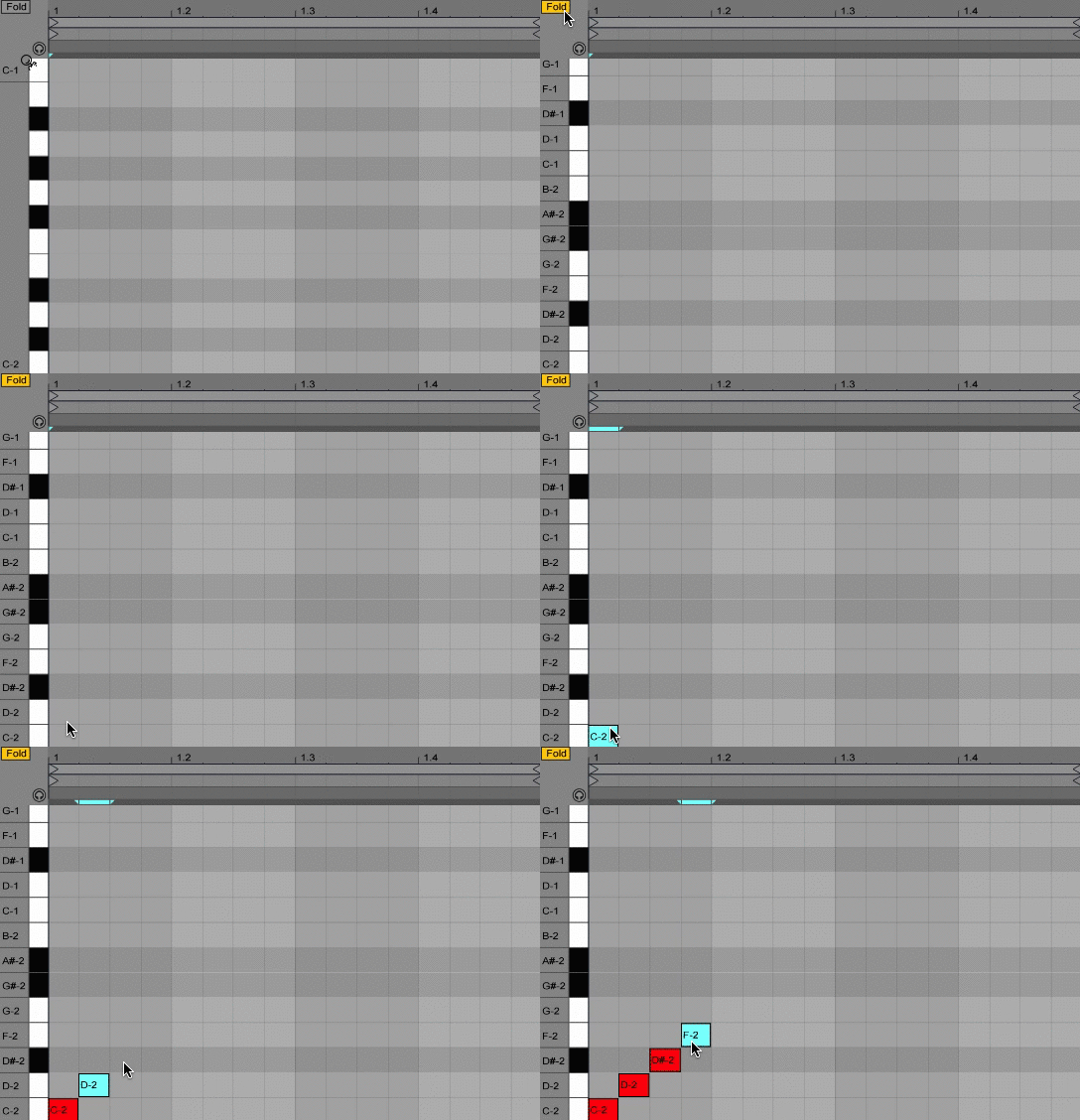
I've created a simple tool that automatically places "ghost notes" in the selected MIDI clip. You can use one of the 39 included scales or roll your own. You can trigger placement of ghost notes via keyboard shortcut or assigned MIDI, then click the fold button in the MIDI clip to only display those notes. More info here -
http://tetmusic.com/scale_fold_features.html.
Re: Lock piano roll to key scale & mode
Posted: Tue Jul 09, 2019 5:42 am
by gbert
That has to be done per each clip on a track, correct? I used to think that placing ghost notes at the beginning of a track was good, but then saw that when making a new clip on the existing track, it didn’t retain the ghost notes.
It would be best if Live supported scale highlighting (see FL Studio) and/or folding to a scale natively.
Re: Lock piano roll to key scale & mode
Posted: Tue Jul 09, 2019 7:13 am
by pottering
Takes manual work, but you can make a MIDI Effect Rack with the scale you want, that works like Drum Racks (shows names, doesn't need to Fold).
Gotta make a (empty) Chain for each note, with key zones set to each note too (and name each Chain with the note name).
Then you right-click any chain and enable "Show Names in MIDI Editor".
Then only the notes with key zones will appear on the MIDI Editor.
Extra work, but after spending a couple boring days making Racks for your favorite scales, then you will have Racks that are re-usable and modular.
Probably someone could make a bunch of those for selling or marketing (like people did with the ghost notes trick).
Re: Lock piano roll to key scale & mode
Posted: Thu Jul 25, 2019 6:45 am
by svankov
gbert wrote: ↑Tue Jul 09, 2019 5:42 am
That has to be done per each clip on a track, correct? I used to think that placing ghost notes at the beginning of a track was good, but then saw that when making a new clip on the existing track, it didn’t retain the ghost notes.
It would be best if Live supported scale highlighting (see FL Studio) and/or folding to a scale natively.
That's correct. New MIDI clips need to be tagged again. Or you could duplicate a tagged clip. The "tag" button on the device can be keyboard or MIDI-learned so it's quick to access via shortcut. But I agree - I would love to see a native ability to do this.