Page 1 of 1
step sequencer note length
Posted: Mon Nov 09, 2015 6:19 pm
by ghunter
Hello,
To define note length with the step sequencer in Push 2 can you press the start pad for the start position and the end pad for the end position or do you have to press the start button and turn the note length knob again?
Sorry I was supposed to post this under Push Q&A, please feel free to move it.
regards
Greg
Re: step sequencer note length
Posted: Mon Nov 09, 2015 6:59 pm
by scheffkoch
…just select the pad and turn length (via "clip")...
Re: step sequencer note length
Posted: Mon Nov 09, 2015 7:00 pm
by ghunter
Hi scheffkoch, what do you mean via clip?
Re: step sequencer note length
Posted: Mon Nov 09, 2015 9:52 pm
by scheffkoch
…the button on your push...
Re: step sequencer note length
Posted: Mon Nov 09, 2015 10:04 pm
by tedlogan
He is asking about individual MIDI note lengths within a clip and how to alter their duration within Push's note step sequencer, not clip length (if that's what you responded about)
I'm on Push 1, 9.5.1b1 Beta. Still have to hold down the pad and then define the length of the note with an encoder. I also wonder if it's different on Push 2. The way you are enquiring about sounds like a pretty good way to perform this action.
Re: step sequencer note length
Posted: Mon Nov 09, 2015 10:16 pm
by rikrak
ghunter wrote:Hello,
To define note length with the step sequencer in Push 2 can you press the start pad for the start position and the end pad for the end position or do you have to press the start button and turn the note length knob again?
Sorry I was supposed to post this under Push Q&A, please feel free to move it.
regards
Greg
Hi Greg,
I haven't used a Push1 but on Push2...
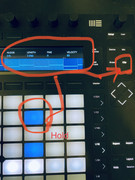
You hold a note and a context menu pops up with Note Settings (and Automation). The available Note Settings are Nudge, Length, Fine and Velocity. They are adjustable using the last 4 encoders.
Nudge moves the Start in percentage of a grid step.
Length changes the Note Length in whole grid steps.
Fine adjusts the Note Length in percentage of a grid step.
Re: step sequencer note length
Posted: Tue Nov 10, 2015 11:08 am
by scheffkoch
...you're right...sorry about the confusion!...
Re: step sequencer note length
Posted: Tue Nov 10, 2015 12:44 pm
by ghunter
tedlogan wrote:He is asking about individual MIDI note lengths within a clip and how to alter their duration within Push's note step sequencer, not clip length (if that's what you responded about)
I'm on Push 1, 9.5.1b1 Beta. Still have to hold down the pad and then define the length of the note with an encoder. I also wonder if it's different on Push 2. The way you are enquiring about sounds like a pretty good way to perform this action.
Yes this is exactly what I am talking about. Sorry for my poor explanation.
I hate having to press a pad, wait for the note length option to appear then turn the note length knob. This is one of the reasons I have started to look at dedicated hardware sequencers. Probably not an issue for most people but I find it kills my work flow.
I was hoping that a script like NativeKontrol would be able to implement this but I have yet to see such a script.
many thanks
Re: step sequencer note length
Posted: Sat May 23, 2020 11:58 pm
by chatterbot
Yea looks like this was not a requirement before but the latest software update you now only see the "Nudge, Length, Fine, Velocity" settings if you're in the Clip view
see below...