Page 1 of 1
Ableton Connection Kit
Posted: Thu Mar 24, 2016 10:15 pm
by Angstrom
Re: Ableton Connection Kit
Posted: Fri Mar 25, 2016 3:28 pm
by [jur]
I'd say, if Angstrom is happy then that's terrific!

Re: Ableton Connection Kit
Posted: Fri Mar 25, 2016 5:20 pm
by Angstrom
I think everybody should be ashamed that it's me who posted this. Be ashamed of yourselves!
Of course [JUR] is refering to my general moan that as a "patcher" oriented person I prefer a more integrated patching environment rather than spending music-making time in an IDE with potential to eat every weekend I possess.
My most common statement is that a Lego-like mid-level modular aproach is a vital missing link between the WYSIWYG of Live and the programming style of Max.
Increasingly some great mid-level tools ARE now provided (such as expression mappers, midi routers, envelopes, etc) sadly their adoption is reduced by the browser experience. Great mid-level tools are buried in giant lists, we scour the filenames trying to remember what "ang-pres-brwsr-midi-v4" was. The only way I manage them is uninstalling and reinstalling packs, otherwise the content is overwhelming!
So, that said ...
I think this is a very nice pack, covering all sorts of bases for connecting Live to the web, APIs, video, LegoMindstorms, Arduino, OSC and more. It's playful, and it's entertaining. It's provocative. It's got a number of immediately obvious uses, from simply "connecting to my ipad" to robotic instrument player so I can trigger instruments to sample at defined quantised velocities.
I've been using some of the (heavilly modified) erasermice OSC tools, but I'll certainly look at this to construct alternatives.
Re: Ableton Connection Kit
Posted: Fri Mar 25, 2016 6:44 pm
by [jur]
Angstrom wrote:I think everybody should be ashamed that it's me who posted this. Be ashamed of yourselves!
Actually I wanted to post it, but I had the secret hope that you find out by yourself while checking the great blog articles on the main ableton.com page

But yeah, that's a great pack (that should have been introduced a long time ago!

)
Re: Ableton Connection Kit
Posted: Fri Mar 25, 2016 7:43 pm
by Angstrom
I actually saw it on Synthtopia! It's one of the blogs I regularly check for music tech news
http://www.synthtopia.com/content/2016/ ... -and-more/
I only visit the Ableton blog to catch up on boyband gossip!

Re: Ableton Connection Kit
Posted: Sat Mar 26, 2016 10:02 am
by redglass
I dead love this pack, just jecked LeapMotion, webcam & weather tool. So crazy! For me this is great, as I did not yet dig into Max programming!
Thanks for that suprising easter egg!
cheers, Bastian
Re: Ableton Connection Kit
Posted: Mon Apr 04, 2016 12:57 pm
by telekom
OK... I raise my hands here and admit I am a complete novice with both Arduino and M4L. I have an Arduino (I can make lights flash and a few other simple things) and I would like to learn more about M4L. I'm a noob. I've read Massimo Banzi's book (at least twice), I've read sections of the O'Reilly book on Processing, and I am hugely impressed by the amazing Amanda Ghassaei on Instructables. I still don't really know what I'm doing!
Do any of you fine experts have thoughts on what an enthusiastic noobster like me should do next to get further with Arduino/M4L/sensors and lights?
Re: Ableton Connection Kit
Posted: Tue Apr 12, 2016 2:08 pm
by [rry]
telekom wrote:OK... I raise my hands here and admit I am a complete novice with both Arduino and M4L. I have an Arduino (I can make lights flash and a few other simple things) and I would like to learn more about M4L. I'm a noob. I've read Massimo Banzi's book (at least twice), I've read sections of the O'Reilly book on Processing, and I am hugely impressed by the amazing Amanda Ghassaei on Instructables. I still don't really know what I'm doing!
Do any of you fine experts have thoughts on what an enthusiastic noobster like me should do next to get further with Arduino/M4L/sensors and lights?
Hey there,
Leap Motion was a great entry point for me, as it was a matter of plug and play really, (except all of the Leap Motion App store nonsense). Of course, programming your own Arduino based device is gonna open a lot more options, but if you are looking for some interesting numbers to control musical paramters, then Id recommend starting here.
For more info on everything in the M4L connection, check the Github pages:
https://github.com/Ableton/m4l-connection-kit
Best,
r
Re: Ableton Connection Kit
Posted: Mon Apr 25, 2016 2:16 am
by DJ2MN
I'm excited about the Connection Kit OSC component because I've been trying to use LiveGrabber and finding it buggy, and I can't customise it to my needs. I'm doing some work getting Live talking to Processing via OSC.. I'm not a Max person but I can open up patches and tweak them. But when I looked into OSC Send I'm getting the feeling it's not going to do what I want

First, you have to map an existing control, but I just want to have each send object come up as an automation envelope. At the moment it looks like the individual parameters have envelope control but not the value. And I can't see a way to change the value sent, i want to be able to use ranges like 0-255. Am I making any sense here at all?
Another way of putting it is: Is there a way to set up something like a macro object/instrument with 8 knobs that map to the OSC Sends, and how might i go about changing the values sent from the seemingly fixed 0-100% scale?
many thanks for any pointers.
Re: Ableton Connection Kit
Posted: Sun May 01, 2016 1:37 pm
by telekom
[rry] wrote:telekom wrote:OK... I raise my hands here and admit I am a complete novice with both Arduino and M4L. I have an Arduino (I can make lights flash and a few other simple things) and I would like to learn more about M4L. I'm a noob. I've read Massimo Banzi's book (at least twice), I've read sections of the O'Reilly book on Processing, and I am hugely impressed by the amazing Amanda Ghassaei on Instructables. I still don't really know what I'm doing!
Do any of you fine experts have thoughts on what an enthusiastic noobster like me should do next to get further with Arduino/M4L/sensors and lights?
Hey there,
Leap Motion was a great entry point for me, as it was a matter of plug and play really, (except all of the Leap Motion App store nonsense). Of course, programming your own Arduino based device is gonna open a lot more options, but if you are looking for some interesting numbers to control musical paramters, then Id recommend starting here.
For more info on everything in the M4L connection, check the Github pages:
https://github.com/Ableton/m4l-connection-kit
Best,
r
Thanks RRY!
Re: Ableton Connection Kit
Posted: Fri May 13, 2016 10:10 pm
by Pachicito
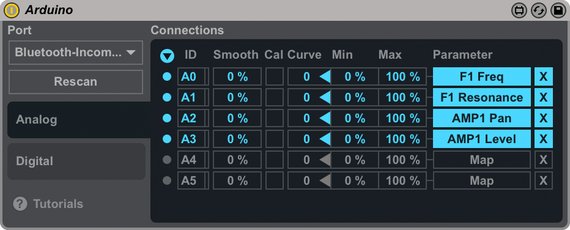
I recently purchased an Arduino 101 board. Does anyone know how I can modify the M4L files in the connection kit so that it works with a different model of Arduino?
I would love to access the accelerometer/gyro info on the 101 to use in Ableton, but I can't even get it to recognize the 101 board.
Any help is much appreciated.
Thanks!
Re: Ableton Connection Kit
Posted: Sun May 15, 2016 9:15 am
by Gass n Klang
hey guys, this is my fist post so please be patient

I'm VERY new to Ableton and wanna use it for FOH purposes. I wanna communicate in both directions via OSC. The OSC send device works well for ableton -> mixer. but How to do that the other way round?