Page 1 of 1
Browser separation of plugin Instruments and FX
Posted: Fri Apr 28, 2017 6:59 pm
by IronShirt
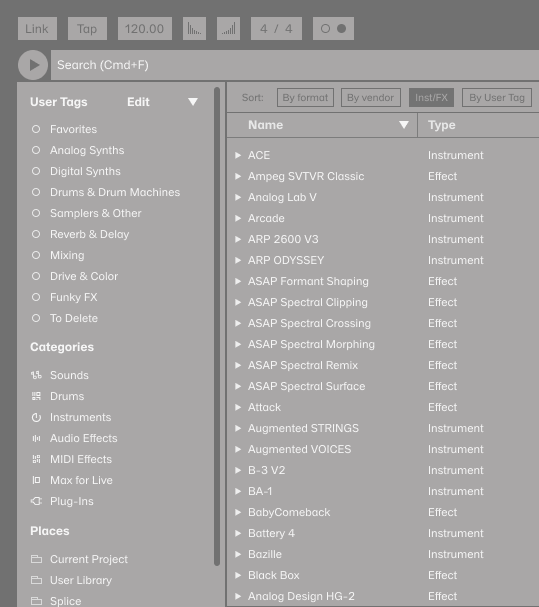
Surprised this is not standard yet but would be very beneficial to have plugin instruments and FX separated so I don't have dig through one when all I want is the other.
Re: Browser separation of plugin Instruments and FX
Posted: Sat Apr 29, 2017 1:14 pm
by doghouse
The manual states:
Audio Units and VST Plug-ins are browsed and imported using the browser’s Plug-In label. Plug-in instruments can be differentiated from plug-in effects in the browser, as they appear with a keyboard icon.
So I asume you are arguing that since the browser already can tell what is an instrument and what is an effect that it should have subdirectories for each? It is already possible to do this yourself.
Re: Browser separation of plugin Instruments and FX
Posted: Sat Apr 29, 2017 2:23 pm
by IronShirt
Unless I'm missing something using Push 2 to scroll through plugins will give you a mix of instruments and FX.
Re: Browser separation of plugin Instruments and FX
Posted: Sat Apr 29, 2017 5:35 pm
by sporkles
Just create a folder called "instruments" and another one called "effects" in the VST folder on your hard drive, then move the the VST files into the relevant folders. You can even take it farther, and create subfolders called "delay & reverb", "distortion", etc.
Re: Browser separation of plugin Instruments and FX
Posted: Thu May 04, 2017 5:15 pm
by IronShirt
OK, took the advice, thanks. Doesn't work for AU but at least I got some organization in the VSTs.
Re: Browser separation of plugin Instruments and FX
Posted: Fri May 05, 2017 9:57 am
by Martin Gifford
It would be great if you could create shortcuts (right-click > create shortcut) to all the folders, and then collapse all the folders in the browser and just use your newly created shortcut folders. Then highlight all the FX plugins, ableton FX, etc., then right-click > create shortcut. Then move all those shortcuts to your previously created shortcut folders. That way, you can have a totally personalised folder structure that is intuitive and immediate.

Re: Browser separation of plugin Instruments and FX
Posted: Thu Apr 20, 2023 9:25 am
by itsbusinesstime
Every time i find a nice sample and i want to work on it i have to delete what i typed jsut to get an eq ont he track and to find the samples back i have to type again... I mean why this silly thing is not fixed yet. I'm just trying to understand how is it possible that brilliant people who develop this program with so much dedication payed no attention to the silliest fault in Ableton. I really cant get my head around it.
anyways has anyone found a solution to this?
Here's my solution : Run two live instances and when you want to grab a effect, drag from the second instance to the first It works ( sometimes it doesn't) it is what it is.. i hope this will get fixed.
Re: Browser separation of plugin Instruments and FX
Posted: Thu Apr 20, 2023 10:22 pm
by scg
itsbusinesstime wrote: ↑Thu Apr 20, 2023 9:25 am
Every time i find a nice sample and i want to work on it i have to delete what i typed jsut to get an eq ont he track and to find the samples back i have to type again...
That's a pet peeve of mine as well
It's not immediately obvious to me though what a better alternative implementation would look like...
Re: Browser separation of plugin Instruments and FX
Posted: Sat Apr 22, 2023 9:04 am
by MallorcaMalle
Moving VST DLLs around is not recommended, not only because of update issues. And all VST3 plugins must go to "../Common files/VST3/" (Windows).
It is always the task of the DAW to make them accessible in a convenient manner.
I.m.o. for Ableton this means:
- The menu item "Plug-Ins"´should be removed completely from the browser.
- All effects - stock and 3rd party plugins - should automatically go to the "Effects" menu item. Ordered by manufacturer (Ableton, Arturia, Native Instruments, etc.) and subcategorized by their function.
- All instruments - stock and 3rd party plugins - should automatically go to the "Instruments" menu item. Ordered by manufacturer (Ableton, Arturia, Native Instruments, etc.).
Re: Browser separation of plugin Instruments and FX
Posted: Sat Jul 15, 2023 9:07 pm
by svennirusl
scg wrote: ↑Thu Apr 20, 2023 10:22 pm
That's a pet peeve of mine as well
It's not immediately obvious to me though what a better alternative implementation would look like...
Lots of ways to do it. Here's one: