Page 1 of 1
How to create separate sequences for notes and gates?
Posted: Wed Aug 29, 2018 9:59 am
by borg nagar
Would anyone have an idea on how to create a melody sequence and a rhythm sequence separately and play them combined with one synthesizer, all in Ableton Live?
This is quite an easy routing to do in Propellerheads Reason for example with Matrix Sequencer, ReDrum and some of the many synths/samplers. Or in eurorack with standalone sequencers.
Here's an image that might help with understanding what I am trying to achieve.
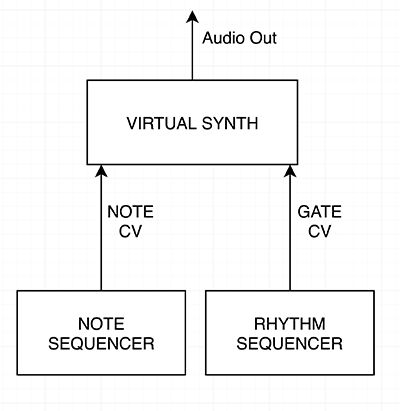
I'm very happy to hear any ideas you might have on this subject.
Kind regards, Aki Latvamäki
Re: How to create separate sequences for notes and gates?
Posted: Wed Aug 29, 2018 12:37 pm
by Shift Gorden
borg nagar wrote:Would anyone have an idea on how to create a melody sequence and a rhythm sequence separately and play them combined with one synthesizer, all in Ableton Live?
This is quite an easy routing to do in Propellerheads Reason for example with Matrix Sequencer, ReDrum and some of the many synths/samplers. Or in eurorack with standalone sequencers.
Here's an image that might help with understanding what I am trying to achieve.
I'm very happy to hear any ideas you might have on this subject.
Kind regards, Aki Latvamäki
Yeah, mate. I think so for sure.
So, you can have a clip or a track in your arrangement with the synth melody (note sequencer using your virtual synth of choice. You can then add Ableton’s Gate to that track. You can then use the Gate to sidechain your rhythm track. I think that should work.
Re: How to create separate sequences for notes and gates?
Posted: Wed Aug 29, 2018 1:02 pm
by doghouse
Shift Gorden's suggestion would probably work.
Some instruments let you do this sort of thing with their internal sequencers and there are some sequencer plugins that can do this, like Numerology (Mac only).
But there's nothing native in Live (or any other DAW as far as I know) like Reason's ability to separate pitch and gating like in a modular synth.
Re: How to create separate sequences for notes and gates?
Posted: Wed Aug 29, 2018 1:47 pm
by wearemindflux
Hey, so if you have two midi tracks you can route the midi output to the synth, set the synths monitor to in.
or
create a midi effect rack, have 2 chains 1 for sequencer 1, and a other for the second 1. Then have your synth.
Re: How to create separate sequences for notes and gates?
Posted: Wed Aug 29, 2018 2:06 pm
by borg nagar
Shift Gorden wrote:So, you can have a clip or a track in your arrangement with the synth melody (note sequencer using your virtual synth of choice. You can then add Ableton’s Gate to that track. You can then use the Gate to sidechain your rhythm track. I think that should work.
Thanks for the suggestion. This would result in cutting the notes which have already played earlier, and I don't want that. The synth should play normally. This means I cannot alter the order of the gating, it should be a gate that is sent to the synth. Like when using real synths.
doghouse wrote:
Some instruments let you do this sort of thing with their internal sequencers and there are some sequencer plugins that can do this, like Numerology (Mac only).
Thanks! I will check Numerology out!
:edit: Numerology was stand alone and I could not create a separate gate & melody track with it, they were combined into one note sequencer module.
wearemindflux wrote:Hey, so if you have two midi tracks you can route the midi output to the synth, set the synths monitor to in.
or
create a midi effect rack, have 2 chains 1 for sequencer 1, and a other for the second 1. Then have your synth.
Hi and thanks for the answer. However I don't think you understand how the Note and Gate messages work. The synth should not play a note unless there's a gate. So the midi tracks that you are describing are sending gates and notes, both, each. And in my scenario, I would like to separate those two. It's actually a quite basic thing that synthesizers have been doing since the early days, but I'm having a hard time achieving that inside Ableton.
Re: How to create separate sequences for notes and gates?
Posted: Wed Aug 29, 2018 3:17 pm
by wearemindflux
Hey sorry it can work.
So use the ml 185 sequencer. This will trigger the notes (pitch) and then on the gate use the new melodic steps.
Or you use what every sequencer you want. One as a note trigger and one as a gate.
So pitch note gets routed into gate sequencer and then to the synths.
Re: How to create separate sequences for notes and gates?
Posted: Wed Aug 29, 2018 3:22 pm
by Shift Gorden
Ah ha! So the gate is triggering the notes/sequence as opposed to simply cutting the audio out?
Re: How to create separate sequences for notes and gates?
Posted: Wed Aug 29, 2018 4:30 pm
by borg nagar
Shift Gorden wrote:Ah ha! So the gate is triggering the notes/sequence as opposed to simply cutting the audio out?
Yes. Exactly!
wearemindflux wrote:Hey sorry it can work.
So use the ml 185 sequencer. This will trigger the notes (pitch) and then on the gate use the new melodic steps.
Or you use what every sequencer you want. One as a note trigger and one as a gate.
So pitch note gets routed into gate sequencer and then to the synths.
I am familiar with the ml185 sequencer, but what do you mean with "One as a note trigger and one as a gate"? How do I do that exactly? How do I separate the note and the gate?
Re: How to create separate sequences for notes and gates?
Posted: Wed Aug 29, 2018 4:51 pm
by wearemindflux
[quote="wearemindflux"
So pitch note gets routed into gate sequencer and then to the synths.[/quote]
Thats how....
I can make a example template if you want
Re: How to create separate sequences for notes and gates?
Posted: Wed Aug 29, 2018 8:07 pm
by pottering
I'm not sure, but with MIDI I think the note ON and pitch (and maybe velocity) are linked (a single digital message). If you want a long note to change in the middle, I think only pitchbend works (needs that the instrument answers to pitchbend too, of course)
But, otherwise:
You can use a Pitch device to automate the pitch, and feed it with the rhythm of "base" notes from a Clip, Arpeggiator, etc. You can even drop a Groove directly on a Track and use it as MIDI.
With MIDI Racks you can put several MIDI devices (Pitch, Velocity, Random devices, etc) in parallel and/or serial signal paths, getting all kinds of craziness.
The free M4L Packs in Ableton's site have several step sequencers.
K-Devices released some pretty crazy ones recently.
Re: How to create separate sequences for notes and gates?
Posted: Thu Aug 30, 2018 12:24 pm
by doghouse
borg nagar wrote::edit: Numerology was stand alone and I could not create a separate gate & melody track with it, they were combined into one note sequencer module.
Just wanted to mention that Numerology can be run standalone, as a VST or as an AU.
This video shows solutions in Monosequencer (included in M4L), Reaktor, Reason and Numerology.
Re: How to create separate sequences for notes and gates?
Posted: Thu Aug 30, 2018 12:46 pm
by borg nagar
pottering wrote:You can use a Pitch device to automate the pitch, and feed it with the rhythm of "base" notes from a Clip, Arpeggiator, etc. You can even drop a Groove directly on a Track and use it as MIDI.
This might be interesting! Using the Pitch device to handle the melody while the midi clip creates the rhythm could really achieve the result I'm aftwe.
Now I just need to figure out how to control the pitch device with a midi clip that is not on the channel itself.
Thanks for the idea.
Re: How to create separate sequences for notes and gates?
Posted: Thu Aug 30, 2018 12:51 pm
by borg nagar
doghouse wrote:This video shows solutions in Monosequencer (included in M4L), Reaktor, Reason and Numerology.
Thanks. Monosequencer looks like exactly what I am after! I will try it out right now
